
Hurry and order now – up to 50% off!
In cart {{totalProductsCount}} item(s)
Your cart is empty
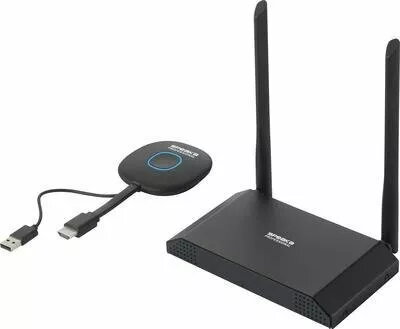
Wireless 4K UHD Presentation System SpeaKa Professional SP-VShare Multi Viewer 4x, wireless 4K support
SpeaKa Professional SP-VShare Multi Viewer 4x is a wireless 4K UHD presentation system that enables sharing and displaying multiple video sources on a single screen. Designed for meeting rooms and classrooms, the system supports wireless streaming of high-resolution video to a display and offers multi-view layouts for up to four inputs, allowing simultaneous visualization of different sources and straightforward switching between them. The product reduces cable clutter and streamlines collaborative presentations and information sharing in professional and educational environments.
The SP-VShare Multi Viewer 4x provides wireless 4K support and the ability to display several sources at once, improving meeting efficiency and visibility. Its multi-view capability lets users combine camera feeds, laptops, and other inputs into configurable layouts without physical input switching. Wireless connectivity reduces the need for multiple cables and adapters, simplifying setup and room aesthetics while enabling flexible placement of devices within the coverage area.
Connect the SP-VShare Multi Viewer 4x to the room display following the manufacturer's installation guidelines, then connect source devices wirelessly to the system. Select the desired multi-view layout and add or switch inputs through the system interface to show up to four sources at once. For daily operation, ensure the display input is set to the SP-VShare device and that source devices are connected to the same network or paired according to the setup instructions.
Place the SP-VShare Multi Viewer 4x and source devices within the recommended wireless coverage area to maintain stable high-resolution streaming. For optimal 4K performance, use a robust Wi‑Fi network or follow any wired-backhaul options described in the installation manual. Verify source device resolution and network settings when planning multi-source presentations to ensure consistent image quality across all inputs.
{{highlightedFeature.featureTitle}}:
{{getProductFeatureValueById(product, highlightedFeature.featureId)}}
{{ productComparisonGenerationError }}