Leave your address - as soon as the price of the product goes down, you'll know about it right away
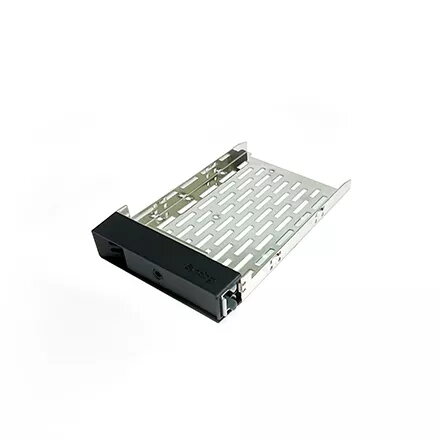
Bezel panel Synology DISK TRAY (TYPE R8) drive bay panel 2.5/3.5"
In cart {{totalProductsCount}} item(s)
Your cart is empty
Bezel panel Synology DISK TRAY (TYPE R8) drive bay panel 2.5/3.5"
Leave your address - as soon as the price of the product goes down, you'll know about it right away
Bezel panel Synology DISK TRAY (TYPE R8) drive bay panel 2.5/3.5"
The Synology DISK TRAY (TYPE R8) is a specialized drive bay panel designed to securely house 2.5-inch and 3.5-inch hard disk drives within compatible Synology rackmount systems. This tray ensures that your storage media is properly aligned and protected, contributing to the overall stability and efficient cooling of your server environment.
This drive tray provides a robust and reliable mounting solution for your storage drives, ensuring they remain firmly in place during operation. Its precise engineering facilitates easy installation and removal of drives, which simplifies maintenance tasks and hardware upgrades. By maintaining proper drive positioning, the tray helps optimize airflow around the disks, which is essential for maintaining consistent performance and extending the lifespan of your storage hardware.
This tray is specifically engineered for the Synology Type R8 series and may not be compatible with other server chassis models or non-Synology hardware. It is not intended for use in desktop NAS units or server enclosures that require different mounting mechanisms.
To install a drive, place your 2.5-inch or 3.5-inch drive into the tray, ensuring the screw holes are aligned with the mounting points on the tray frame. Secure the drive using the appropriate screws provided with your storage system. Once the drive is firmly attached, slide the tray into the designated drive bay of your Synology rackmount unit until it clicks or locks into position, ensuring the connection to the backplane is fully engaged.
Always ensure the drive tray is fully inserted and locked into the server chassis to prevent vibration and ensure proper electrical contact with the backplane.
{{highlightedFeature.featureTitle}}:
{{getProductFeatureValueById(product, highlightedFeature.featureId)}}
| Warehouse | Stock | Delivery to the store | Store Price | |
| EU3 | 1 | 01.07.2026 Best delivery | 46.99 € | |
| WH354 | 1 | 08.07.2026 | 58.99 € |
|
46.99 €
Stock:
1
Delivery Date:
01.07.2026
Best delivery
Warehouse: EU3
|
|
58.99 €
Stock:
1
Delivery Date:
08.07.2026
Warehouse: WH354
|