Hurry and order now – up to 50% off!
In cart {{totalProductsCount}} item(s)
Your cart is empty
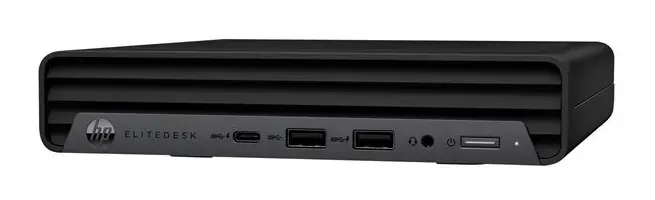
TEQCYCLE HP EliteDesk 800 G6 Mini PC, Intel Core i5-10500T, 16GB RAM, 256GB SSD, Windows 11 Pro
The TEQCYCLE HP EliteDesk 800 G6 is a professional-grade mini PC designed to deliver reliable performance in a compact form factor. This certified refurbished desktop features an Intel Core i5-10500T processor, 16GB of DDR4 RAM, and a 256GB SSD, ensuring efficient multitasking and fast system responsiveness for various professional and personal computing needs. Housed in a sleek black chassis, it is an ideal solution for users looking to maximize desk space without compromising on power.
This mini PC offers a significant advantage in terms of space efficiency, allowing for a clutter-free workspace while maintaining the capabilities of a full-sized desktop. The inclusion of 16GB of RAM ensures smooth operation across multiple applications, while the SSD provides quick boot times and rapid file access. As a certified refurbished unit, it provides high-quality hardware at an excellent value, backed by rigorous testing and cleaning processes to meet strict performance standards.
This device is not intended for high-end gaming, professional video editing, or complex 3D rendering tasks, as it relies on integrated graphics. Users requiring extensive internal storage for large media libraries may also find the 256GB SSD capacity limiting without external storage solutions.
To begin using your TEQCYCLE HP EliteDesk 800 G6, connect the provided power supply to the unit and plug it into a standard wall outlet. Connect your monitor using the appropriate video cable, and attach your keyboard and mouse to the available USB ports. Once connected, press the power button on the front panel to initiate the Windows 11 Pro setup process. Follow the on-screen instructions to configure your language, network settings, and user account.
For optimal performance, keep the ventilation areas on the chassis clear of obstructions to ensure proper airflow. Regularly update your Windows 11 Pro operating system to maintain security and system stability.
{{highlightedFeature.featureTitle}}:
{{getProductFeatureValueById(product, highlightedFeature.featureId)}}
{{ productComparisonGenerationError }}