


Unmanaged Switch TP-Link TL-SG1024 24-Port Gigabit Ethernet
Short description


Cheapest delivery:
Unisend LV

Esto — pay in 6 equal parts
Product information
Description
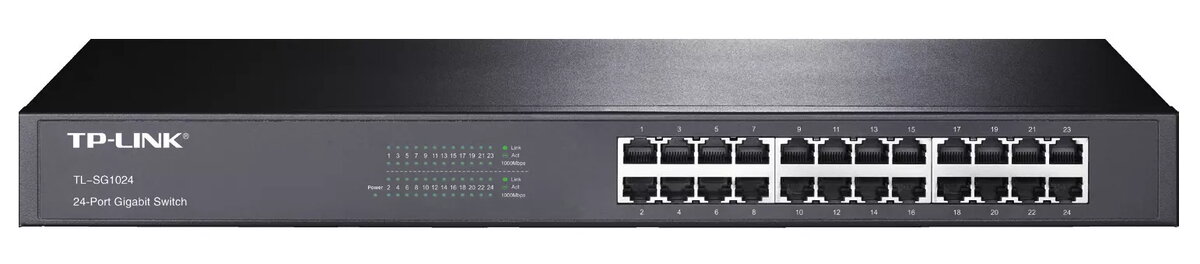
The TP-Link TL-SG1024 is an unmanaged 24-port Gigabit Ethernet switch that offers a simple, high-performance upgrade for existing networks to 1000 Mbps. All 24 RJ-45 ports support 10/100/1000 Mbps with auto MDI/MDIX and auto-negotiation, allowing plug-and-play installation without configuration. The switch uses energy-efficient technology to adjust power according to link status and reduces environmental impact through recyclable packaging and RoHS compliance.
Advantages
The TL-SG1024 provides full wire-speed forwarding with a non-blocking switching architecture and a switching capacity of 48 Gbit/s, enabling efficient large-file transfers and reliable throughput. Support for 10KB Jumbo frames improves performance for big data transfers, while IEEE 802.3x flow control (full duplex) and backpressure (half duplex) help alleviate traffic congestion. Its unmanaged design requires no setup, making it suitable for straightforward deployments.
Suitable for
- Small and medium-sized office networks needing a simple Gigabit upgrade
- Rack-mounted 1U deployments in server rooms or wiring closets
- Environments requiring reliable wired connectivity for desktops, NAS, and printers
Key specifications
- Ports: 24 × Gigabit RJ-45 (10/100/1000 Mbps), auto MDI/MDIX
- Switching capacity: 48 Gbit/s
- MAC address table: 8,000 entries
- Jumbo frame support: up to 10 KB
- Standards: IEEE 802.3ab, 802.3u, 802.3i, 802.3x
- Form factor: 1U rack-mountable, unmanaged
- Colour: Black
How to use
Place the TL-SG1024 in a well-ventilated rack or on a flat surface and connect power. Use standard Cat5e or Cat6 Ethernet cables to connect devices to any of the 24 RJ-45 ports; auto MDI/MDIX removes the need for crossover cables. Devices will negotiate the optimal link speed (10/100/1000 Mbps) automatically and the switch will begin forwarding traffic immediately with no configuration required.
Usage recommendations
For best performance use Cat5e or Cat6 cables and connect high-bandwidth devices (servers, NAS, switches) to separate ports to distribute traffic. Ensure adequate rack ventilation and avoid stacking multiple powered devices directly on top of the switch to prevent overheating.
Features
- Power supply included:
- Yes
- Power source:
- AC
- Rack mounting:
- Yes
- Switching capacity:
- 48 Gbit/s
- MAC address table:
- 8000 entries
- 10G support:
- No
- Basic switching RJ-45 Ethernet ports type:
- Gigabit Ethernet (10/100/1000)
- Basic switching RJ-45 Ethernet ports quantity:
- 24
- Switch type:
- Unmanaged
- Networking standards:
- IEEE 802.3x, IEEE 802.3u, IEEE 802.3i, IEEE 802.3ab
Instructions

Product comparison
The network switch Unmanaged Switch TP-Link TL-SG1024 24-Port Gigabit Ethernet is compared against several similar TP-Link alternative models. All compared devices share common features such as multiple Ethernet ports, an 8000-entry MAC address table, and compliance with standard IEEE networking protocols. The primary differences lie in port speed (Gigabit versus Fast Ethernet), management capabilities (unmanaged versus smart managed), and the total number of ports, which directly impact data transfer speeds and network configuration options.
⚙️ The specifications comparison table below evaluates port types and counts, switch types, switching capacity, and rack-mounting capabilities to highlight practical differences in performance and deployment convenience.
| Parameter | Unmanaged Switch TP-Link TL-SG1024 24-Port Gigabit Ethernet | Unmanaged Switch TP-Link TL-SF1024 24-Port 10/100Mbps Rackmount | Managed Switch TP-Link TL-SG1024DE 24-Port Gigabit Easy Smart Switch | Network Switch TP-Link TL-SG1024D 24-Port Gigabit Desktop Rackmount | Unmanaged Switch TP-Link TL-SG116E 16-Port Gigabit | TP-Link TL-SG1024 Unmanaged L2 Gigabit Ethernet Network Switch with 24 RJ-45 Ports 48 Gbit/s Switching Capacity Black Rack Mountable | Practical significance |
|---|---|---|---|---|---|---|---|
| Port type | Gigabit Ethernet (24 ports) | Fast Ethernet (24 ports) | Gigabit Ethernet (24 ports) | Gigabit Ethernet (24 ports) | Gigabit Ethernet (16 ports) | Gigabit Ethernet (24 ports) | Gigabit ports offer ten times faster data transfer speeds compared to Fast Ethernet, preventing network bottlenecks. |
| Switch type | Unmanaged | Unmanaged | Managed | Unmanaged | Unmanaged | Unmanaged | Unmanaged switches work instantly out of the box, while managed models allow advanced network configuration like VLANs. |
| Switching capacity | 48 Gbit/s | 4.8 Gbit/s | 48 Gbit/s | 48 Gbit/s | 32 Gbit/s | 48 Gbit/s | Higher switching capacity ensures smooth data handling under heavy simultaneous traffic across all ports. |
| Rack mounting | Yes | Yes | Yes | Yes | No | Yes | Allows clean and secure installation in standard server racks. |
◎ The suitability table below evaluates different user needs and use cases to help determine which product best fits specific network requirements.
| Use case | Recommended product | Why |
|---|---|---|
| High-speed office network expansion for 24 devices | Unmanaged Switch TP-Link TL-SG1024 24-Port Gigabit Ethernet | Provides 24 high-speed gigabit ports with high switching capacity and zero configuration required. |
| Basic budget network with low bandwidth demands | Unmanaged Switch TP-Link TL-SF1024 24-Port 10/100Mbps Rackmount | Sufficient for simple tasks where gigabit speeds are not necessary. |
| Network requiring traffic prioritization and basic management | Managed Switch TP-Link TL-SG1024DE 24-Port Gigabit Easy Smart Switch | Offers layer 2 management features while maintaining full gigabit port speeds. |
| Smaller network with fewer connected devices | Unmanaged Switch TL-SG116E 16-Port Gigabit | Ideal when 24 ports are unnecessary and a 16-port configuration is sufficient. |
The Unmanaged Switch TP-Link TL-SG1024 24-Port Gigabit Ethernet stands out from alternatives by combining 24 high-speed gigabit ports, a robust 48 Gbit/s switching capacity, and straightforward plug-and-play operation. It is most suitable for small to medium-sized business environments that require reliable, high-speed wired connectivity without the complexity of managed networking. A buyer should prefer this model over alternatives when they need dependable multi-port gigabit performance without advanced configuration needs.
Stock data
| Warehouse | Stock | Delivery to the store | Store Price | |
| WH349 | 5 | 07.12.2026 | 85.99 € | Add to cart |
| WH155 | 6 | 07.12.2026 | 96.49 € | Add to cart |
| BT19 | 2 | Tuesday | Fast shipping 98.99 € | Add to cart |
- 85.99 €Stock: 5Delivery Date: 07.12.2026Warehouse: WH349Add to cart
- 96.49 €Stock: 6Delivery Date: 07.12.2026Warehouse: WH155Add to cart
- Fast shipping98.99 €Stock: 2Delivery Date: TuesdayWarehouse: BT19Add to cart
- 99.99 €Stock: 100Delivery Date: 07.12.2026Warehouse: WH94Add to cart
- Fast shipping101.49 €Stock: 6Delivery Date: WednesdayWarehouse: BT5Add to cart
- 110.99 €Stock: 30Delivery Date: 15.12.2026Warehouse: EU58Add to cart
- 111.99 €Stock: 30Delivery Date: 02.12.2026Warehouse: EU1Add to cart
| Warehouse | Stock | Delivery to the store | Store Price | |
| WH109 | 100 | 21.12.2026 | 104.49 € | Add to cart |
- 104.49 €Stock: 100Delivery Date: 21.12.2026Warehouse: WH109Add to cart
Customer reviews
Customer questions
How much does the Unmanaged Switch TP-Link TL-SG1024 TL-SG1024 cost, and is it available for purchase?
If I order this product today, when will I receive my order?
What payment options are available?
Can Unmanaged Switch TP-Link TL-SG1024 TL-SG1024 be purchased with a lease?
- Select the product on the website and add it to your cart;
- When placing your order, choose the payment method “Installments”;
- Fill in the required details for the lending partner;
- Receive a decision within a few minutes.


