
Hurry and order now – up to 50% off!
In cart {{totalProductsCount}} item(s)
Your cart is empty
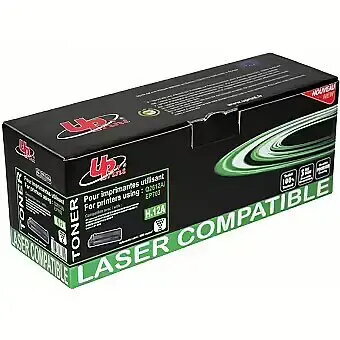
Toner cartridge Uprint for HP Q2612A / Canon EP703 Black, compatible laser printer cartridge
Uprint black toner cartridge compatible with HP Q2612A and Canon EP703 is a replacement monochrome laser toner designed to fit printers that accept the Q2612A/EP703 form factor. It supplies black toner for printing text documents, reports and other monochrome output. The cartridge offers straightforward installation and yields comparable to standard cartridges of this size, making it suitable for both office and home environments where a compatible alternative to original HP or Canon consumables is required.
The Uprint compatible cartridge delivers consistent black print density for clear, legible text and sharp lines in documents. It is manufactured to be compatible with Q2612A/EP703 form-factor printers and supports easy, tool-free replacement. The cartridge is intended to provide reliable operation across typical monochrome laser workflows while preserving printer functions such as toner sensing and page counting where supported.
Turn off the printer and open the front cover or toner access door according to the printer manufacturer's instructions. Remove the empty cartridge by pulling it straight out, taking care not to spill residual toner. Unpack the Uprint cartridge and gently shake it side to side a few times to distribute toner evenly. Remove any protective seals or tape, then insert the cartridge into the printer along the guide rails until it seats firmly. Close the access door, power on the printer, and run a test print or printer calibration if available to confirm correct installation.
Store unused cartridges in a cool, dry place away from direct sunlight and extreme temperatures. Handle cartridges carefully by the sides to avoid contact with the imaging drum or toner outlet. If prints show streaks or faint areas after installation, try removing and gently rocking the cartridge to redistribute toner or run the printer's cleaning cycle. For consistent results, use the cartridge within its stated shelf life and follow the printer manufacturer's maintenance guidelines.
{{highlightedFeature.featureTitle}}:
{{getProductFeatureValueById(product, highlightedFeature.featureId)}}
{{ productComparisonGenerationError }}