
JBL speakers and headphones for pure and deep sound!
In cart {{totalProductsCount}} item(s)
Your cart is empty
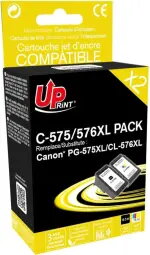
Ink Cartridge UPrint Canon 575/576 XL PACK Black
The UPrint Canon 575/576 XL PACK Black ink cartridge delivers reliable black printing for Canon-compatible printers. Designed for general home and office tasks, this cartridge produces sharp, high-contrast text and clear black areas in documents and images. With an estimated yield of up to 600 pages, it balances performance and economy for everyday printing needs, and its design allows straightforward installation and consistent output.
This cartridge provides dependable black density for text and monochrome graphics, reducing the need for frequent replacements. The XL capacity offers a higher page yield compared with standard cartridges, which lowers the cost per page for regular users. Compatibility with a range of Canon models ensures simple swap-in installation and steady printing performance without frequent maintenance.
Turn the printer on and open the cartridge access cover according to your Canon printer instructions. Remove the used cartridge by gently pressing the release latch and pull it out. Unpack the new UPrint Canon 575/576 XL PACK Black cartridge, remove any protective tape or packaging, and insert it into the correct slot until it clicks into place. Close the access cover, allow the printer to initialize, and run a test page or alignment if prompted to ensure optimal print quality.
Store cartridges in a cool, dry place away from direct sunlight and extreme temperatures. If the printer is not used for extended periods, perform a brief nozzle check and cleaning cycle before important print jobs to maintain crisp black output. For best results, use original or manufacturer-recommended cleaning and maintenance routines as described in your printer manual.
{{highlightedFeature.featureTitle}}:
{{getProductFeatureValueById(product, highlightedFeature.featureId)}}
{{ productComparisonGenerationError }}