


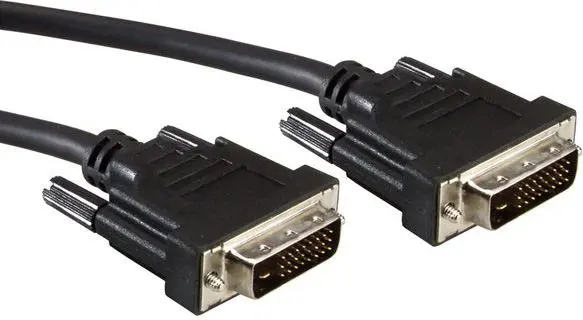
VALUE DVI-D to DVI-D Cable 2m Black
Short description


Cheapest delivery:
Unisend LV
Product information
Description
The VALUE DVI-D to DVI-D Cable 2m Black is a high-quality digital video cable designed to establish a stable and reliable connection between your computer, monitor, and other compatible multimedia devices. With a length of 2 meters, this cable offers optimal reach for standard desktop setups, office workstations, and home entertainment systems. It ensures precise digital signal transmission without conversion loss, delivering sharp and clear high-definition images for your daily computing and viewing needs.
Advantages
This DVI-D to DVI-D cable provides purely digital signal transmission, preventing the quality degradation often associated with analog conversions. Its robust construction ensures dependable everyday performance, while the 2-meter length strikes the right balance between flexibility in device placement and maintaining a tidy workspace without excessive cable clutter. The discrete black color blends seamlessly with most computer hardware and office environments.
Suitable for
- Connecting a desktop computer or laptop with a DVI-D output to a compatible flat-screen monitor
- Setting up dual-monitor workstations in office or home environments
- Linking professional displays and multimedia hardware that utilize standard DVI-D connections
When it may not be suitable
This cable is not suitable for connecting devices that only feature VGA or HDMI ports without the use of dedicated active signal converters or adapters, as DVI-D transmits digital video only and does not carry audio signals. It may also be too short if your equipment layout requires a longer physical distance between the computer and the display.
Key specifications
- Cable type: DVI-D to DVI-D
- Length: 2 meters
- Color: Black
- Signal type: Purely digital video
How to use
Before connecting the cable, ensure that both your computer and monitor are powered off to prevent any potential electrical surges. Align the DVI-D connector pins with the port on your computer's graphics card and gently push it in until fully seated. Secure the connection by tightening the thumbscrews on both sides of the connector. Repeat the same process for your monitor. Once securely fastened, power on your devices and adjust your display settings through your operating system if necessary.
What to consider before purchase
- Verify that both your source device and display feature compatible DVI-D ports
- Confirm that a 2-meter length is sufficient for your intended desk layout and device positioning
- Keep in mind that DVI-D cables transmit video signals only and do not support audio transmission
Usage recommendations: To maintain optimal signal integrity and prevent damage to the connectors, avoid tightly bending the cable at sharp angles or placing heavy objects on top of it. Ensure that the thumbscrews are hand-tightened securely to prevent accidental disconnection during use.
Product comparison
The VALUE DVI-D to DVI-D Cable 2m Black is compared against several alternative DVI-D cable options from TB Print, Lindy, Sharkoon, Procab, and ACT. All of these products serve the same core purpose: providing a direct digital video signal connection between computers, graphics cards, monitors, and projectors. The primary practical differences between them lie in cable length, color shade, and physical reach, which directly impact setup convenience and workspace management.
⚙️ Below is a comparison of characteristics such as cable length, connector types, color, and intended application to help you evaluate the physical and compatibility differences.
| Parameter | VALUE DVI-D to DVI-D Cable 2m Black | TB Print AKTBXVD24DVI18B | Lindy 37144 | Sharkoon 2m DVI-D | Procab 1KPCL209 | ACT AK3834 | Practical significance |
|---|---|---|---|---|---|---|---|
| Connector types | DVI-D (Male to Male) | DVI-D (Male to Male) | DVI-D (Male to Male) | DVI-D (24+1) | DVI-D single-link | DVI-D Dual Link | All options provide standard digital video connectivity, though single-link or dual-link variations may influence maximum resolution support depending on connected equipment. |
| Cable length | 2 m | 1.8 m | 5 m | 2 m | 1.5 m | 1.5 m | Length determines placement flexibility: VALUE is versatile for standard desks, Lindy suits distant displays, and Procab and ACT fit compact setups. |
| Color | Black | Black | Anthracite | Black | Not specified | Black | Color options are largely similar, allowing the cables to blend neatly into standard office or home entertainment environments. |
◎ The table below evaluates the suitability of each cable for different usage scenarios based on distance requirements and setup preferences.
| Use case | Recommended product | Why |
|---|---|---|
| Standard desk setup | VALUE DVI-D to DVI-D Cable 2m Black | The 2-meter length is optimal for most home and office configurations where the computer and monitor sit on the same desk. |
| Long-distance connection | Lindy 37144 | The 5-meter length makes it easy to connect a monitor or projector located further away from the video source. |
| Compact desktop arrangement | Procab 1KPCL209 or ACT AK3834 | The 1.5-meter length prevents cable clutter when equipment is positioned close together. |
The VALUE DVI-D to DVI-D Cable 2m Black differs from alternatives by offering a well-balanced 2-meter length that fits typical desk layouts without excess slack. Choose this product if you need a reliable medium-distance connection between your computer and monitor, while the longer Lindy cable is better suited for distant displays, and the shorter models from Procab, ACT, TB Print, and Sharkoon cater to tight or close-proximity setups.


