
Leave your address - as soon as the price of the product goes down, you'll know about it right away
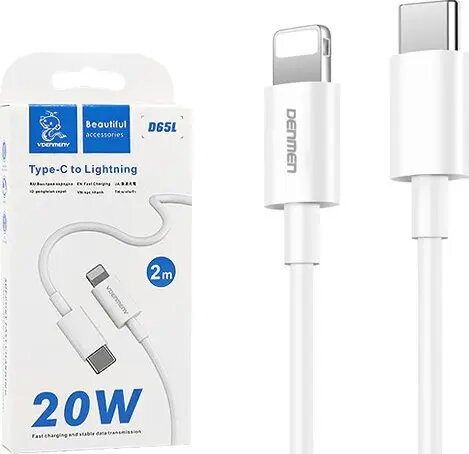
USB-C to Lightning Cable Vega 2 m White – data and charging cable
In cart {{totalProductsCount}} item(s)
Your cart is empty
USB-C to Lightning Cable Vega 2 m White – data and charging cable
Leave your address - as soon as the price of the product goes down, you'll know about it right away
USB-C to Lightning Cable Vega 2 m White – data and charging cable
The Vega USB-C to Lightning Cable 2 m in white is a data and charging cable designed to connect USB‑C power adapters, computers or other hosts to Apple devices with a Lightning port. With a 2‑metre length it provides extended reach for charging and wired data transfers, supporting everyday syncing and power delivery between compatible devices. The cable features standard USB‑C and Lightning connectors and a durable outer jacket intended for regular use at home, office or on the go.
This 2 m Vega USB‑C to Lightning cable offers extended reach for flexible placement while charging or syncing. The durable jacket improves resistance to wear from repeated bending and handling, and the standard connector types ensure compatibility with USB‑C power adapters, chargers and many host devices. The cable is suitable for stable wired data transfers and charging of Lightning‑equipped Apple devices.
Connect the USB‑C end to a compatible charger, power adapter, computer or host device and insert the Lightning end into the Apple device. For charging, use an appropriate USB‑C power adapter that matches the required power profile of the target device. For wired data transfers, connect the cable between the host computer and the Lightning device and use the operating system's file transfer or sync tools. Remove the cable by pulling the connector body rather than the cable itself to prolong service life.
To maximise cable longevity, avoid sharp bending near the connector ends, keep the cable dry and store it loosely coiled. Use chargers and adapters that comply with device manufacturer recommendations to ensure proper charging behaviour and system compatibility.
{{highlightedFeature.featureTitle}}:
{{getProductFeatureValueById(product, highlightedFeature.featureId)}}