{{ totalProductsCount }}

In cart {{totalProductsCount}} item(s)

Total:
{{sum | formatAmount}}

Your cart is empty

header-product Vention KDTB0 USB Wi-Fi Adapter, Dual-Band 2.4/5 GHz, 633 Mbit/s, Wi-Fi 5
11.49 €

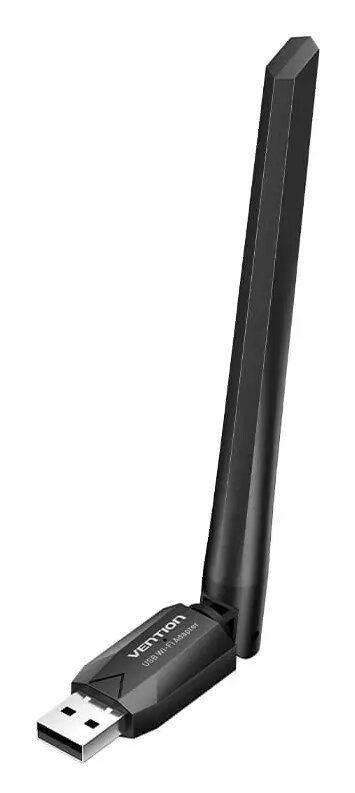
Vention KDTB0 USB Wi-Fi Adapter, Dual-Band 2.4/5 GHz, 633 Mbit/s, Wi-Fi 5

Fast shipping
Vention KDTB0 USB Wi-Fi Adapter | Dual-Band 633 Mbit/s Photo 1
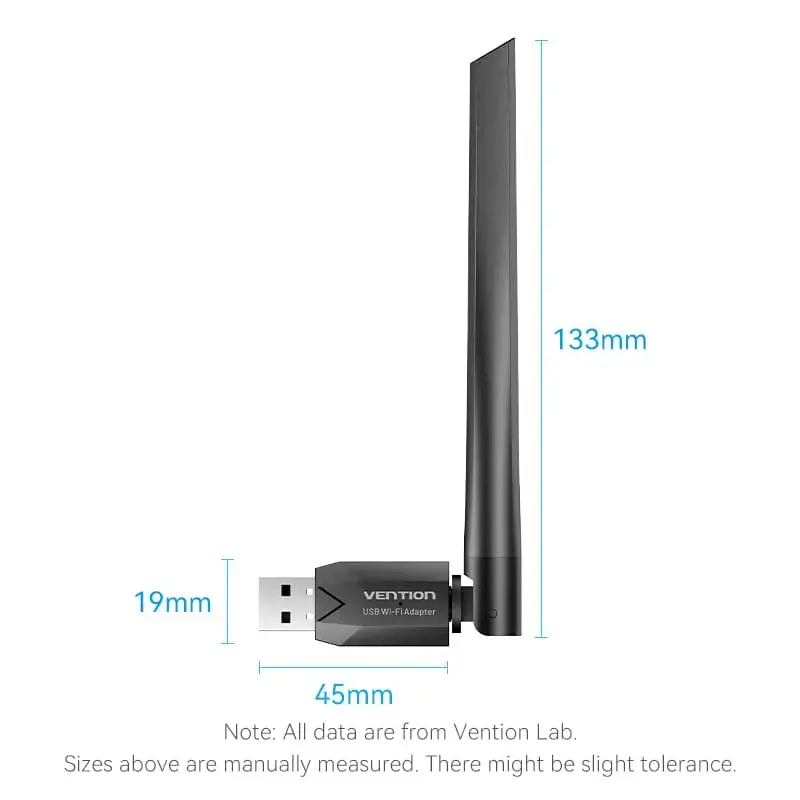
Vention KDTB0 USB Wi-Fi Adapter | Dual-Band 633 Mbit/s Photo 2
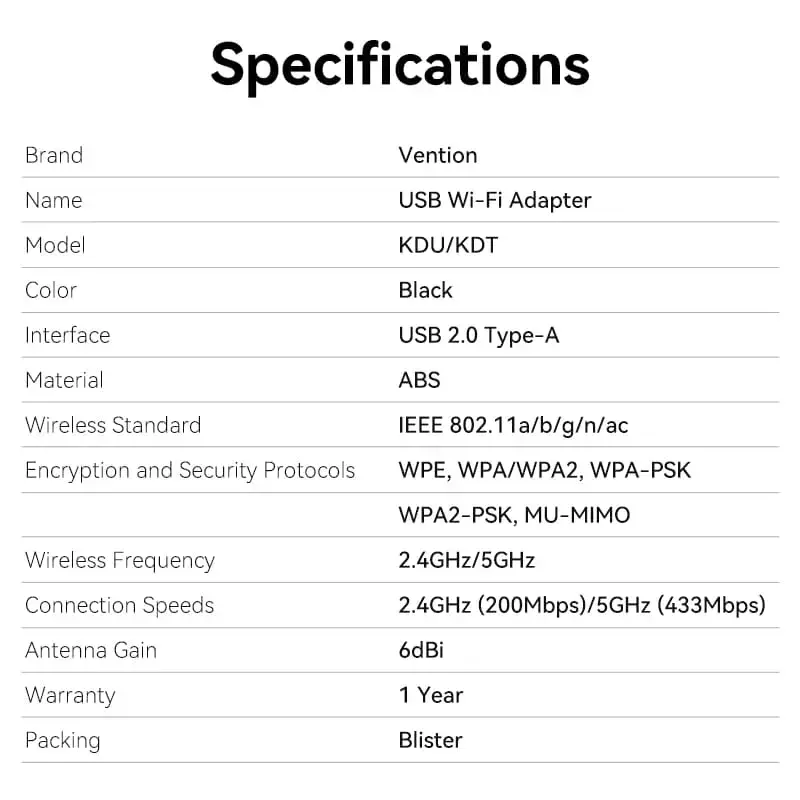
Vention KDTB0 USB Wi-Fi Adapter | Dual-Band 633 Mbit/s Photo 3
Vention KDTB0 USB Wi-Fi Adapter | Dual-Band 633 Mbit/s Photo 1
Vention KDTB0 USB Wi-Fi Adapter | Dual-Band 633 Mbit/s Photo 2
Vention KDTB0 USB Wi-Fi Adapter | Dual-Band 633 Mbit/s Photo 3
payment

Discount 14%

You save: 2.00 €

The discount is valid from 17.08.2026 to 14.09.2026

Keep track of price changes You keep track of price changes
Watch the price drop

Leave your address - as soon as the price of the product goes down, you'll know about it right away

You keep track of price changes

Vention KDTB0 USB Wi-Fi Adapter, Dual-Band 2.4/5 GHz, 633 Mbit/s, Wi-Fi 5

{{email}}
You keep track of price changes

Vention KDTB0 USB Wi-Fi Adapter, Dual-Band 2.4/5 GHz, 633 Mbit/s, Wi-Fi 5

{{email}}
Price without discount: 13.49 €
Your Price:
{{selectedOffer.price | formatAmount}}

Short description

The Vention KDTB0 is a compact USB Wi-Fi adapter designed for reliable wireless connectivity. It supports dual-band operation at 2.4 GHz and 5 GHz, utilizing the Wi-Fi 5 (802.11ac) standard to achieve data transfer rates up to 633 Mbit/s. This black network adapter is ideal for upgrading desktop or laptop computers with stable wireless internet access, ensuring efficient performance for browsing, streaming, and online tasks.
Available at price 11.49 €: 19 pcs.
Total available for order: 38 pcs.
Warranty: 2 Years
SKU: 11590450
free shipment

Cheapest delivery:

Unisend LV

Pick-up points

Unisend LV

Cost

1.99 €

Deliver

{{selectedOffer.parcelStationDeliveryString}}

Customer service center
2b. Kengaraga str., Riga, Latvia, LV-1063
Tuesday {{selectedOffer.officeDeliveryString}}
free
Courier Delivery Please note that in case of a large parcel additional delivery costs may apply!
Friday {{selectedOffer.courierDeliveryString}}
From 4.99 €
Parcel couriers
Unisend LV / Venipak Pickup LV / Venipak Locker LV / DPD Paku skapis / Omniva LV / Latvijas Pasts pakomāts / Latvijas Pasts nodaļa
Friday {{selectedOffer.parcelStationDeliveryString}}
From 1.99 €
payment
Payment Methods:
Cash payment, Bank transfer, Bank cards on-line, Apple Pay, Google Pay
Together cheaper
{{product.price | formatAmount}}
{{product.title}}
{{productBundle.reference.specialPrice | formatAmount}}
{{productBundle.title}}
{{productBundlePreviousPrice | formatAmount}}
{{productBundleSpecialPrice | formatAmount}}

You saving {{productBundleYouSave | formatAmount}}

Product information

Description

The Vention KDTB0 USB Wi-Fi adapter is a compact and efficient solution for upgrading your computer's wireless capabilities. Designed to support the Wi-Fi 5 standard, this dual-band adapter operates on both 2.4 GHz and 5 GHz frequencies, providing a versatile connection for various networking environments. Its plug-and-play design and high-gain antenna ensure that users can enjoy a stable and reliable internet connection for their desktop or laptop computers.

Advantages

This adapter offers significant benefits for users looking to improve their wireless connectivity. The dual-band functionality allows for less interference by utilizing the 5 GHz band for high-speed tasks, while the 2.4 GHz band provides better range for general browsing. The inclusion of a high-gain antenna enhances signal reception, allowing for better wall penetration and a more consistent connection throughout your workspace. Furthermore, the integrated driver installation simplifies the setup process, making it accessible even for users with limited technical experience.

Suitable for

  • Upgrading older laptops or desktops lacking built-in Wi-Fi
  • High-definition video streaming and online gaming
  • General web browsing and office productivity tasks
  • Establishing a stable connection in areas with moderate signal interference

When it may not be suitable

This adapter may not be the ideal choice for professional-grade network environments requiring multi-gigabit speeds or advanced enterprise-level security features. Additionally, it is designed for USB 2.0 interfaces, which may limit the maximum potential throughput compared to newer USB 3.0 or higher standards.

Key specifications

  • Maximum data transfer rate: 633 Mbit/s
  • Wi-Fi standards: IEEE 802.11ac, 802.11n, 802.11g, 802.11b, 802.11a
  • Frequency bands: Dual-band 2.4 GHz and 5 GHz
  • Interface: USB 2.0
  • Antenna: 6dBi high-gain
  • Color: Black

How to use

To use the Vention KDTB0, simply insert the adapter into an available USB port on your computer. The device features a built-in driver system that should automatically initiate the installation process upon connection. Once the drivers are installed, select your preferred wireless network from your operating system's network settings, enter the password, and establish the connection. Ensure the antenna is positioned upright for optimal signal reception.

What to consider before purchase

  • Check if your computer has an available USB 2.0 port
  • Verify that your operating system is compatible with the adapter's drivers
  • Consider the distance between your computer and the wireless router

Usage recommendations

For the best performance, place the adapter in a USB port that is not obstructed by other cables or metal objects, and ensure the antenna is oriented toward your wireless router to maintain a strong signal link.

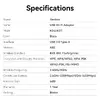
Specifications

Connectivity technology: The technology that enables connectivity of the device, e.g. wired or wireless.
Wired
Interface: Interface ports to connect pieces of equipment. USB (Universal Serial Bus) has become the most popular wired interface to connect peripherals. USB 2.0 supports speeds up to 480 Mbit/s (USB 1: 12 Mbit/s). The interface FireWire is also known as the IEEE 1394 standard. Enhanced IDE (EIDE)is sometimes referred to as Fast ATA, Fast IDE or ATA-2.
WLAN
Host interface: Interface that enables a host controller to communicate with a driver.
USB
Maximum data transfer rate: The maximum speed with which data can be transmitted from one device to another.
633 Mbit/s
Networking standards: The way in which the network is working, e.g. IEEE 802.11a, IEEE 802.11b, IEEE 802.11g.
IEEE 802.11ac, IEEE 802.11b, IEEE 802.11g, IEEE 802.11n, IEEE 802.11a
Product colour: The colour e.g. red, blue, green, black, white.
Black
All features
Wi-Fi standards: The type of wireless local area network (LAN). It can be ad-hoc, where units in a network communicate peer-to-peer, or Infrastructure, where units communicate with each other via an access point A LAN interconnects computers in a small area e.g. home, school or office.
802.11a, Wi-Fi 5 (802.11ac), Wi-Fi 4 (802.11n), 802.11g, 802.11b
Antenna gain level (max): Antenna gain is the measurement of an antenna's ability to amplify the incoming microwave signals in a particular direction, compared with the sensitivity of an isotropic antenna in any direction, or a dipole antenna in the equatorial direction.
6 dBi
Bluetooth: Bluetooth is a low-power radio technology developed to replace the cables and wires currently used to link or connect electronic devices such as personal computers, printers, and a wide variety of handheld devices including mobile phones. Because it uses radio-wave connectivity, a Bluetooth-enabled device has a constant, established connection to whatever browser it uses. This saves the user the trouble of logging on to check for emails or news updates, for example.
No
Component for: What this product is used as a part of (component for).
PC/Laptop
Resource CD:
Yes
Antenna direction type:
Directional
MU-MIMO:
Yes
Mobile network generation:
Not supported
Antenna design:
External
Warranty period:
1 year(s)

Ports & interfaces

Connectivity technology: The technology that enables connectivity of the device, e.g. wired or wireless.
Wired
Interface: Interface ports to connect pieces of equipment. USB (Universal Serial Bus) has become the most popular wired interface to connect peripherals. USB 2.0 supports speeds up to 480 Mbit/s (USB 1: 12 Mbit/s). The interface FireWire is also known as the IEEE 1394 standard. Enhanced IDE (EIDE)is sometimes referred to as Fast ATA, Fast IDE or ATA-2.
WLAN
Host interface: Interface that enables a host controller to communicate with a driver.
USB
Internal: The product is built in.
No
USB version: Universal Serial Bus (USB) is an industry standard developed in the mid-1990s that defines the interface used for connection, communication and power supply between computers and electronic devices. Every new version - for example 1.1, 2.0, 3.0 - is much faster than the previous one.
2.0

Bandwidth

Maximum data transfer rate: The maximum speed with which data can be transmitted from one device to another.
633 Mbit/s

Network

Networking standards: The way in which the network is working, e.g. IEEE 802.11a, IEEE 802.11b, IEEE 802.11g.
IEEE 802.11ac, IEEE 802.11b, IEEE 802.11g, IEEE 802.11n, IEEE 802.11a

Wireless LAN features

Wi-Fi: Popular technology that allows an electronic device to exchange data or connect to the internet wirelessly using radio waves.
Yes
Wi-Fi band: The frequency bands the product features.
Dual-band (2.4 GHz / 5 GHz)
Top Wi-Fi standard: Connection of this device is done via Wi-Fi in a high standard.
Wi-Fi 5 (802.11ac)
WLAN data transfer rates supported:
200, 433

Antenna

Antenna:
Yes
Frequency range:
2.4 - 5

Performance

Security algorithms: Security algorithms are used to provide authentication, cipher key generation, integrity and radio link privacy to users on mobile networks. The security algorithms supported are the ones that can be used with this product.
WPA2-PSK
Windows operating systems supported: Windows vesions wich can be used with the device.
Windows 7, Windows 8, Windows 10, Windows 11

Design

Housing material: What the casing of the product is made of.
ABS
Product colour: The colour e.g. red, blue, green, black, white.
Black

Weight & dimensions

Height: The measurement of the product from head to foot or from base to top.
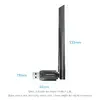
133 mm
Width: The measurement or extent of something from side to side.
45 mm
Depth: The distance from the front to the back of something.
19 mm

Packaging content

Manual:
Yes

Description

Machine translation. Load original

Similar products

{{product.title}}
Show details Hide details

{{highlightedFeature.featureTitle}}:

{{getProductFeatureValueById(product, highlightedFeature.featureId)}}

{{product.price | formatAmount}}

Product comparison

The Vention KDTB0 adapter is compared with several alternative wireless solutions from brands such as TOTOLINK, D-Link, Mercusys, and DeLOCK. All these products are designed to provide wireless internet connectivity for desktop computers or laptops using the Wi-Fi 5 standard and dual-band operation across 2.4 GHz and 5 GHz frequencies. The main differences lie in their maximum data transfer rates, connection interfaces (USB or PCIe), additional features like Bluetooth, and physical design.

⚙️ The table below compares the most relevant characteristics, including maximum data transfer speed, host interface, and wireless standards, helping you understand their technical capabilities.

ParameterVention KDTB0TOTOLINK A650USMD-Link AC1300Mercusys MA32HMercusys AC1200 PCIeDeLOCK 12550Practical conclusion
Max data rate633 Mbit/s633 Mbit/sNot specified867 Mbit/s1200 Mbit/sNot specifiedVention and TOTOLINK suit basic daily tasks, while Mercusys options deliver higher speeds for more demanding usage.
InterfaceUSBUSB Type-AUSBUSBPCI ExpressUSBMost adapters use USB for easy plug-and-play, whereas the Mercusys MA30E requires an internal PCIe slot installation.
Wi-Fi standardsWi-Fi 5 (802.11ac)Wi-Fi 5 (802.11ac)Wi-Fi 5 (802.11ac)Wi-Fi 5 (802.11ac)Wi-Fi 5 (802.11ac)Wi-Fi 5 (802.11ac)All compared models support modern dual-band Wi-Fi 5 standards for stable wireless connectivity.

◎ The table below evaluates product suitability for various user needs and usage scenarios to help you select the most appropriate option.

Use caseRecommended productWhy
Basic web browsing and streamingVention KDTB0Provides a reliable and adequate dual-band wireless connection via a simple USB interface for everyday tasks.
Higher speeds via USBMercusys MA32HOffers a faster maximum data transfer rate while maintaining the convenience of a USB network card format.
Maximum performance for a desktop PCMercusys AC1200 PCIeUtilizes a PCI Express interface and delivers higher speeds along with built-in Bluetooth connectivity.

The Vention KDTB0 differs from alternatives by offering a well-balanced, compact dual-band Wi-Fi 5 USB solution tailored for everyday web browsing and streaming. It is best suited for users looking for a straightforward, reliable wireless upgrade without complex installation. Competitor products may be preferred if your setup requires higher data transfer rates or an internal PCI Express connection.

Might be useful
{{product.manufacturerName}}
{{product.categoryName}}
{{product.title}}
{{product.specialPrice}}
{{product.price}}
Stock data
Warehouse Stock Delivery to the store Store Price
BT19 19 Tuesday Best delivery
Fast shipping
Discount 14%
11.49 € Best price
WH354 19 28.09.2026
16.49 €
Fast shipping
Discount 14%
11.49 €
Stock: 19
Delivery Date: Tuesday Best delivery
Warehouse: BT19
16.49 €
Stock: 19
Delivery Date: 28.09.2026
Warehouse: WH354

Customer reviews

Customer questions

FAQ

How much does the Vention KDTB0 USB Wi-Fi Adapter | Dual-Band 633 Mbit/s cost, and is it available for purchase?

The price is 11.49 € (valid at the time of publication and already includes all taxes). The item is available for order — 38 pcs. are in stock, and you can place your purchase right now with delivery across Latvia and Europe or choose pickup at the Riga collection point. We offer favorable purchase terms, including the option to split the payment into convenient monthly installments. Availability and price are updated in real time, so we recommend placing your order in advance.

If I order this product today, when will I receive my order?

If you place your order today, delivery will be as fast and convenient as possible. You will be able to pick up your order on Tuesday at the Riga pickup point or choose delivery across Latvia and Europe. We carefully inspect every purchase and pack it securely for safe transportation.

What payment options are available?

AiO.lv offers several payment methods: Cash payment, Bank transfer, Bank cards on-line, Apple Pay, Google Pay. All transactions are 100% secure and encrypted.

Can this product be purchased for a company (with VAT)?

Yes. AiO.lv works with legal entities in Latvia and across Europe. The product price already includes VAT. For certain product categories, as well as for companies from other EU countries with a valid VAT number, a 0% VAT rate may apply. We issue the invoice immediately after the order is placed, support electronic BIS invoices, and automatically generate all necessary accounting documents. You can complete the purchase for a company online — simply select the company profile and choose bank transfer as the payment method during checkout.

What is the warranty period?

All Vention products come with an official 2 Years warranty. It covers all manufacturing defects and malfunctions that may occur during use. The warranty is valid at all authorized Vention service centers and through AiO.lv

Can the product be returned after purchase?

Yes, you can return the product within 14 days of purchase if you bought it as a consumer (not a legal entity). Returns are possible without giving any reason — the main condition is that the product retains its original appearance and full set of accessories. We will make the process as simple and convenient as possible: just contact our customer support team, and we will help you arrange the return.

Where should I contact for warranty service?

For warranty-related questions you can contact the AiO.lv (SIA VSPRO) customer support team. We will assist with consultation, warranty claim processing, and coordination with certified service centers.

How can I tell if this product suits my needs?

When making a choice, we recommend paying attention to the key features: connectivity technology, interface, host interface, maximum data transfer rate, networking standards, product colour, compatibility with your devices or usage conditions, material quality, functionality, and warranty terms. These characteristics will help you determine how well the model meets your needs.

warranty
14-Day Return Policy We are confident in our quality, but if the purchase doesn’t fit — you have 14 days to return the product with peace of mind.
shipping
Fast Delivery Get your orders as quickly as possible — right to your door, parcel lockers, or pickup points across Latvia and the EU.
payment
Secure Payment Pay the way you prefer: cash, VISA, MasterCard, Apple Pay, Google Pay, bank transfer, or 0% installment plan.
warranty
Quality Since 2008 AiO.lv has been on the market for over 18 years and has earned trust — with more than 6000 genuine positive reviews on Google.