JBL speakers and headphones for pure and deep sound!
In cart {{totalProductsCount}} item(s)
Your cart is empty
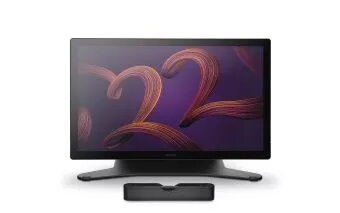
Graphic tablet Wacom DTH227K0B-ST 476 x 268 mm 55 inch
The Wacom Cintiq Pro 22 is a professional 22" pen display offering a 4K panel with 120 Hz refresh rate and advanced color support. Pre-calibrated to cover up to 99% of DCI-P3 and 95% of Adobe RGB, with Pantone Validated certification, 10-bit color and HDR Gamma support, it is designed for color-critical digital content creation. The device includes the customizable Wacom Pro Pen 3 and is bundled with the adjustable Wacom Cintiq Pro 22 Stand, providing flexible height, angle and up to 20° rotation in each direction for comfortable working positions.
The display combines high color accuracy, wide color gamut and HDR support to deliver consistent results for printing, video and cross-team workflows. A 120 Hz refresh rate and up to 12 ms response time minimise latency and parallax for precise pen input even on fast-moving content. Ergonomic improvements—such as a slimmer bezel, an ergonomic grip pen, customizable ExpressKeys and multiple mounting options—help reduce fatigue and adapt the device to different studio setups. The included stand offers stable and rapid adjustments while the Wacom Pro Pen 3 allows extensive personalization of weight, balance and button configuration.
Unpack the pen display and attach the included Wacom Cintiq Pro 22 Stand or mount the display on a compatible VESA 100 monitor arm. Connect the display to your computer using the supplied wired connection and install the latest Wacom driver to enable pen customization, pen gestures and color management features. Calibrate the display with the Wacom Color Manager if required, then customize ExpressKeys, pen buttons and on‑screen controls to match your workflow. Use the Pro Pen 3 for drawing, retouching and editing with near-zero latency and natural hand movement.
For accurate color-critical work, verify calibration with Wacom Color Manager under your local lighting conditions before final proofing or printing. Use the included stand for extended sessions to maintain ergonomic posture; when integrating into a shared studio, ensure any third‑party VESA mount supports the weight and tilt range of the display.
{{highlightedFeature.featureTitle}}:
{{getProductFeatureValueById(product, highlightedFeature.featureId)}}
{{ productComparisonGenerationError }}