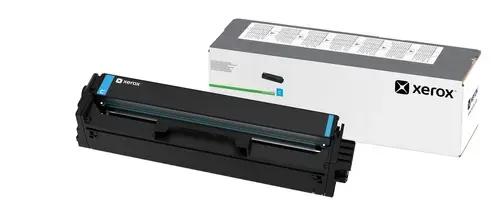
The Xerox C240, C245, C255, C300, C303, C305 Cyan High Capacity Laser Printer Toner Cartridge is an original printing consumable engineered to deliver reliable performance and vibrant color output for your office documents. Designed specifically to work in harmony with select Xerox laser printers, this high capacity cyan toner cartridge ensures consistent print quality from the first page to the last, supporting your daily business productivity without interruption.
Advantages
Using this genuine high capacity cyan toner cartridge provides exceptional value through its impressive page yield, reducing the frequency of cartridge replacements in busy office environments. The formulation of the toner guarantees sharp text and vivid, professional-grade cyan graphics, ensuring that presentations, reports, and marketing materials meet high visual standards. As an original Xerox consumable, it integrates smoothly with your printing device, minimizing the risk of smudging, paper jams, or hardware incompatibility while supporting long-term printer health.
Suitable for
- Printing professional business reports and client presentations with vibrant cyan graphics
- Daily office document production in small to medium workgroups
- Creating eye-catching marketing materials and internal communications
When it may not be suitable
This toner cartridge is not suitable for high-volume commercial print production environments that require industrial-scale output beyond standard office printer capacities. Additionally, it will not function properly in printer models outside of the specific Xerox C240, C245, C255, C300, C303, and C305 series.
Key specifications
- Color: Cyan
- Cartridge type: High capacity laser printer toner cartridge
- Page yield: Up to 2500 pages
- Compatibility: Xerox C240, C245, C255, C300, C303, C305
How to use
To install the toner cartridge, first open the front cover of your compatible Xerox laser printer. Carefully remove the old cyan toner cartridge from its slot, taking care not to spill any residual toner. Unpack the new replacement cartridge and gently shake it from side to side to distribute the toner evenly inside. Remove any protective packaging tapes or covers, then insert the new cartridge firmly into the correct cyan slot until it clicks securely into place. Close the printer cover and wait for the device to reset and confirm readiness before sending your next print job.
What to consider before purchase
- Verify your specific printer model matches the compatibility list before purchasing
- Assess your average monthly printing volume to determine if a high capacity cartridge aligns with your needs
- Ensure you are selecting the correct color, as this product contains cyan toner only
Store the toner cartridge in a cool, dry place away from direct sunlight and out of reach of children. Always recycle used cartridges according to local environmental regulations.