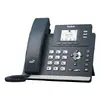
The Yealink MP52 E2 Teams is a desk IP phone built for Microsoft Teams environments, offering HD audio and VoIP connectivity for reliable business communication. Designed for everyday office use, it provides direct access to Teams features, clear voice transmission and an intuitive interface that supports typical call handling, conferencing and collaboration tasks. The device integrates with corporate networks and supports standard SIP-based VoIP calls alongside native Teams functionality.
Advantages
The MP52 E2 Teams delivers high-definition audio quality to improve speech clarity during calls and meetings, reducing miscommunication and listener fatigue. Its user interface is tailored for Microsoft Teams, enabling fast access to contacts, presence and calendar without complex configuration. Built with desk-focused ergonomics, the phone offers physical buttons and a clear display for straightforward operation, while its network connectivity options ensure stable VoIP performance in office environments.
Suitable for
- Office desks and workstations where Microsoft Teams is used as the primary collaboration platform
- Reception areas and shared workspaces requiring reliable VoIP voice calls
- Home offices and remote work setups that need a dedicated desk phone for team meetings
- Small and medium-sized business environments with standard Ethernet network infrastructure
Key specifications
- HD audio with wideband codec support for clear voice reproduction
- Native Microsoft Teams client integration for calls, presence and calendar access
- VoIP support for SIP-based telephony and network calling
- Color display with intuitive menu layout and programmable keys for common functions
- Wired Ethernet connectivity compatible with standard office LANs
- Physical buttons for volume, call control and navigation
- Desk form factor optimized for daily use and easy placement on work surfaces
How to use
Connect the Yealink MP52 E2 Teams to the office Ethernet network and power it according to site infrastructure (Power over Ethernet if supported or external power adapter). Sign in with a Microsoft Teams account following the device prompts or enroll it through centralized device management where available. Use the display and physical keys to access contacts, place and receive calls, and join scheduled Teams meetings. Adjust volume and audio settings through on-screen menus to suit the environment. For VoIP calls, configure network and account settings as required by the organization or service provider.
Usage recommendations
Place the phone on a stable desk surface within comfortable reach and connect to a wired Ethernet network to ensure consistent call quality. Keep firmware up to date and follow corporate security and provisioning procedures when integrating the device into a managed Teams estate. For optimal audio, use the phone in a quiet environment or pair it with compatible audio accessories if necessary.