Powerful EcoFlow stations for energy anywhere!
In cart {{totalProductsCount}} item(s)
Your cart is empty
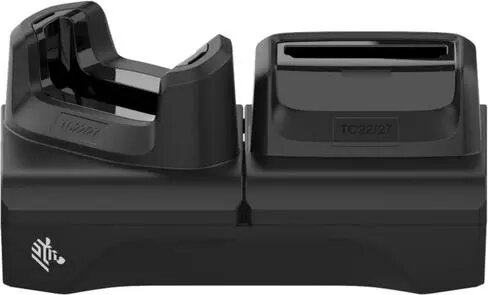
Charging cradle for Zebra TC22 / TC27 single-slot with spare battery charging
The Zebra single-slot charging cradle for TC22 and TC27 mobile computers provides a compact docking solution that charges the device while simultaneously charging one spare battery. Designed for environments where continuous device availability is important, this cradle supports a quick turnaround of terminals and batteries without requiring separate charging stations.
This cradle combines device docking and spare-battery charging in a single unit, reducing desktop clutter and simplifying charging workflows. Its design ensures reliable electrical contact for steady charging, and the integrated spare-battery bay allows teams to keep a charged replacement battery ready. The unit is compatible with the form factor of the Zebra TC22 and TC27, enabling secure docking and easy insertion or removal of the mobile computer.
This single-slot cradle charges one device and one spare battery at a time; environments that need to charge multiple devices simultaneously may require multi-slot chargers. It is designed specifically for the physical dimensions and contacts of the Zebra TC22 and TC27 mobile computers and will not fit other device models without compatible docking interfaces.
Place the cradle on a stable, flat surface and connect it to a compatible power adapter following the supplier or Zebra power specifications. Insert the Zebra TC22 or TC27 into the docking slot until it seats firmly and the contact pins align; the device will begin charging automatically. Insert a spare battery into the integrated battery bay in the orientation shown by the cradle markings; the spare battery will charge independently while the terminal is docked. Remove the device or battery by lifting them straight out of their bays when charging is complete.
For reliable operation, use the cradle in a clean, dry environment and follow Zebra’s guidelines for power input and battery handling. Regularly inspect contacts for debris and ensure spare batteries are rotated into service to maintain device uptime.
{{highlightedFeature.featureTitle}}:
{{getProductFeatureValueById(product, highlightedFeature.featureId)}}
{{ productComparisonGenerationError }}