Save time and money with our discounts!
In cart {{totalProductsCount}} item(s)
Your cart is empty
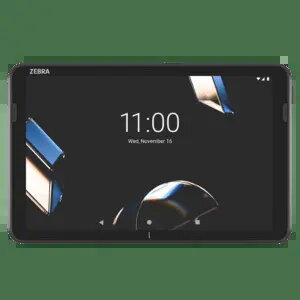
Zebra ET401 Tablet, 10-inch, Wi-Fi 6E, Android, GMS, NFC, USB-C, Black
The Zebra ET401 is a professional 10-inch tablet engineered to enhance business efficiency and streamline daily operations. Running on the Android operating system with Google Mobile Services, this device provides a familiar and intuitive interface for enterprise users. With its robust construction and high-performance hardware, it serves as a reliable tool for demanding work environments, ensuring that data remains accessible and workflows remain uninterrupted.
This tablet offers significant advantages for professional use, including high-speed connectivity through Wi-Fi 6E, which ensures stable and fast data transmission in crowded network environments. The integration of NFC technology facilitates secure and rapid data exchange, while the durable design with an IP65 protection rating makes it resistant to dust and water splashes. The inclusion of a removable 6100 mAh battery allows for extended operation times and easy maintenance, ensuring the device is ready for long shifts. Furthermore, the combination of a powerful Qualcomm Octa-Core processor and 6GB of RAM provides the necessary speed to run complex business applications smoothly.
The Zebra ET401 may not be the ideal choice for tasks requiring high-resolution graphical rendering or heavy video editing, as its display resolution is optimized for business applications rather than multimedia production. Additionally, it lacks an integrated barcode scanner, making it less efficient for high-volume scanning tasks compared to specialized data capture models.
To begin using the Zebra ET401, insert the battery into the rear compartment and charge the device fully using the USB-C port. Power on the tablet by holding the power button until the Android logo appears. Follow the on-screen prompts to configure your network settings and sign in with your Google account to access Google Mobile Services. You can expand the storage capacity by inserting a compatible Micro SD card into the designated slot. For daily operations, utilize the touch interface to navigate applications and use the integrated cameras for documentation or communication purposes.
To maintain the longevity of the device, ensure the battery is charged regularly and the USB-C port is kept free of debris. Use the device within the specified IP65 environmental limits to prevent damage from moisture or dust. Regularly update the Android system software to ensure optimal security and performance.
{{highlightedFeature.featureTitle}}:
{{getProductFeatureValueById(product, highlightedFeature.featureId)}}
{{ productComparisonGenerationError }}