{{ totalProductsCount }}

In cart {{totalProductsCount}} item(s)

Total:
{{sum | formatAmount}}

Your cart is empty

header-product ADDER CCS-PRO4 KVM Switch Black USB Keyboard Mouse Video Ports 4 Computers Controlled Metal Housing

ADDER CCS-PRO4 KVM Switch Black USB Keyboard Mouse Video Ports 4 Computers Controlled Metal Housing

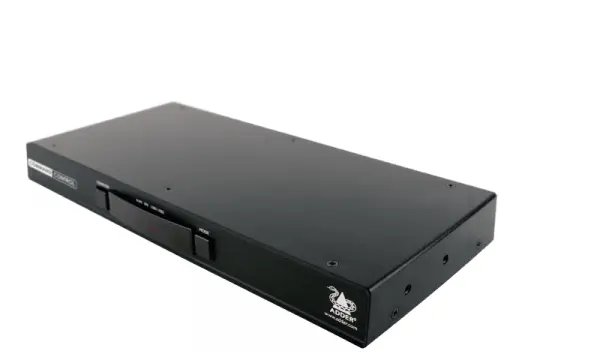
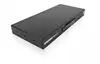
ADDER CCS-PRO4 KVM Switch Photo 1
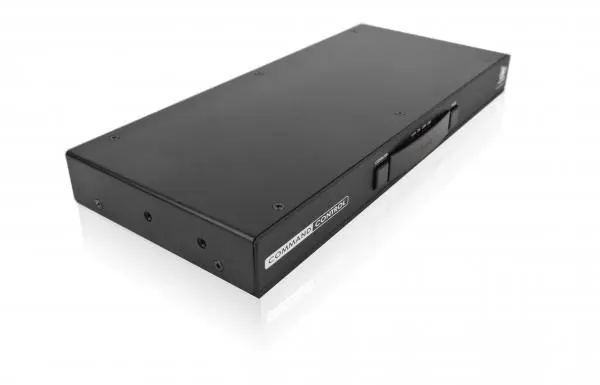
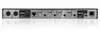
ADDER CCS-PRO4 KVM Switch Photo 2
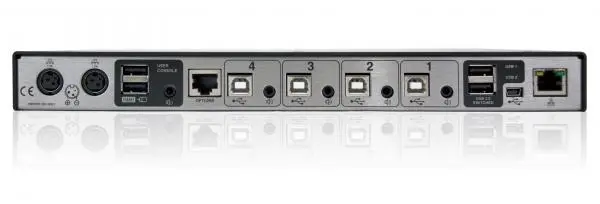
ADDER CCS-PRO4 KVM Switch Photo 3
ADDER CCS-PRO4 KVM Switch Photo 1
ADDER CCS-PRO4 KVM Switch Photo 2
ADDER CCS-PRO4 KVM Switch Photo 3
Out of stock.
View similar!

Short description

The ADDER CCS-PRO4 is a professional 4-port KVM switch designed to control multiple computers seamlessly from a single workstation. Featuring USB ports for keyboard, mouse, and video connectivity, this device comes in a durable black metal housing. It supports efficient multi-computer management for office, control room, and technical environments, streamlining workflow and reducing desk clutter.
Warranty: 2 Years
SKU: 433007
Manufacturer: Adder
delivery
Information regarding the items availability for purchase will be posted on this site
price
Item cost information will be published on this site
Together cheaper
{{product.price | formatAmount}}
{{product.title}}
{{productBundle.reference.specialPrice | formatAmount}}
{{productBundle.title}}
{{productBundlePreviousPrice | formatAmount}}
{{productBundleSpecialPrice | formatAmount}}

You saving {{productBundleYouSave | formatAmount}}

Product information

Description

The ADDER CCS-PRO4 is a professional 4-port KVM switch designed to control multiple computers seamlessly from a single workstation. Featuring USB ports for keyboard, mouse, and video connectivity, this device comes in a durable black metal housing and supports efficient multi-computer management for office, control room, and technical environments, streamlining workflow and reducing desk clutter.

Advantages

The device provides improved desk ergonomics by allowing a single keyboard and mouse to operate up to four computers, which saves physical workspace and reduces operator mental load. It features seamless switching through intuitive mouse movement across screen borders, enabling operators to switch instantly between target computers. Additionally, flexible audio integration allows users to monitor audio and alarm events from multiple computer sources simultaneously.

Suitable for

  • Control rooms managing multiple displays and systems
  • Professional office workstations requiring multi-computer access
  • Technical testing and development environments
  • Trading desks and financial monitoring stations

When it may not be suitable

This KVM switch may not be suitable for basic home setups that only require a single computer connection. It is also not designed for environments utilizing non-standard peripheral connections that lack USB support or require specialized proprietary video interfaces without protocol conversion.

Key specifications

  • Controls up to 4 computers
  • Keyboard, mouse, and video port type: USB
  • Console ports include 3.5mm microphone and USB Type-A
  • Built-in display indicator
  • Durable black metal housing
  • AC power supply operating on 100 - 240 V

How to use

Connect your four target computers to the switch using the appropriate USB and video cables. Attach your primary keyboard, mouse, and audio devices to the designated console ports on the unit. Power the device using the AC power supply. Once connected, use the mouse to navigate across screen borders or utilize the switching mechanisms to transition control between the active computers smoothly.

What to consider before purchase

  • Verify that your computer systems and displays support the USB video and peripheral connection types required by the switch
  • Ensure your physical workspace accommodates the dimensions of the metal housing unit
  • Check your audio setup compatibility with the 3.5mm microphone and console port configurations

For optimal performance and uninterrupted multi-computer management, ensure all peripheral drivers are properly updated and verify that cables are securely connected to the designated ports prior to active operation.

Specifications

Built-in display: A display which is part of the product, so you do not need to attach another display.
Yes
Video port type: The type of socket in the device for connecting a video e.g. SCART.
USB
Mouse port type:
USB
Keyboard port type: The type of socket in the device for connecting a keyboard e.g. USB.
USB
Number of computers controlled: The amount of computers controlled by this device.
4
Product colour: The colour e.g. red, blue, green, black, white.
Black
Console ports:
3.5mm mic, USB A
All features

Logistics data

Harmonized System (HS) code:
85176200

Weight & dimensions

Weight: Weight of the product without packaging (net weight). If possible, the net weight is given including standard accessories and supplies. Please note that sometimes the manufacturer leaves out the weight of accessories and/or supplies.
0.9 kg
Height: The measurement of the product from head to foot or from base to top.
30 mm
Depth: The distance from the front to the back of something.
130 mm
Width: The measurement or extent of something from side to side.
290 mm

Operational conditions

Operating temperature (T-T): The minimum and maximum temperatures at which the product can be safely operated.
0 - 40

Power

Output voltage:
12
Input current:
0.7
AC input frequency:
50 - 60
Input voltage: The voltage (V) which is required to power the product.
100 - 240
Power source: What is providing power for the product e.g. mains electricity.
AC

Display

Built-in display: A display which is part of the product, so you do not need to attach another display.
Yes

Design

Certification:
CE, FCC
LED indicators:
Y
Housing material: What the casing of the product is made of.
Metal
Product colour: The colour e.g. red, blue, green, black, white.
Black

Network

Ethernet LAN (RJ-45) ports: Number of Ethernet LAN (RJ-45) ports (connecting interfaces) in the device. Ethernet LAN (RJ-45) ports allow a computer to connect to the ethernet.
1
Ethernet LAN: An Ethernet LAN (Local Area Network) interface is present, for a wired conection via a cable.
Yes

Ports & interfaces

Audio connections: Cables used to connect audio inputs or audio outputs to another device e.g, audio amplifier.
Yes
Console ports:
3.5mm mic, USB A
Console USB ports quantity:
4
USB 2.0 Type-B ports quantity:
4
Video port type: The type of socket in the device for connecting a video e.g. SCART.
USB
Mouse port type:
USB
Keyboard port type: The type of socket in the device for connecting a keyboard e.g. USB.
USB
Number of computers controlled: The amount of computers controlled by this device.
4

Similar products

{{product.title}}
Show details Hide details

{{highlightedFeature.featureTitle}}:

{{getProductFeatureValueById(product, highlightedFeature.featureId)}}

{{product.price | formatAmount}}
Might be useful
{{product.manufacturerName}}
{{product.categoryName}}
{{product.title}}
{{product.specialPrice}}
{{product.price}}

Customer reviews

Customer questions

FAQ

What payment options are available?

AiO.lv offers several payment methods: Bank transfer, Leasing for legal entities. All transactions are 100% secure and encrypted.

Can this product be purchased for a company (with VAT)?

Yes. AiO.lv works with legal entities in Latvia and across Europe. The product price already includes VAT. For certain product categories, as well as for companies from other EU countries with a valid VAT number, a 0% VAT rate may apply. We issue the invoice immediately after the order is placed, support electronic BIS invoices, and automatically generate all necessary accounting documents. You can complete the purchase for a company online — simply select the company profile and choose bank transfer as the payment method during checkout.

What is the warranty period?

All Adder products come with an official 2 Years warranty. It covers all manufacturing defects and malfunctions that may occur during use. The warranty is valid at all authorized Adder service centers and through AiO.lv

Can the product be returned after purchase?

Yes, you can return the product within 14 days of purchase if you bought it as a consumer (not a legal entity). Returns are possible without giving any reason — the main condition is that the product retains its original appearance and full set of accessories. We will make the process as simple and convenient as possible: just contact our customer support team, and we will help you arrange the return.

Where should I contact for warranty service?

For warranty-related questions you can contact the AiO.lv (SIA VSPRO) customer support team. We will assist with consultation, warranty claim processing, and coordination with certified service centers.

How can I tell if this product suits my needs?

When making a choice, we recommend paying attention to the key features: built-in display, video port type, mouse port type, keyboard port type, number of computers controlled, product colour, console ports, compatibility with your devices or usage conditions, material quality, functionality, and warranty terms. These characteristics will help you determine how well the model meets your needs.

Where can I download the instructions for ADDER CCS-PRO4 KVM Switch?

You can download the instructions in PDF format from the “Instructions” section on the product description page. The file contains complete information about installation, setup, and usage.

warranty
14-Day Return Policy We are confident in our quality, but if the purchase doesn’t fit — you have 14 days to return the product with peace of mind.
shipping
Fast Delivery Get your orders as quickly as possible — right to your door, parcel lockers, or pickup points across Latvia and the EU.
payment
Secure Payment Pay the way you prefer: cash, VISA, MasterCard, Apple Pay, Google Pay, bank transfer, or 0% installment plan.
warranty
Quality Since 2008 AiO.lv has been on the market for over 18 years and has earned trust — with more than 6000 genuine positive reviews on Google.