A curated selection of maximum value offers!
In cart {{totalProductsCount}} item(s)
Your cart is empty
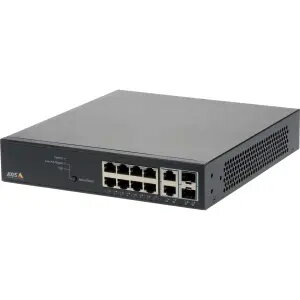
AXIS 01191-003 Managed Gigabit Ethernet Network Switch with 8 Ports and PoE
The AXIS 01191-003 is a high-performance managed Gigabit Ethernet network switch designed to provide reliable connectivity and power for professional surveillance and networking environments. Featuring 8 Gigabit Ethernet ports, this device supports Power over Ethernet (PoE) technology, allowing it to deliver both data and power to connected devices such as IP cameras through a single cable. Its compact, fan-less design makes it an ideal solution for noise-sensitive areas, while its robust construction ensures stable operation in demanding network infrastructures.
This managed switch offers advanced control and monitoring capabilities, including an intuitive administrator interface with a graphic topology view that simplifies the management of all connected devices. With a switching capacity of 20 Gbit/s and an 8000-entry MAC address table, it handles high traffic loads efficiently. The inclusion of PoE support eliminates the need for separate power supplies for peripheral devices, significantly streamlining the installation process for surveillance systems. Furthermore, its compliance with various IEEE standards ensures broad compatibility and seamless integration into existing network setups.
This switch may not be suitable for large-scale enterprise networks that require 10G uplink speeds or higher port densities beyond the 8 available Gigabit ports. It is also not intended for environments requiring high-speed fiber backbone connections beyond its specific SFP/RJ45 combination port capabilities.
To set up the AXIS 01191-003, mount the device in a standard 1U rack or place it on a stable surface. Connect your network devices to the RJ-45 ports using high-quality Ethernet cables. Once powered on, access the managed interface via a web browser to configure network settings, monitor device status, and manage PoE power distribution. The graphic topology interface allows for easy identification of connected cameras and network nodes.
For optimal performance and longevity, ensure the switch is installed in a well-ventilated area to maintain its fan-less cooling efficiency. Regularly update the firmware through the management interface to benefit from the latest security patches and feature enhancements.
{{highlightedFeature.featureTitle}}:
{{getProductFeatureValueById(product, highlightedFeature.featureId)}}
{{ productComparisonGenerationError }}