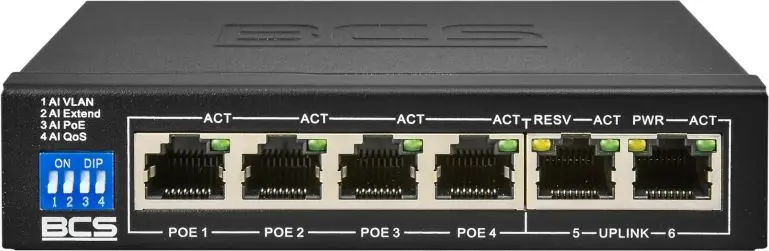
The PoE switch BCS B-SP0402 for 4 IP cameras, model 36535, 4 PoE ports is compared with several alternative network switches from BCS and Atte brands. All evaluated products are designed for surveillance systems and connecting IP cameras using Power over Ethernet technology. The main practical differences between them lie in port capacity, uninterruptible power supply (UPS) support, mounting type, and the scale of security systems they are optimized for.
⚙️ The specifications comparison table below contrasts key device characteristics: port capacity for IP camera connection, Gigabit network support, integrated UPS backup power availability, mounting type (desktop or 5U rack), and the practical purpose of each model.
| Comparison parameter | PoE switch BCS B-SP0402 for 4 IP cameras, model 36535, 4 PoE ports | Network PoE Switch BCS BCS-IP8Gb/E-S/E for 8 IP Cameras, Gigabit Ethernet, PoE Support | PoE Switch BCS BCS-UPS/IP16/E-S/RACK5U — PoE switch with UPS support, 16 ports, rack 5U | BCS UPS/IP8/E-S/RACK5U UPS PoE switch by BCS — rack 5U, model BCS-UPS/IP8/E-S/RACK5U | PoE Network Switch Atte IPUPS-17-11-R5U0 — 17 ports for IP cameras | Practical conclusion |
|---|
| Supported ports / camera capacity | 4 PoE ports | Up to 8 IP cameras | 16 ports | 8 ports | 17 ports | Determines the scale of the surveillance system: from compact local setups to large enterprise sites. |
| UPS / backup power support | Not specified | Not specified | Built-in UPS support | Built-in UPS support | Yes (integrated backup power) | Models with UPS ensure continuous equipment operation during power grid interruptions. |
| Mounting type and form factor | Designed for indoor and local deployments | For small to medium sites, network closets | 5U rack mounting | 5U rack mounting (rack 5U) | For CCTV deployments | Affects space requirements: compact units for simple locations and rack solutions for server cabinets. |
| Network interfaces | PoE ports for data and power | Gigabit Ethernet ports | PoE switching | PoE switching with backup power support | Data and PoE connectivity | Gigabit interfaces and expanded ports suit heavier traffic networks. |
◎ The table below evaluates the suitability of each switch for different use cases, deployment environments, and buyer needs to help select the most appropriate option.
| Use case | Recommended product | Why |
|---|
| Small home or office setup with a few cameras | PoE switch BCS B-SP0402 for 4 IP cameras, model 36535, 4 PoE ports | Ideal for basic local tasks, combining power and data transmission for four cameras with plug-and-play operation. |
| Medium-scale systems requiring gigabit connectivity | Network PoE Switch BCS BCS-IP8Gb/E-S/E for 8 IP Cameras, Gigabit Ethernet, PoE Support | Provides connection for up to 8 cameras and utilizes gigabit ports for increased throughput. |
| Sites requiring power outage protection and server rack integration | PoE Switch BCS BCS-UPS/IP16/E-S/RACK5U — PoE switch with UPS support, 16 ports, rack 5U or BCS UPS/IP8/E-S/RACK5U UPS PoE switch by BCS — rack 5U, model BCS-UPS/IP8/E-S/RACK5U | Integrated UPS support and 5U rack form factor guarantee continuous operation and organized server cabinet placement. |
| Large distributed surveillance systems | PoE Network Switch Atte IPUPS-17-11-R5U0 — 17 ports for IP cameras | Offers the highest port count (17) for centralized connection of a large equipment fleet. |
The PoE switch BCS B-SP0402 for 4 IP cameras, model 36535, 4 PoE ports differs from alternative models by offering a compact 4-port design tailored for simple local surveillance systems without the need for complex rack mounting or UPS backup power. This model is most suitable for small installations where up to four IP cameras need to be deployed quickly via plug-and-play operation. Buyers should prefer this option if they have a small number of cameras and no requirement for server racks or autonomous power, whereas larger multi-port or UPS-equipped devices are better suited for medium to extensive security installations.