{{ totalProductsCount }}

In cart {{totalProductsCount}} item(s)

Total:
{{sum | formatAmount}}

Your cart is empty

header-product Docking Station CalDigit CD-TS4-EU — Thunderbolt dock with 4 Thunderbolt ports and 2 USB-C ports

Docking Station CalDigit CD-TS4-EU — Thunderbolt dock with 4 Thunderbolt ports and 2 USB-C ports

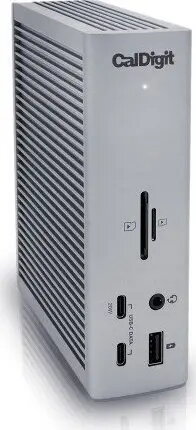
CalDigit CD-TS4-EU Thunderbolt docking station Photo 1
Out of stock.
View similar!

Short description

CalDigit CD-TS4-EU is a docking station designed to expand a computer’s connectivity. It provides four Thunderbolt ports and two USB-C ports for attaching displays, storage, and peripherals. Suitable for workstations and laptops with Thunderbolt/USB-C, it simplifies cable management and enables multiple device connections from a single hub.
Warranty: 2 Years
Stāvoklis: Demo

Demo - Showcase sample. Opened packaging. There may be minor minor scratches.

SKU: 5081058
Manufacturer: CalDigit
delivery
Information regarding the items availability for purchase will be posted on this site
price
Item cost information will be published on this site
Together cheaper
{{product.price | formatAmount}}
{{product.title}}
{{productBundle.reference.specialPrice | formatAmount}}
{{productBundle.title}}
{{productBundlePreviousPrice | formatAmount}}
{{productBundleSpecialPrice | formatAmount}}

You saving {{productBundleYouSave | formatAmount}}

Product information

Description

The CalDigit CD-TS4-EU is a Thunderbolt dock that expands a computer's connectivity with four Thunderbolt ports and two additional USB-C ports. Designed for workstations and laptops with Thunderbolt or USB-C support, it centralizes connections for displays, high-speed storage, audio interfaces, and other peripherals. The compact, bus-powered design simplifies cable management by allowing multiple devices to be connected through a single hub while preserving high data transfer rates and support for external monitors.

Advantages

The dock offers multiple Thunderbolt ports to daisy-chain devices and connect high-bandwidth peripherals without sacrificing performance. Integrated USB-C ports add flexibility for devices that use standard USB-C connections. The unit supports simultaneous use of several displays and external drives, reducing the need to swap cables frequently. Its sturdy build and consistent port layout make it suitable for both mobile and stationary setups that require predictable connectivity.

Suitable for

  • Creative professionals using external displays and fast NVMe or Thunderbolt storage
  • Office users who need multiple USB-C/Thunderbolt ports for docking laptops
  • Engineers and developers connecting multiple peripherals such as audio interfaces, external GPUs, and network adapters
  • Home offices that require simplified cable management and reliable device expansion

When it may not be suitable

The dock requires a host computer with Thunderbolt or USB-C support to provide full functionality; systems without Thunderbolt may not be able to use all ports at full bandwidth. It may be excessive for users who only need one or two additional USB ports or who do not use high-bandwidth peripherals. Power delivery capabilities depend on the specific laptop and cable used, so on some systems the dock may not provide enough charging power for heavy-duty laptops.

Key specifications

  • Number of Thunderbolt ports: four Thunderbolt ports for host and downstream connections
  • Number of USB-C ports: two USB-C ports for peripherals and charging-compatible devices
  • Display support: supports multiple external displays via Thunderbolt/USB-C with compatible host and cables
  • Data transfer: high-bandwidth Thunderbolt connectivity suitable for NVMe and other fast storage
  • Form factor: compact desktop dock designed for workstation and laptop setups
  • Compatibility: intended for computers with Thunderbolt/USB-C ports; functionality varies by OS and host capabilities

How to use

Connect the dock to a compatible laptop or workstation using a Thunderbolt or USB-C cable. Attach external monitors, storage devices, audio interfaces, and other peripherals to the available Thunderbolt and USB-C ports. If required, connect a power adapter and confirm power delivery negotiation between the dock and the host system. Use the host operating system’s display and device settings to configure multiple monitors, external drives, and network adapters as needed.

What to consider before purchase

  • Confirm that your computer supports Thunderbolt or USB-C and verify the version and bandwidth available on your host ports
  • Check the dock’s power delivery compatibility with your laptop if you require charging through the dock
  • Ensure your monitors and cables support the desired resolutions and refresh rates when connected via Thunderbolt/USB-C
  • Review operating system compatibility for functions like display chaining, device drivers, and network interfaces

Usage recommendations

For reliable performance, use certified Thunderbolt cables and keep host firmware and drivers up to date. When connecting multiple high-bandwidth devices (such as external NVMe drives and multiple 4K displays), verify host bandwidth limits and, if necessary, distribute devices across ports or use additional docks to maintain optimal transfer rates.

Description

Machine translation.

Similar products

{{product.title}}
Show details Hide details

{{highlightedFeature.featureTitle}}:

{{getProductFeatureValueById(product, highlightedFeature.featureId)}}

{{product.price | formatAmount}}
Might be useful
{{product.manufacturerName}}
{{product.categoryName}}
{{product.title}}
{{product.specialPrice}}
{{product.price}}

Customer reviews

Customer questions

FAQ

What payment options are available?

AiO.lv offers several payment methods: Bank transfer. All transactions are 100% secure and encrypted.

Can this product be purchased for a company (with VAT)?

Yes. AiO.lv works with legal entities in Latvia and across Europe. The product price already includes VAT. For certain product categories, as well as for companies from other EU countries with a valid VAT number, a 0% VAT rate may apply. We issue the invoice immediately after the order is placed, support electronic BIS invoices, and automatically generate all necessary accounting documents. You can complete the purchase for a company online — simply select the company profile and choose bank transfer as the payment method during checkout.

What is the warranty period?

All CalDigit products come with an official 2 Years warranty. It covers all manufacturing defects and malfunctions that may occur during use. The warranty is valid at all authorized CalDigit service centers and through AiO.lv

Can the product be returned after purchase?

Yes, you can return the product within 14 days of purchase if you bought it as a consumer (not a legal entity). Returns are possible without giving any reason — the main condition is that the product retains its original appearance and full set of accessories. We will make the process as simple and convenient as possible: just contact our customer support team, and we will help you arrange the return.

Where should I contact for warranty service?

For warranty-related questions you can contact the AiO.lv (SIA VSPRO) customer support team. We will assist with consultation, warranty claim processing, and coordination with certified service centers.
warranty
14-Day Return Policy We are confident in our quality, but if the purchase doesn’t fit — you have 14 days to return the product with peace of mind.
shipping
Fast Delivery Get your orders as quickly as possible — right to your door, parcel lockers, or pickup points across Latvia and the EU.
payment
Secure Payment Pay the way you prefer: cash, VISA, MasterCard, Apple Pay, Google Pay, bank transfer, or 0% installment plan.
warranty
Quality Since 2008 AiO.lv has been on the market for over 18 years and has earned trust — with more than 6000 genuine positive reviews on Google.