JBL speakers and headphones for pure and deep sound!
In cart {{totalProductsCount}} item(s)
Your cart is empty
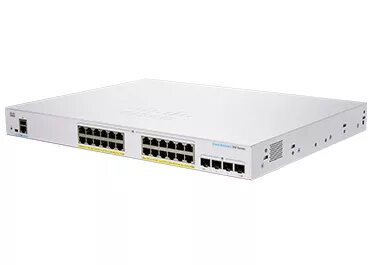
Managed Switch Cisco CBS350-24P-4G-EU L2/L3 Gigabit Ethernet 24 Ports
The Cisco CBS350-24P-4G-EU is a high-performance managed L2/L3 switch designed to serve as a foundational building block for small office networks. With 24 Gigabit Ethernet ports and additional 10G support, this device provides the reliability, security, and scalability required for modern digital business environments. It is engineered to simplify network management while delivering advanced traffic-handling capabilities, ensuring that your business stays connected and productive.
This switch offers a comprehensive suite of features that balance affordability with enterprise-grade performance. Its managed nature allows for precise control over network traffic, while the intuitive dashboard and support for Cisco Business Dashboard simplify deployment and ongoing maintenance. The device includes robust security protocols such as IEEE 802.1X, IP-MAC port binding, and IPv6 First Hop Security to protect sensitive business data. Furthermore, the switch is designed for energy efficiency, incorporating IEEE 802.3az standards to reduce power consumption without compromising throughput. The inclusion of true stacking capabilities allows for unified management of multiple units, significantly reducing administrative complexity as your network grows.
This switch may not be the ideal choice for large-scale enterprise data centers that require high-density 40G or 100G fiber uplinks, as it is optimized for small to medium business applications. Additionally, if your infrastructure does not require advanced Layer 3 routing or managed features, a simpler unmanaged switch might be more cost-effective.
To begin using the Cisco CBS350-24P-4G-EU, connect the device to your power source and link your network devices to the RJ-45 ports using standard Ethernet cables. You can access the management interface via a web browser by entering the switch's IP address, or utilize the Cisco Business Dashboard for a more streamlined, centralized management experience. For advanced configurations, the switch supports a full Command-Line Interface (CLI) via the console port or SSH. Ensure that you have configured your VLANs and security settings according to your office requirements before deploying the switch into your production environment.
For optimal performance and security, it is recommended to keep the switch firmware updated to the latest version provided by Cisco. Utilize the Energy Efficient Ethernet settings to minimize operational costs and ensure that all sensitive ports are protected using the built-in IEEE 802.1X authentication features.
{{highlightedFeature.featureTitle}}:
{{getProductFeatureValueById(product, highlightedFeature.featureId)}}