Dreame vacuums for fast and efficient cleaning!
In cart {{totalProductsCount}} item(s)
Your cart is empty
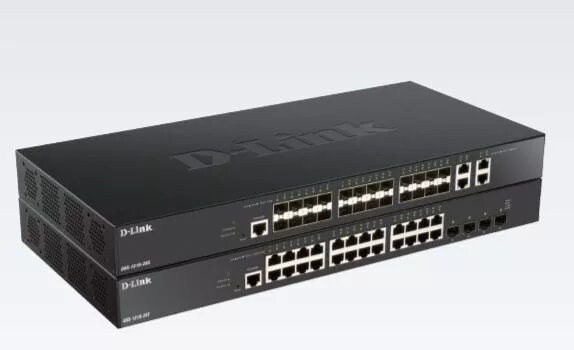
Managed Switch D-Link DXS-1210-28S
The D-Link DXS-1210-28S is a managed L2/L3 network switch in a 1U rack-mount form factor designed for environments that require 10G connectivity and reliable traffic handling. It provides four 10G RJ-45 Ethernet ports, a switching capacity of 560 Gbit/s and a MAC address table that holds up to 32,000 entries. The switch supports a wide range of IEEE networking standards for compatibility with existing infrastructures and is supplied in a black chassis suitable for data center or server-room racks. Management options include a web-based multi-lingual user interface, full command-line access via console and Telnet, and compatibility with centralized D-Link network management tools.
The DXS-1210-28S combines 10G port performance with managed switching features to deliver low latency and solid throughput for aggregation and access layer deployments. Its L2 feature set includes port mirroring, Spanning Tree Protocol variants and link aggregation capabilities, while inter-VLAN static routing reduces load on external routers and improves internal traffic flow. The switch’s 1U rack design and multiple management interfaces simplify integration and maintenance in rack-based networks.
Install the DXS-1210-28S into a standard 19-inch rack using the included mounting brackets and secure appropriate power and cooling. Connect uplink and server links to the 10G RJ-45 ports or SFP ports as required by your topology. Access the multi-lingual web UI for initial configuration, or use the console/Telnet interface for advanced setup and scripting. Configure VLANs, link aggregation, STP and inter-VLAN static routes according to your network design, and verify MAC table learning and port statistics to ensure proper operation.
For optimal performance, use high-quality Cat6a/Cat7 cabling for 10G RJ-45 connections, enable link aggregation for multi-link server or uplink redundancy, and apply VLAN segmentation to separate traffic types. Regularly back up the switch configuration and monitor firmware releases; use D-Link Network Assistant or D-View 7 for centralized monitoring in multi-device environments.
{{highlightedFeature.featureTitle}}:
{{getProductFeatureValueById(product, highlightedFeature.featureId)}}
{{ productComparisonGenerationError }}