
Dreame vacuums for fast and efficient cleaning!
In cart {{totalProductsCount}} item(s)
Your cart is empty
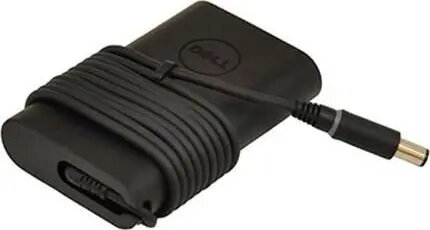
AC Adapter Dell 45W 19.5V 3.34A for compatible laptops, model W125706732
Dell AC adapter 45W 19.5V 3.34A (model W125706732) supplies regulated DC power to compatible Dell laptops and provides battery charging when connected to AC mains. The compact power brick converts household AC voltage to a stable 19.5V output with a maximum current of 3.34A, suitable for everyday office, travel and home use where the laptop requires this voltage and amperage. The adapter includes an attached DC output cable with a barrel connector designed to match Dell-compatible charging ports.
This adapter delivers a consistent 45W power output and stable voltage regulation to ensure reliable laptop operation and battery charging. Its compact, lightweight design makes it convenient for travel and easy to store in a laptop bag. Built-in protection against short circuit, overcurrent and overvoltage helps protect the connected device and the adapter itself. The adapter is intended as a direct replacement for lost or damaged units when the laptop's required voltage and current match the adapter specifications.
Verify that your laptop requires a 19.5V power supply and that the maximum current of 3.34A and 45W power rating are appropriate. Connect the adapter to an appropriate AC mains outlet using the supplied AC cable, then plug the DC barrel connector into the laptop charging port until it sits securely. When connected, the adapter will provide power and charge the battery if the laptop supports charging at this voltage and current. Disconnect the adapter by first unplugging from the laptop, then from the AC outlet when not in use.
Use this adapter only with laptops that specify 19.5V and up to 3.34A input. Avoid exposure to liquids, extreme temperatures and prolonged bending of the attached cable. For best performance, unplug the adapter during thunderstorms and when the laptop is unused for extended periods. If the connector does not fit securely or the laptop shows error messages about power, stop use and check compatibility before continuing.
{{highlightedFeature.featureTitle}}:
{{getProductFeatureValueById(product, highlightedFeature.featureId)}}
{{ productComparisonGenerationError }}
