{{ totalProductsCount }}

In cart {{totalProductsCount}} item(s)

Total:
{{sum | formatAmount}}

Your cart is empty

header-product Laptop dock / port replicator Dell 452-BCCX Wired Black — Gigabit Ethernet, DC power

Laptop dock / port replicator Dell 452-BCCX Wired Black — Gigabit Ethernet, DC power

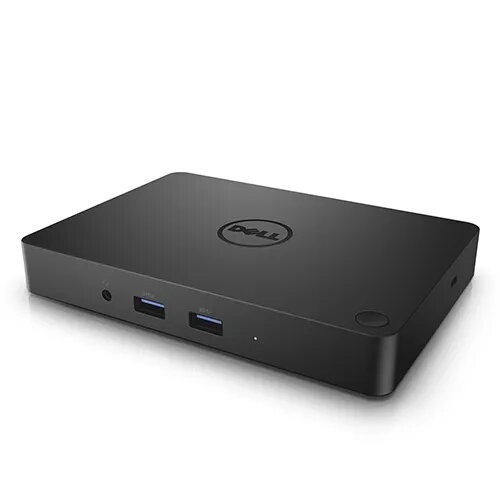
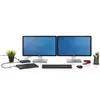
Dell 452-BCCX laptop dock — wired Gigabit Ethernet Photo 1
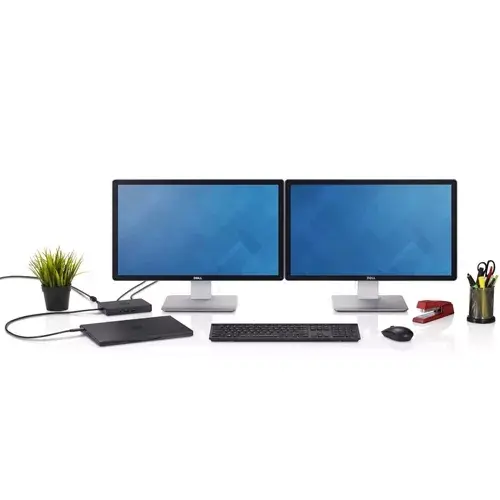
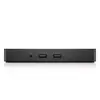
Dell 452-BCCX laptop dock — wired Gigabit Ethernet Photo 2
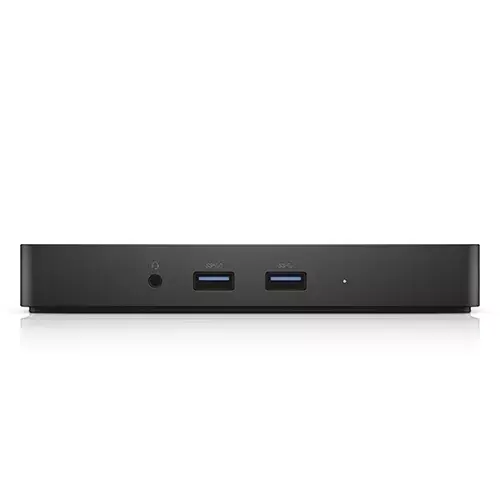
Dell 452-BCCX laptop dock — wired Gigabit Ethernet Photo 3
Dell 452-BCCX laptop dock — wired Gigabit Ethernet Photo 1
Dell 452-BCCX laptop dock — wired Gigabit Ethernet Photo 2
Dell 452-BCCX laptop dock — wired Gigabit Ethernet Photo 3
Out of stock.
View similar!

Short description

Dell 452-BCCX is a wired laptop dock and port replicator in black, designed for Dell-compatible notebooks. It provides Gigabit Ethernet (10/100/1000 Mbps) connectivity and uses DC power. The dock extends a laptop’s ports for network access and peripheral connection, simplifying workstation setup in offices, classrooms, and remote work environments.
Warranty: 2 Years
SKU: 3504064
delivery
Information regarding the items availability for purchase will be posted on this site
price
Item cost information will be published on this site
Together cheaper
{{product.price | formatAmount}}
{{product.title}}
{{productBundle.reference.specialPrice | formatAmount}}
{{productBundle.title}}
{{productBundlePreviousPrice | formatAmount}}
{{productBundleSpecialPrice | formatAmount}}

You saving {{productBundleYouSave | formatAmount}}

Product information

Description

Dell 452-BCCX is a wired laptop dock and port replicator in black that extends connectivity for compatible notebooks and tablets. The dock uses a single DisplayPort over USB Type-C cable to deliver data, video and power, enabling connection to dual Full HD displays or a single 4K display at 30 Hz while providing Gigabit Ethernet (10/100/1000 Mbps) network access and multiple USB and audio ports. Its compact footprint and single-cable design simplify workstation setup in offices, classrooms, conference rooms and remote work environments.

Advantages

This Dell dock provides single-cable connectivity that carries power, video and data, reducing cable clutter and enabling fast connection and disconnection of a laptop or tablet. Small dimensions make it easy to place on a desk or mount behind a monitor, while support for dual FHD or single 4K output ensures clear display performance for presentations and multi-window workflows. The inclusion of Gigabit Ethernet and multiple USB ports lets you attach wired network connections and common peripherals without additional adapters.

Suitable for

  • Office workstations where a single-cable dock streamlines connection to displays, network and peripherals
  • Conference rooms and meeting spaces for quick laptop connection and presentation sharing
  • Classrooms and training environments that require reliable wired networking and external displays
  • Remote or hot-desk setups where compact size and easy portability are important

Key specifications

  • Connectivity: DisplayPort over USB Type-C single-cable connection (data, video, power)
  • Network: Gigabit Ethernet (10/100/1000 Mbps)
  • Video output: dual Full HD displays support or single 4K display at 30 Hz
  • USB ports: three USB 3.0 ports and two USB 2.0 ports
  • Audio: rear speaker output and front combo audio jack
  • Security: Kensington lock slot
  • Power delivery: up to 130W to Dell devices and up to 60W to non-Dell devices via the dock; included 180W AC adapter (7.4 mm barrel)
  • Physical size: compact footprint suitable for limited desk space

How to use

Connect the included DisplayPort over USB Type-C cable from the dock to a compatible laptop or tablet USB-C port that supports data, video and power. Plug the supplied 180W AC adapter into the dock to provide power and enable device charging and peripheral operation. Connect external displays to the appropriate video outputs, attach wired Ethernet to the Gigabit port, and connect keyboards, mice and other peripherals to the USB ports. After connecting, use your operating system's display settings to configure multiple display arrangements and set audio output as required.

Usage recommendations

Use a laptop or tablet USB-C port that explicitly supports video, data and power delivery for full functionality. For dual FHD or single 4K output, confirm the host device’s USB-C video capabilities and set the display resolution and refresh rate in system settings. Place the dock on a stable surface or mount it behind a monitor where ventilation is not obstructed, and secure the unit with a Kensington lock if physical security is needed.

Specifications

USB 3.2 Gen 1 (3.1 Gen 1) Type-A ports quantity:
3
USB 2.0 ports quantity:
2
Connectivity technology:
Wired
Ethernet LAN (RJ-45) ports:
1
VGA (D-Sub) ports quantity:
1
HDMI ports quantity:
1
Weight:
0.422 kg
Product colour:
Black
All features

Ports & interfaces

Connectivity technology:
Wired
USB 2.0 ports quantity:
2
Ethernet LAN (RJ-45) ports:
1
Headphone outputs:
1
Microphone in:
Yes
DC-in jack:
Yes
VGA (D-Sub) ports quantity:
1
HDMI ports quantity:
1
Mini DisplayPorts quantity:
1
USB 3.2 Gen 1 (3.1 Gen 1) Type-A ports quantity:
3

Network

Ethernet LAN:
Yes
Ethernet LAN data rates:
1000, 100, 10

Performance

Cable lock slot:
Yes
LED indicators:
Y
Product colour:
Black
Card reader integrated:
No
Windows operating systems supported:
Windows 8, Windows 7 Home Basic x64, Windows 7 Ultimate x64, Windows 7 Ultimate, Windows 7 Starter x64, Windows 7 Starter, Windows 10 Home, Windows 7 Professional x64, Windows 7 Professional, Windows 7 Home Premium x64, Windows 7 Home Premium, Windows 8 Enterprise, Windows 8 Enterprise x64, Windows 8 Pro, Windows 8 Pro x64, Windows 8 x64, Windows 8.1, Windows 8.1 Enterprise, Windows 8.1 Enterprise x64, Windows 8.1 Pro, Windows 8.1 Pro x64, Windows 8.1 x64, Windows 7 Enterprise x64, Windows 10 Education, Windows 10 Education x64, Windows 10 Enterprise, Windows 10 Enterprise x64, Windows 10 Home x64, Windows 10 Pro, Windows 10 Pro x64, Windows 7 Enterprise, Windows 7 Home Basic
Brand compatibility:
Dell

Weight & dimensions

Weight:
0.422 kg
Height:
21.1 mm
Width:
155 mm
Depth:
109 mm

Power

Power source type:
DC

Packaging content

AC adapter included:
Yes
Cables included:
DisplayPort
Manual:
Yes

Logistics data

Harmonized System (HS) code:
84733020

Description

Machine translation. Load original

{{highlightedFeature.featureTitle}}:

{{product.title}}
{{product.price}}

{{getProductFeatureValueById(product, highlightedFeature.featureId)}}

Might be useful
{{product.manufacturerName}}
{{product.categoryName}}
{{product.title}}
{{product.specialPrice}}
{{product.price}}

Customer reviews

Customer questions

FAQ

What payment options are available?

AiO.lv offers several payment methods: Bank transfer. All transactions are 100% secure and encrypted.

Can this product be purchased for a company (with VAT)?

Yes. AiO.lv works with legal entities in Latvia and across Europe. The product price already includes VAT. For certain product categories, as well as for companies from other EU countries with a valid VAT number, a 0% VAT rate may apply. We issue the invoice immediately after the order is placed, support electronic BIS invoices, and automatically generate all necessary accounting documents. You can complete the purchase for a company online — simply select the company profile and choose bank transfer as the payment method during checkout.

What is the warranty period?

All Dell products come with an official 2 Years warranty. It covers all manufacturing defects and malfunctions that may occur during use. The warranty is valid at all authorized Dell service centers and through AiO.lv

Can the product be returned after purchase?

Yes, you can return the product within 14 days of purchase if you bought it as a consumer (not a legal entity). Returns are possible without giving any reason — the main condition is that the product retains its original appearance and full set of accessories. We will make the process as simple and convenient as possible: just contact our customer support team, and we will help you arrange the return.

Where should I contact for warranty service?

For warranty-related questions you can contact the AiO.lv (SIA VSPRO) customer support team. We will assist with consultation, warranty claim processing, and coordination with certified service centers.

How can I tell if this product suits my needs?

When making a choice, we recommend paying attention to the key features: usb 3.2 gen 1 (3.1 gen 1) type-a ports quantity, usb 2.0 ports quantity, connectivity technology, ethernet lan (rj-45) ports, vga (d-sub) ports quantity, hdmi ports quantity, weight, product colour, compatibility with your devices or usage conditions, material quality, functionality, and warranty terms. These characteristics will help you determine how well the model meets your needs.

warranty
14-Day Return Policy We are confident in our quality, but if the purchase doesn’t fit — you have 14 days to return the product with peace of mind.
shipping
Fast Delivery Get your orders as quickly as possible — right to your door, parcel lockers, or pickup points across Latvia and the EU.
payment
Secure Payment Pay the way you prefer: cash, VISA, MasterCard, Apple Pay, Google Pay, bank transfer, or 0% installment plan.
warranty
Quality Since 2008 AiO.lv has been on the market for over 18 years and has earned trust — with more than 6000 genuine positive reviews on Google.