
Save time and money with our discounts!
In cart {{totalProductsCount}} item(s)
Your cart is empty
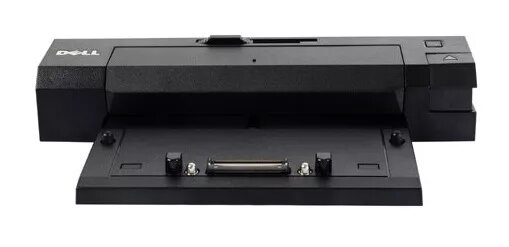
Laptop docking station Dell 331-6304 — docking port replicator, black, compatible with Latitude E5440/E5540/E6440/E6540/E7240/E7440, 287×170.2×63.5 mm
Dell 331-6304 is a black docking station (port replicator) designed to expand connectivity for compatible Latitude laptops. Intended for Latitude E5440, E5540, E6440, E6540, E7240 and E7440 models, the dock measures 287 × 170.2 × 63.5 mm and provides a single, desk-ready point to attach peripherals, external monitors, wired network and power. The unit supports USB 3.0 data transfer and DisplayPort 1.2 video output, enabling improved throughput and multi-monitor configurations compared with earlier generations.
The docking station consolidates multiple ports into a single connection to the laptop, reducing cable clutter and speeding workstation setup. USB 3.0 ports deliver higher data transfer rates for external drives and peripherals, while DisplayPort 1.2 enables higher-resolution video and the option to daisy-chain compatible displays. The design is validated for use with supported Latitude systems and offers compatibility with common office peripherals including wired Ethernet, USB devices and external displays.
Place the docking station on a stable surface near your workstation and connect it to external monitors, keyboard, mouse, Ethernet cable and other peripherals. Align and attach a compatible Dell Latitude laptop to the dock’s docking connector until it locks in place, or use the designated docking mechanism for your laptop model. Once connected, the laptop will use the dock’s power and connected peripherals; install any required drivers if prompted by the operating system. To remove the laptop, use the release mechanism and disconnect the laptop before moving it.
Use certified cables and DisplayPort 1.2–compatible monitors to take full advantage of daisy-chaining and higher-resolution output. Keep the docking station’s vents clear and place it on a non-conductive, level surface. When using multiple high-bandwidth peripherals, ensure the host laptop firmware and operating system are updated for optimal USB 3.0 and DisplayPort performance.
{{highlightedFeature.featureTitle}}:
{{getProductFeatureValueById(product, highlightedFeature.featureId)}}
{{ productComparisonGenerationError }}
