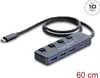
We are comparing Delock USB 10 Gbps Hub with 3 x USB Type-A and 1 x USB Type-C socket and switch with several alternative USB hubs from the same brand, Delock. All these devices are designed to expand connectivity options for computers and notebooks, but they differ in port counts, the mix of Type-A and Type-C connectors, the presence of individual power switches, cable length, and maximum data transfer speeds ranging from 10 Gbps on the main model and select alternatives down to 5 Gbps on simpler variants.
⚙️ In the table below, we will compare key characteristics such as maximum data transfer speed, port configuration, presence of individual switches, and connection format to show the practical differences between the devices.
| Comparison parameter | Delock USB 10 Gbps Hub with 3 x USB Type-A and 1 x USB Type-C socket and switch | Delock 64283 USB 10 Gbps Hub with 3 USB Type-C and 4 USB Type-A Ports | Delock 2 Port USB 5 Gbps Type-A Cable Hub with USB Type-C Connection 25 cm 64373 | Delock 64259 USB 10 Gbps Hub with 2 USB Type-C and 2 USB Type-A Ports | DeLOCK 4 Port Slim USB Hub USB Type-C USB Type-A 3 x USB 2.0 1 x USB 5 Gbps | DELOCK 64375 4-Port USB 5 Gbps Cable Hub with USB Type-C and USB Type-A Connector 2x USB-A 2x USB-C Ports 25 cm | Practical significance of differences |
|---|
| Data transfer speed | Up to 10 Gbps | Up to 10 Gbps | Up to 5 Gbps | Up to 10 Gbps | Up to 5 Gbps (including USB 2.0) | Up to 5 Gbps | The main model delivers double the data transfer speed compared to 5 Gbps models, which is essential for fast performance with high-speed external drives. |
| Port configuration | 3 x USB Type-A, 1 x USB Type-C | 3 x USB Type-C, 4 x USB Type-A | 2 x USB Type-A | 2 x USB Type-C, 2 x USB Type-A | 3 x USB 2.0, 1 x USB 5 Gbps | 2 x USB-A, 2 x USB-C | The main model offers a balanced port selection with an emphasis on Type-A and one Type-C socket for versatile peripheral connections. |
| Power management | Individual switches | Not specified | No | Not specified | No | No | The inclusion of individual switches on the main model allows for convenient peripheral power management without unplugging cables. |
◎ In the table below, we will evaluate which usage scenarios and buyer needs are best met by each of the compared devices.
| Use case | Recommended product | Why |
|---|
| Peripheral power management and high speed | Delock USB 10 Gbps Hub with 3 x USB Type-A and 1 x USB Type-C socket and switch | Best suited when you need fast 10 Gbps data transfer speeds combined with the convenience of powering down individual devices via dedicated switches. |
| Connecting a larger number of diverse devices | Delock 64283 USB 10 Gbps Hub with 3 USB Type-C and 4 USB Type-A Ports | The right choice for users who require a higher total port count (seven ports) while maintaining a high 10 Gbps transfer speed. |
| Compact connection for basic peripherals | Delock 2 Port USB 5 Gbps Type-A Cable Hub with USB Type-C Connection 25 cm 64373 | Suitable for straightforward setups where two Type-A ports and an integrated 25 cm cable are sufficient. |
Delock USB 10 Gbps Hub with 3 x USB Type-A and 1 x USB Type-C socket and switch is the optimal choice for users who value high-speed data transfer and convenient individual control over connected peripherals via dedicated switches. If your setup requires a larger port count or an integrated cable design, alternative models may be more suitable.