Hurry and order now – up to 50% off!
In cart {{totalProductsCount}} item(s)
Your cart is empty
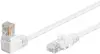
Patch Cable Goobay CAT5e 0.25 m U/UTP with one 90° RJ-45 connector, White
Short Goobay CAT5e Patch Cable, 0.25 m, U/UTP, with one 90° RJ-45 connector and one straight RJ-45 connector in white. The cable uses copper-clad aluminium (CCA) conductors and gold-plated contacts, a slim overmoulded strain relief on the straight plug that shows the length, and a sturdy PVC jacket with bend protection. It is designed for Cat5e Ethernet networks and intended for patching, connecting devices in racks, cabinets or behind wall outlets where space is limited.
The 90° angled RJ-45 connector allows connection in tight spaces without bending the cable sharply. Gold-plated contacts and precisely fitted plugs support reliable signal transmission, while the overmoulded strain relief and latch protection on the straight plug reduce the risk of damage during insertion and removal. Its short 0.25 m length minimises cable clutter for tidy installations.
This 0.25 m cable is not suitable for applications requiring longer reach; for runs between distant network points choose a longer cable. Also, because the conductors are copper-clad aluminium (CCA) rather than solid copper, it may not meet requirements for some PoE (Power over Ethernet) installations or environments that specifically require pure copper cabling.
Insert the angled RJ-45 plug or the straight RJ-45 plug into the device port or patch panel port until the latch clicks. Use the angled connector when rear clearance is limited to keep the cable close to the device. The cable is plug-and-play and requires no configuration; confirm link/activity LEDs on switches or network devices to verify the connection. Avoid sharp bends near the connectors and do not exceed recommended bend radius to preserve signal quality.
Use the angled RJ-45 end when connecting devices close to walls or in dense racks to reduce strain on the connector. For best results, route the cable without tight kinks, keep it away from heavy electrical interference sources, and verify link speed on network equipment after installation.
{{highlightedFeature.featureTitle}}:
{{getProductFeatureValueById(product, highlightedFeature.featureId)}}
{{ productComparisonGenerationError }}