Leave your address - as soon as the price of the product goes down, you'll know about it right away
Goobay 79157 USB-C to 4-Port USB 3.2 Gen 1 Type-A Hub, 5000 Mbit/s, Grey
In cart {{totalProductsCount}} item(s)
Your cart is empty
Goobay 79157 USB-C to 4-Port USB 3.2 Gen 1 Type-A Hub, 5000 Mbit/s, Grey
Leave your address - as soon as the price of the product goes down, you'll know about it right away
Goobay 79157 USB-C to 4-Port USB 3.2 Gen 1 Type-A Hub, 5000 Mbit/s, Grey
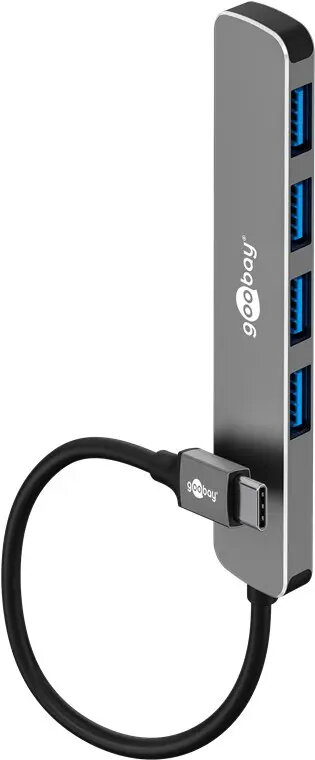
The Goobay 79157 USB-C to 4-Port USB 3.2 Gen 1 Type-A Hub is a compact and efficient solution for expanding the connectivity of modern laptops, tablets, and smartphones equipped with a USB-C port. By converting a single USB-C interface into four USB-A ports, this device allows users to connect multiple peripherals simultaneously, such as keyboards, mice, external hard drives, and webcams, without the need for constant cable swapping.
This hub is designed for high-speed data transfer, supporting the USB 3.2 Gen 1 standard with speeds up to 5000 Mbit/s, which ensures quick file transfers for large documents, photos, or videos. The construction features a durable aluminium and plastic housing that provides both a premium feel and long-lasting protection against daily wear. Its slim and lightweight design makes it highly portable, fitting easily into laptop bags or pockets for use on the go. Furthermore, the plug-and-play functionality eliminates the need for complex driver installations, ensuring immediate compatibility with major operating systems including Windows, macOS, Linux, and Android.
This hub is not intended for high-power charging applications, as it is primarily designed for data connectivity. It may not provide sufficient power to run multiple high-draw external hard drives simultaneously without an additional power source.
To use the Goobay 79157 hub, simply insert the USB-C connector into the corresponding port on your host device. The hub is automatically recognized by the operating system, allowing you to plug your USB-A peripherals into any of the four available ports immediately. No external power supply or software installation is required for standard operation.
For optimal performance, connect the hub directly to the host device's USB-C port rather than through another adapter or extension cable. When disconnecting, ensure that any active data transfers are completed to prevent potential file corruption.
{{highlightedFeature.featureTitle}}:
{{getProductFeatureValueById(product, highlightedFeature.featureId)}}