
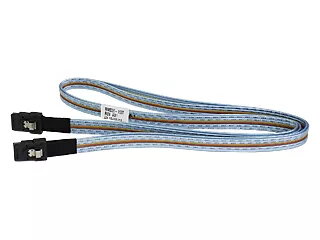
The HPE External Mini SAS Cable HPE 407339-B21-RFB is a 2-meter external Mini SAS cable equipped with dual 26-pin SFF-8088 connectors. Designed for enterprise storage and server environments, this HP Enterprise cable supports high-speed data transfer and provides a standardized physical interface for connecting external SAS enclosures, RAID controllers, and host bus adapters. Its construction and connector type make it suitable for short-range external connections where reliable throughput and signal integrity are required.
Advantages
The cable offers a standardized SFF-8088 interface enabling compatibility with a wide range of Mini SAS external ports. At 2 meters in length, it balances reach and signal performance for rack and data center layouts. The dual 26-pin configuration supports multi-lane SAS signaling, helping maintain aggregate throughput and allowing use with external storage enclosures and controllers that implement Mini SAS connectivity. The product bears the HP Enterprise brand and MPN 407339-B21-RFB, ensuring traceability and consistency with HP Enterprise system components.
Suitable for
- Connecting external SAS enclosures to servers or RAID controllers
- Linking host bus adapters (HBAs) to external storage arrays
- Short-range external connections in racks and data centers
- Replacement or spare cable for HP Enterprise storage deployments
Key specifications
- Brand: HP Enterprise
- Manufacturer part number (MPN): 407339-B21-RFB
- EAN: 5712505655481
- Connector type: Dual 26-pin SFF-8088 (Mini SAS external)
- Length: 2 meters
- Category: Fibre Optic Cables (external Mini SAS copper/fiber interface compatibility as per system requirements)
How to use
Identify the SFF-8088 external ports on the server, RAID controller, HBA, or storage enclosure. Align each SFF-8088 connector with the corresponding port and insert it straight until it seats securely; avoid angling or forcing the connector. Route the cable to minimize sharp bends and avoid contact with heat sources or moving parts in the rack. When attaching to equipment, ensure power and data operations follow the vendor's recommended procedures to prevent hot-plug damage. For removal, depress any latch mechanism and pull the connector straight out.
Usage recommendations
Use the cable within its 2-meter nominal length to maintain signal integrity. Avoid excessive twisting, kinking, or tight bends; maintain manufacturer-recommended bend radius. Verify compatibility with your server or enclosure SFF-8088 ports and consult HP Enterprise documentation for firmware and HBA settings when integrating into storage systems. Store unused cables in a dry, dust-free environment and inspect connectors for debris before connecting.