
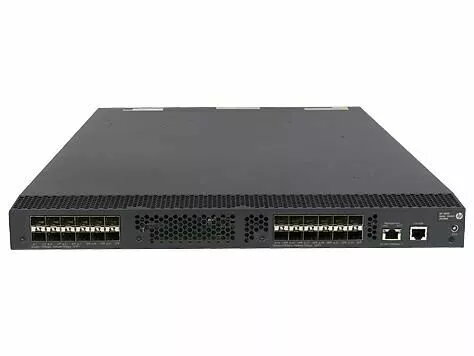
The HP Enterprise N 5920AF-24XG 24-port 10G Managed Stackable Switch (JG296A-RFB) is a rack-mountable network switch designed for data center and enterprise deployment. It provides twenty-four 10 Gigabit Ethernet ports for uplinks and aggregation, managed switching capabilities for VLAN segmentation, Quality of Service (QoS), and security features, plus stackability to simplify expansion and centralize management. The switch is intended for use at core or distribution layers where high throughput and predictable performance are required.
Advantages
This managed switch supports 24 10G ports, enabling high-throughput uplinks and port aggregation without additional converters. Stackable architecture reduces management overhead by allowing multiple units to act as a single logical device, simplifying firmware updates and configuration. Built-in management features such as VLAN, QoS, and access controls provide traffic segregation, prioritization, and basic security controls suitable for enterprise environments. The unit is designed for rack mounting and integrates with standard network management workflows.
Suitable for
- Data center aggregation and uplink switching
- Core or distribution layer in enterprise LANs
- High-bandwidth server connectivity and virtualization hosts
- Environments requiring VLAN segmentation and QoS
Key specifications
- Brand: HP Enterprise
- Model / MPN: N 5920AF-24XG (JG296A-RFB)
- Ports: 24 × 10 Gigabit Ethernet ports
- Managed: Yes — VLAN, QoS, security and management features
- Stackable: Yes — supports stacking for simplified management and scaling
- Form factor: Rack-mountable switch suitable for network racks
- Category: Switches — enterprise / data center class
- EAN: 5706998992512
How to use
Install the switch in a standard 19-inch rack using the provided mounting brackets. Connect power according to the equipment rack's power design and follow grounding best practices. Use the console port or web/CLI management interface to apply initial configuration: set management IP, configure VLANs, enable QoS policies, and define access controls. For stacking, follow the manufacturer stacking procedure to link units and verify they present as a single managed entity. Connect servers, uplinks and aggregation links to the 10G ports, and test connectivity and performance after applying configurations.
Usage recommendations
Place the switch in a temperature-controlled rack environment with adequate airflow. Use quality SFP+/direct attach optics or compatible transceivers certified for the platform for 10G links. When deploying in production, document VLAN and QoS policies, perform staged firmware updates, and verify stack health and link aggregation settings to maintain predictable performance.