A curated selection of maximum value offers!
In cart {{totalProductsCount}} item(s)
Your cart is empty
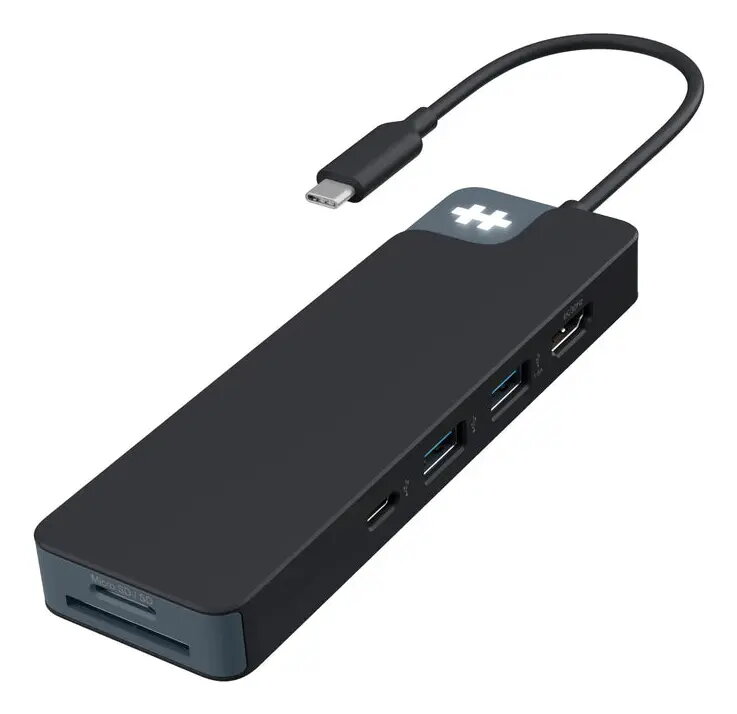
USB-C multiport hub HYPER HD4102BKGL — USB 3.2 Gen 1 Type-C host, HDMI 4K, SD/MicroSD, 3.5mm, 2x USB-A, USB-C, 5000 Mbit/s, Black
HYPER HD4102BKGL is a compact USB-C multiport hub that expands a single USB 3.2 Gen 1 (3.1 Gen 1) Type-C host into six useful ports. The hub provides HDMI video output up to 3840×2160, SD and MicroSD card readers, a 3.5 mm audio jack, two USB-A 3.2 Gen 1 ports and a downstream USB-C 3.2 Gen 1 port. It is bus-powered through the host USB-C connection, supports data transfer rates up to 5000 Mbit/s and is compatible with macOS, ChromeOS and iPadOS. The black compact design makes it suitable for mobile work and desktop setups where extra connectivity is required.
The hub combines multiple interfaces in a single compact unit, enabling video output, high-speed data transfers and audio passthrough without additional adapters. Native support for USB 3.2 Gen 1 ensures up to 5 Gbit/s transfer speeds for compatible devices, while integrated SD and MicroSD slots allow direct access to camera media. Bus-powered operation removes the need for an external power supply in most typical use cases, and the lightweight, black design is easy to carry with a laptop or place on a workstation.
Connect the hub to a host device using the USB-C host interface. For video output, attach an HDMI cable from the hub to a compatible monitor or projector and configure the display settings on the host device. Insert SD or MicroSD cards into the appropriate slots to access files directly from the card readers. Plug USB peripherals into the USB-A or downstream USB-C ports for data transfer or device use. Connect headphones or external speakers to the 3.5 mm jack for audio output. The hub is bus-powered, so most functions will operate when connected to a powered host; some high-power peripherals may require an independently powered hub or host with adequate power delivery.
Use high-quality HDMI cables and USB 3.2 Gen 1 capable cables and devices to achieve the best video and data transfer performance. When transferring large files from SD or MicroSD cards, ensure the host system supports the card format and allow the transfer to complete before removing media. For stable multi-monitor setups or high-power external drives, verify host power capabilities and consider a powered USB-C docking solution if additional power is required.
{{highlightedFeature.featureTitle}}:
{{getProductFeatureValueById(product, highlightedFeature.featureId)}}
This product page focuses on the USB-C multiport hub HYPER HD4102BKGL, which is compared with similar alternatives from HYPER, INTER-TECH, and TP-LINK. All reviewed products support data transfer rates up to 5000 Mbit/s and a USB-C host interface, but they differ in total port count, card reader availability, audio jacks, and network interfaces, determining their practical use cases.
⚙️ The table below compares the core characteristics of the devices, including port counts, interfaces, 4K video output support, and additional slots for memory cards or networking.
| Parameter | HYPER HD4102BKGL | HYPER HD4103BUGL | HYPER HD4102BUGL | HYPER HD4101BKGL | INTER-TECH H-428 | TP-Link UH7021C | Practical significance |
|---|---|---|---|---|---|---|---|
| Host interface | USB 3.2 Gen 1 Type-C | USB 3.2 Gen 1 Type-C | USB 3.2 Gen 1 Type-C | USB Type-C | USB 3.2 Gen 1 Type-C | USB Type-C | Ensures standard compatibility with modern laptops and tablets. |
| Data transfer rate | 5000 Mbit/s | 5000 Mbit/s | 5000 Mbit/s | 5000 Mbit/s | 5000 Mbit/s | 5000 Mbit/s | Identical transfer speed for fast file exchange with external drives. |
| Ports quantity | 6 | 7 | 6 | 5 | 5 | 5 | Affects the number of simultaneously connected peripheral devices. |
| Video output | HDMI (up to 4K) | HDMI (up to 4K) | HDMI (up to 4K) | HDMI (up to 4K) | HDMI (up to 4K) | HDMI (up to 4K, 60 Hz) | Allows connection to external monitors and TVs in high resolution. |
| Audio and card reader | 3.5 mm, SD/MicroSD | 3.5 mm, SD/MicroSD | 3.5 mm, SD/MicroSD | None | SD/MicroSD, no 3.5 mm | SD/MicroSD, no 3.5 mm | Provides convenience for plugging in headphones and working with camera memory cards. |
| Network port | None | None | None | None | Gigabit Ethernet | None | Wired internet connectivity is exclusively available in the INTER-TECH model. |
◎ The table below evaluates how well each model suits different usage scenarios to help choose the most appropriate hub for specific tasks.
| Use case | Recommended product | Why |
|---|---|---|
| Daily multitasking with media and headphones | USB-C multiport hub HYPER HD4102BKGL | Great port balance, built-in card reader, and audio jack in a black finish. |
| Maximum port variety within the HYPER lineup | USB-C Multiport Hub HYPER HD4103BUGL | Offers 7 ports instead of 6 while keeping the audio jack and card reader. |
| Working with wired internet networks | USB-C Multiport Hub INTER-TECH H-428 | The only model in the comparison featuring a Gigabit Ethernet port for stable wired networking. |
| Minimalist display and flash drive connection | USB-C hub HYPER HD4101BKGL | A simpler 5-port option without an audio output and card reader. |
The USB-C multiport hub HYPER HD4102BKGL differs from the alternatives by offering an optimal set of six ports, including an HDMI video output, a card reader, and a 3.5 mm audio jack in a classic black design. It is best suited for users who need a balanced tool for everyday laptop workflows without redundant interfaces. Choosing another model is recommended only if wired networking or a larger port count is explicitly required.