{{ totalProductsCount }}

In cart {{totalProductsCount}} item(s)

Total:
{{sum | formatAmount}}

Your cart is empty

header-product KATUN 150 m Cat.6 HDBaseT KVM Extender – DisplayPort 1.2, USB, IR, RS-232 (Transmitter & Receiver)

KATUN 150 m Cat.6 HDBaseT KVM Extender – DisplayPort 1.2, USB, IR, RS-232 (Transmitter & Receiver)

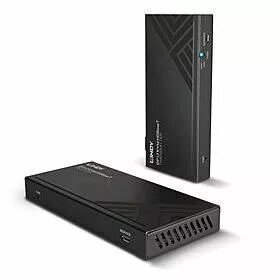
KATUN KVM Extender 150 m Cat.6 DisplayPort 1.2 Photo 1
Out of stock.
View similar!

Short description

Wired HDBaseT KVM extender for extending DisplayPort 1.2 video, USB keyboard/mouse, IR and RS-232 control up to 150 m over Cat.6. Includes transmitter and receiver with DisplayPort video ports and USB local I/O. Operates from 24 V DC, 1 A input current. Suitable for AV installations, control rooms and remote workstation setups requiring long-distance keyboard, video and control signal extension.
Warranty: 2 Years
SKU: 10483871

Charging device included Charging device included
delivery
Information regarding the items availability for purchase will be posted on this site
price
Item cost information will be published on this site
Together cheaper
{{product.price | formatAmount}}
{{product.title}}
{{productBundle.reference.specialPrice | formatAmount}}
{{productBundle.title}}
{{productBundlePreviousPrice | formatAmount}}
{{productBundleSpecialPrice | formatAmount}}

You saving {{productBundleYouSave | formatAmount}}

Product information

Description

The KATUN 150 m Cat.6 HDBaseT KVM Extender is a wired transmitter-and-receiver kit designed to extend DisplayPort 1.2 video, USB keyboard/mouse, infrared (IR) control and RS-232 control signals up to 150 m over a single Cat.6 cable. The system supports DisplayPort 1.2 video formats and offers PoC (Power over Cable) so power can be supplied across the Cat.6 link in a point-to-point installation. The kit includes a transmitter and a receiver, each with DisplayPort video ports and USB local I/O, and is powered from a 24 V DC supply with a 1 A input current requirement. The extender is intended for AV installations, control rooms and remote workstation setups where long-distance extension of keyboard, video and control signals is needed.

Advantages

The extender enables long-distance transmission of high-quality DisplayPort 1.2 video and USB HID signals using standard Cat.6 cable, reducing the need for costly fibre or proprietary cabling. Supporting PoC reduces cabling complexity by allowing a single power source at one end of the link. Bi-directional IR and RS-232 support provide flexible remote control and integration with existing control systems. Built-in EDID handling improves compatibility with a wide range of displays and projectors. The design supports lossless multi-channel audio formats when carried by the DisplayPort link.

Suitable for

  • AV installations requiring long-distance DisplayPort video extension
  • Control rooms and command centres with remote operator stations
  • Digital signage and event displays needing remote media sources
  • Environments where source equipment is stored in secure or temperature-controlled rooms
  • Installations that require IR and RS-232 control over distance

Key specifications

  • Interface: DisplayPort 1.2 video, USB HID (keyboard/mouse), bi-directional IR, RS-232
  • Extension medium: Single Cat.6 cable (U/UTP or F/UTP solid core recommended)
  • Maximum extension distances (with high quality Cat.6 solid core): up to 150 m at 1920x1080@60Hz 4:4:4 8-bit; up to 100 m at 3840x2160@60Hz 4:4:4 8-bit
  • Audio: Supports lossless multi-channel audio formats carried by DisplayPort
  • Power: Operates from 24 V DC, 1 A input; supports PoC (Power over Cable) in point-to-point setups
  • Includes: Transmitter and receiver units with local USB I/O and DisplayPort connectors

How to use

Connect the DisplayPort video source to the transmitter DisplayPort input and connect the display or projector to the receiver DisplayPort output. Attach USB keyboard and mouse devices to the USB HID ports where required. Use a single solid core Cat.6 U/UTP or F/UTP cable between the transmitter and receiver to carry video, USB, IR and RS-232 signals; ensure cable terminations meet Cat.6 standards. Provide 24 V DC power to the designated unit or use PoC capability to power the remote unit from a single power supply at one end. Configure EDID settings if necessary to match the display’s supported resolutions and audio formats.

Usage recommendations

For best results, use high-quality, solid core Cat.6 cable and maintain proper cable routing away from strong electromagnetic interference sources. Observe the device’s operating temperature limits and install units in a cool, ventilated location. Test display resolution and EDID configuration at installation to confirm required resolution and audio formats are delivered across the chosen cable length.

Specifications

Connectivity technology: The technology that enables connectivity of the device, e.g. wired or wireless.
Wired
Type: Characteristics of the device.
Transmitter & receiver
All features

Technical details

Product colour: The colour e.g. red, blue, green, black, white.
Black
Maximum transfer distance: The greatest distance over which the data/signal can be transferred.
150 m

Sustainability

Sustainability compliance:
Yes
Sustainability certificates:
RoHS, REACH, CE, UKCA, Federal Communications Commission (FCC)

Power

DC-in jack: The socket/plug where the DC electricity supply connects to the device.
Yes
DC voltage:
24
Input current:
1

Packaging content

Cables included:
USB
Manual:
Yes
Included power plug types:
US, UK, EU, AU
Mounting bracket(s) included:
Yes
AC adapter included:
Yes

Packaging data

Package weight: Weight of the packaged product.
1020 g
Package height: The distance from the top to the bottom of the packaging.
185 mm
Package depth: The distance from the front to the back of the packaging.
75 mm
Package width: The distance from one side of the packaging to the other.
245 mm

Operational conditions

Storage relative humidity (H-H):
20 - 90
Operating relative humidity (H-H):
20 - 90
Storage temperature (T-T): The minimum and maximum temperatures at which the product can be safely stored.
-20 - 60
Operating temperature (T-T): The minimum and maximum temperatures at which the product can be safely operated.
0 - 40

Weight & dimensions

Receiver height:
18 mm
Receiver depth:
65 mm
Receiver width:
140 mm
Transmitter height:
18 mm
Receiver weight:
800 g
Transmitter depth:
65 mm
Transmitter width:
140 mm
Transmitter weight:
800 g

Ports & interfaces

USB 1.1 ports quantity: Number of USB 1.1 ports (connecting interfaces) in the device. USB 1.1 was released in August 1998, fixing problems identified in 1.0, mostly related to using hubs. USB 1.1 was the earliest revision that was widely adopted. Usually coloured white.
5
Remote (IR) input:
2
Remote (IR) output:
2
USB port type:
USB Type-A/USB Type-B
RS-232 ports: The number of sockets (ports) for RS-232. An RS-232 serial port was once a standard feature of a personal computer, used for connections to modems, printers, mice, data storage, uninterruptible power supplies, and other peripheral devices. Now it has been largely replaced by USB and other ports.
2

Receiver

RJ-45 ports quantity (receiver):
1
Receiver local video port type:
DisplayPort
Receiver local keyboard/mouse port type:
USB
Receiver local video ports quantity:
1

Transmitter

RJ-45 ports quantity (transmitter):
1
Transmitter local keyboard/mouse port type:
USB
Transmitter local video port type:
DisplayPort
Transmitter local video port:
Yes
Transmitter video port type:
DisplayPort

Features

LED indicators:
Power
Material: The material from which a thing is or can be made e.g. wood, plastic.
Metal
Colour depth:
8 bit
Maximum refresh rate:
60 Hz
Maximum digital resolution:
3840 x 2160
Cable types supported:
Cat6
Connectivity technology: The technology that enables connectivity of the device, e.g. wired or wireless.
Wired
Type: Characteristics of the device.
Transmitter & receiver

Description

Machine translation.

Similar products

{{product.title}}
Show details Hide details

{{highlightedFeature.featureTitle}}:

{{getProductFeatureValueById(product, highlightedFeature.featureId)}}

{{product.price | formatAmount}}
Might be useful
{{product.manufacturerName}}
{{product.categoryName}}
{{product.title}}
{{product.specialPrice}}
{{product.price}}

Customer reviews

Customer questions

FAQ

What payment options are available?

AiO.lv offers several payment methods: Bank transfer. All transactions are 100% secure and encrypted.

Can this product be purchased for a company (with VAT)?

Yes. AiO.lv works with legal entities in Latvia and across Europe. The product price already includes VAT. For certain product categories, as well as for companies from other EU countries with a valid VAT number, a 0% VAT rate may apply. We issue the invoice immediately after the order is placed, support electronic BIS invoices, and automatically generate all necessary accounting documents. You can complete the purchase for a company online — simply select the company profile and choose bank transfer as the payment method during checkout.

What is the warranty period?

All KATUN products come with an official 2 Years warranty. It covers all manufacturing defects and malfunctions that may occur during use. The warranty is valid at all authorized KATUN service centers and through AiO.lv

Can the product be returned after purchase?

Yes, you can return the product within 14 days of purchase if you bought it as a consumer (not a legal entity). Returns are possible without giving any reason — the main condition is that the product retains its original appearance and full set of accessories. We will make the process as simple and convenient as possible: just contact our customer support team, and we will help you arrange the return.

Where should I contact for warranty service?

For warranty-related questions you can contact the AiO.lv (SIA VSPRO) customer support team. We will assist with consultation, warranty claim processing, and coordination with certified service centers.

How can I tell if this product suits my needs?

When making a choice, we recommend paying attention to the key features: connectivity technology, type, compatibility with your devices or usage conditions, material quality, functionality, and warranty terms. These characteristics will help you determine how well the model meets your needs.

Where can I download the instructions for KATUN KVM Extender 150 m Cat.6 DisplayPort 1.2?

You can download the instructions in PDF format from the “Instructions” section on the product description page. The file contains complete information about installation, setup, and usage.
warranty
14-Day Return Policy We are confident in our quality, but if the purchase doesn’t fit — you have 14 days to return the product with peace of mind.
shipping
Fast Delivery Get your orders as quickly as possible — right to your door, parcel lockers, or pickup points across Latvia and the EU.
payment
Secure Payment Pay the way you prefer: cash, VISA, MasterCard, Apple Pay, Google Pay, bank transfer, or 0% installment plan.
warranty
Quality Since 2008 AiO.lv has been on the market for over 18 years and has earned trust — with more than 6000 genuine positive reviews on Google.