
Hurry and order now – up to 50% off!
In cart {{totalProductsCount}} item(s)
Your cart is empty
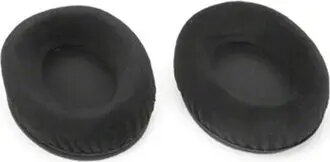
Replacement earpads (foam disk) for Lenovo headsets — 1 pair, model 050635, black
Replacement earpads (foam disk) for Lenovo headsets — 1 pair, black are designed to restore cushioning and acoustic contact for compatible on-ear or lightweight headset earcups. These foam disks replace worn-out original pads, preserving the earcup fabric and helping maintain comfortable contact during calls or extended wear. The product is sold as one pair and is intended for easy, quick replacement without tools.
The foam disks offer soft cushioning and a close fit that helps reduce ambient noise leakage and improves microphone pick-up consistency by restoring the intended acoustic seal. Their slim profile maintains the original headset fit and does not significantly change earcup spacing or clamp force. The replacement pads protect the headset’s inner fabrics from wear and sweat, extending the usable life of the headset.
Remove the worn pad from the headset earcup by gently peeling it off from the rim, taking care not to damage the earcup frame or fabric. Align a replacement foam disk with the earcup rim and press evenly around the edge until it seats securely. Ensure the disk is centered and provides an even contact surface. Repeat the procedure for the other earcup. No special tools are required; check fit before use and adjust positioning if needed.
For hygiene and longevity, replace foam disks when they show visible wear, compression, or odor. Clean surrounding earcup surfaces with a dry or slightly damp lint-free cloth before installing new pads. Store spare replacement pads in a dry environment away from direct sunlight and heat sources.
{{highlightedFeature.featureTitle}}:
{{getProductFeatureValueById(product, highlightedFeature.featureId)}}
{{ productComparisonGenerationError }}
