{{ totalProductsCount }}

In cart {{totalProductsCount}} item(s)

Total:
{{sum | formatAmount}}

Your cart is empty

header-product Lenovo Digital Pen 3 Stylus Pen Blue GX81N91321 with High Precision and Pressure Sensitivity
43.99 €

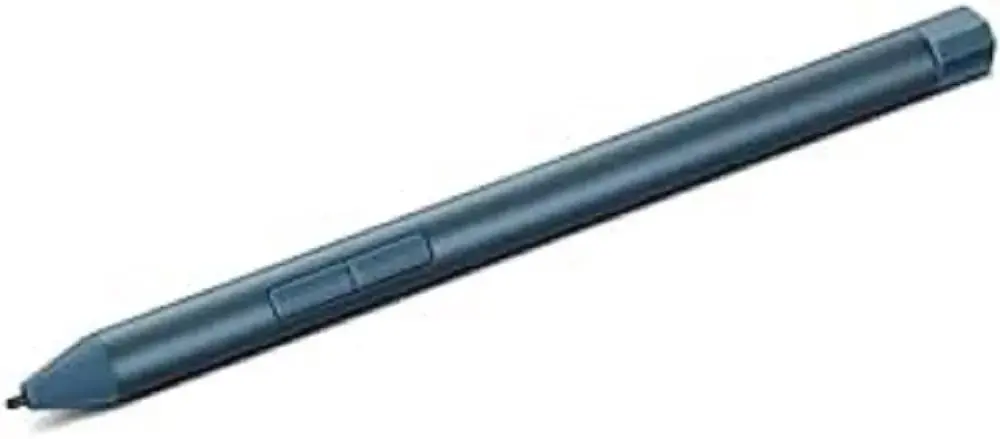
Lenovo Digital Pen 3 Stylus Pen Blue GX81N91321 with High Precision and Pressure Sensitivity

Lenovo Digital Pen 3 Stylus Blue GX81N91321 Photo 1

New arrival!

Keep track of price changes You keep track of price changes
Watch the price drop

Leave your address - as soon as the price of the product goes down, you'll know about it right away

You keep track of price changes

Lenovo Digital Pen 3 Stylus Pen Blue GX81N91321 with High Precision and Pressure Sensitivity

{{email}}
You keep track of price changes

Lenovo Digital Pen 3 Stylus Pen Blue GX81N91321 with High Precision and Pressure Sensitivity

{{email}}
{{selectedOffer && selectedOffer.price | formatAmount}}

Short description

The Lenovo Digital Pen 3 in blue, model GX81N91321, is an advanced stylus pen designed for precise drawing, note-taking, and smooth navigation on compatible touchscreens. Featuring high pressure sensitivity and ergonomic design, it offers a natural pen-on-paper feel for improved productivity and creative tasks.
Available for order: 28 pcs.
Warranty: 2 Years
SKU: 12629686
free shipment

Cheapest delivery:

Unisend LV

Pick-up points

Unisend LV

Cost

1.79 €

Deliver

{{selectedOffer.parcelStationDeliveryString}}

Customer service center
2b. Kengaraga str., Riga, Latvia, LV-1063
16.09.2026 {{selectedOffer.officeDeliveryString}}
free
Courier Delivery Please note that in case of a large parcel additional delivery costs may apply!
21.09.2026 {{selectedOffer.courierDeliveryString}}
From 4.99 € (Weight: 0.02 kg)
Parcel couriers
Unisend LV / Venipak Pickup LV / Venipak Locker LV / Latvijas Pasts pakomāts / DPD Paku skapis / Omniva LV / Latvijas Pasts nodaļa
21.09.2026 {{selectedOffer.parcelStationDeliveryString}}
From 1.79 €
payment
Payment Methods:
Bank transfer, Bank cards on-line, Apple Pay, Google Pay
Together cheaper
{{product.price | formatAmount}}
{{product.title}}
{{productBundle.reference.specialPrice | formatAmount}}
{{productBundle.title}}
{{productBundlePreviousPrice | formatAmount}}
{{productBundleSpecialPrice | formatAmount}}

You saving {{productBundleYouSave | formatAmount}}

Product information

Description

The Lenovo Digital Pen 3 Stylus Pen Blue offers advanced functionality for users seeking precise control and smooth navigation on compatible touchscreens. Designed to enhance both creative workflows and daily productivity, this stylus provides a responsive and reliable input method for modern touch devices. With its ergonomic construction and striking blue finish, it combines practical utility with a comfortable user experience for extended drawing, sketching, and note-taking sessions.

Advantages

The stylus delivers high precision and exceptional pressure sensitivity, allowing users to create varied line thickness and detailed illustrations effortlessly. Its natural pen-on-paper feel minimizes hand fatigue during prolonged use, making it an efficient tool for professional tasks and casual sketching alike. The device integrates seamlessly with supported touchscreens to ensure accurate cursor placement and fluid handwriting recognition without noticeable lag.

Suitable for

  • Digital drawing and artistic sketching
  • Handwritten note-taking and document markup
  • Smooth navigation and menu selection on touchscreens
  • Office productivity and academic assignments

When it may not be suitable

This stylus is not compatible with all touchscreen devices and requires a specifically supported model to function correctly. It may not meet the specialized demands of professional graphic designers who require advanced tilt recognition or custom programmable barrel buttons.

Key specifications

  • Color: Blue
  • High pressure sensitivity
  • Precise touch input mechanism
  • Ergonomic stylus body

How to use

To begin using the stylus, ensure your compatible touchscreen device is powered on and within operational range. Simply approach the screen and utilize the pen tip for navigation, writing, or drawing tasks. No complex pairing procedures are typically required for basic stylus functionality on supported Lenovo touchscreens. Store the pen in a secure location when not in use to protect the sensitive tip from accidental damage.

What to consider before purchase

  • Verify compatibility with your specific touchscreen device model
  • Confirm whether your workflow requires specialized features such as tilt support
  • Check if your device supports active stylus technology

Usage recommendations: Keep the stylus tip clean and free from dust or debris to ensure optimal contact with the screen. Avoid dropping the device on hard surfaces to prevent internal damage and maintain structural integrity of the pen tip.

Description

Machine translation. Load original

Similar products

{{product.title}}
Show details Hide details

{{highlightedFeature.featureTitle}}:

{{getProductFeatureValueById(product, highlightedFeature.featureId)}}

{{product.price | formatAmount}}

Product comparison

Comparing the Lenovo Digital Pen 3 Stylus Pen Blue GX81N91321 with alternative stylus pens from various manufacturers helps clarify how they differ in design intent, compatibility, and real-world usability. Because all compared items are active styluses for touchscreens and graphic tablets, they share the primary objective of enabling accurate handwriting, sketching, and navigation. The main distinctions lie in supported device ecosystems, specialized features such as magnetic attachment or tilt sensitivity, and the intended balance between casual note-taking and professional digital creation.

⚙️ The table below compares the devices based on their core type, brand context, main functional attributes, and practical implications for everyday use.

FeatureLenovo Digital Pen 3 (GX81N91321)Lenovo GX81N91321 (Alternative)Microsoft Surface Pen (8WY-00002)Vention KQGW0Wacom Pro Pen 3Asus Pen SA300Practical implication
Device typeActive stylusActive stylusActive stylus with BluetoothActive stylusProfessional stylusRechargeable active stylusDetermines power requirements and screen interaction methods.
BrandLenovoLenovoMicrosoftVentionOEM (Wacom)AsusIndicates foundational hardware compatibility.
ColourBlueNot specifiedNot specifiedWhiteBlackNot specifiedAesthetic preference for matching devices.
Key featuresHigh precision and pressure sensitivity4096 pressure levels for precise linesBluetooth connectivity, pressure sensitivityMagnetic attachment, palm rejection, tilt sensitivityProfessional input control for graphicsPrecise input, slim barrel, rechargeable designInfluences comfort and capability in creative and productive tasks.

◎ The suitability table below evaluates which product is best aligned with specific user needs and use cases.

Use caseRecommended productWhy
Note-taking on compatible Lenovo touch devicesLenovo Digital Pen 3 (GX81N91321)Engineered specifically for seamless integration with supported Lenovo touchscreens, offering a natural writing feel.
Professional digital illustration and designWacom Pro Pen 3Tailored for integration with Wacom graphic tablets to meet the demands of digital artists.
Handwriting and annotation on Surface devicesMicrosoft Surface Pen (8WY-00002)Optimized for Surface hardware with Bluetooth integration for precise productivity workflows.
General touch navigation with palm rejectionVention KQGW0Provides convenient features like magnetic storage and tilt sensitivity for varied tasks.
Productivity on Asus touchscreen laptopsAsus Pen SA300A rechargeable active stylus designed for natural control on compatible Asus touch devices.
The Lenovo Digital Pen 3 Stylus Pen Blue GX81N91321 is best suited for users of compatible Lenovo touchscreens who need a reliable tool for notes and navigation. Choose it if you require native ecosystem compatibility, whereas buyers focused on professional graphics tablets or Microsoft Surface hardware will find dedicated alternatives more appropriate.

Might be useful
{{product.manufacturerName}}
{{product.categoryName}}
{{product.title}}
{{product.specialPrice}}
{{product.price}}

Customer reviews

Customer questions

FAQ

How much does the Lenovo Digital Pen 3 Stylus Blue GX81N91321 cost, and is it available for purchase?

The price is 43.99 € (valid at the time of publication and already includes all taxes). The item is available for order — 28 pcs. are in stock, and you can place your purchase right now with delivery across Latvia and Europe or choose pickup at the Riga collection point. We offer favorable purchase terms, including the option to split the payment into convenient monthly installments. Availability and price are updated in real time, so we recommend placing your order in advance.

If I order this product today, when will I receive my order?

If you place your order today, delivery will be as fast and convenient as possible. You will be able to pick up your order on 16.09.2026 at the Riga pickup point or choose delivery across Latvia and Europe. We carefully inspect every purchase and pack it securely for safe transportation.

What payment options are available?

AiO.lv offers several payment methods: Bank transfer, Bank cards on-line, Apple Pay, Google Pay. All transactions are 100% secure and encrypted.

Can this product be purchased for a company (with VAT)?

Yes. AiO.lv works with legal entities in Latvia and across Europe. The product price already includes VAT. For certain product categories, as well as for companies from other EU countries with a valid VAT number, a 0% VAT rate may apply. We issue the invoice immediately after the order is placed, support electronic BIS invoices, and automatically generate all necessary accounting documents. You can complete the purchase for a company online — simply select the company profile and choose bank transfer as the payment method during checkout.

What is the warranty period?

All Lenovo products come with an official 2 Years warranty. It covers all manufacturing defects and malfunctions that may occur during use. The warranty is valid at all authorized Lenovo service centers and through AiO.lv

Can the product be returned after purchase?

Yes, you can return the product within 14 days of purchase if you bought it as a consumer (not a legal entity). Returns are possible without giving any reason — the main condition is that the product retains its original appearance and full set of accessories. We will make the process as simple and convenient as possible: just contact our customer support team, and we will help you arrange the return.

Where should I contact for warranty service?

For warranty-related questions you can contact the AiO.lv (SIA VSPRO) customer support team. We will assist with consultation, warranty claim processing, and coordination with certified service centers.
warranty
14-Day Return Policy We are confident in our quality, but if the purchase doesn’t fit — you have 14 days to return the product with peace of mind.
shipping
Fast Delivery Get your orders as quickly as possible — right to your door, parcel lockers, or pickup points across Latvia and the EU.
payment
Secure Payment Pay the way you prefer: cash, VISA, MasterCard, Apple Pay, Google Pay, bank transfer, or 0% installment plan.
warranty
Quality Since 2008 AiO.lv has been on the market for over 18 years and has earned trust — with more than 6000 genuine positive reviews on Google.