
Hurry and order now – up to 50% off!
In cart {{totalProductsCount}} item(s)
Your cart is empty
Docking Station Lenovo ThinkPad USB 3.0 Pro Dock
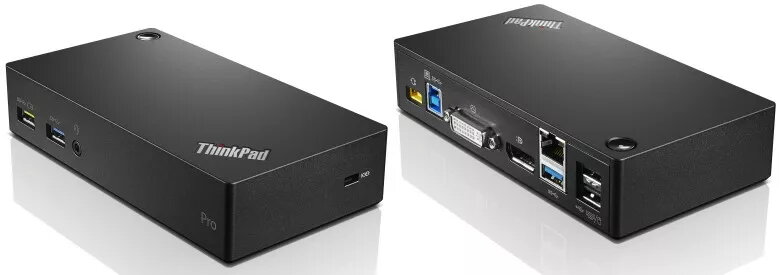
The Lenovo ThinkPad USB 3.0 Pro Dock provides a universal wired docking solution that expands a laptop's connectivity through a single USB 3.0 connection. It enables quick access to up to two external monitors, Gigabit Ethernet, audio output, USB printers and scanners, keyboard and mouse, and other workspace peripherals while offering passthrough power to charge mobile devices via the always-on USB port.
The docking station includes multiple USB ports (four USB 3.2 Gen 1 Type-A and two USB 2.0) for fast data transfer and peripheral connection, plus a VGA port and digital video support for multi-monitor setups. It provides a wired Gigabit Ethernet (10/100/1000 Mbit/s) connection for stable network access. The compact black enclosure and 45W power design make it suitable for desktop or flexible workspace environments, and it is compatible with Lenovo systems and certified for reliability and safety.
Place the docking station on a stable surface and connect its power adapter if provided. Use the supplied USB 3.0 cable to connect the dock to your Lenovo laptop's USB port. Once connected, the dock will provide access to attached monitors, network, audio devices and USB peripherals. Configure external displays and network settings in your operating system as required. Use the always-on USB port to charge mobile devices even when the host computer is asleep or turned off.
For best performance, connect monitors using supported video outputs and ensure your laptop USB port supports USB 3.0/3.2 Gen 1 speeds. Keep firmware and drivers up to date and use a Gigabit-capable Ethernet cable for full network throughput.
{{highlightedFeature.featureTitle}}:
{{getProductFeatureValueById(product, highlightedFeature.featureId)}}
{{ productComparisonGenerationError }}
