
This is due to long delivery times and limited product warranties.
Dreame vacuums for fast and efficient cleaning!
In cart {{totalProductsCount}} item(s)
Your cart is empty
Docking Station Lenovo 40A70045IT
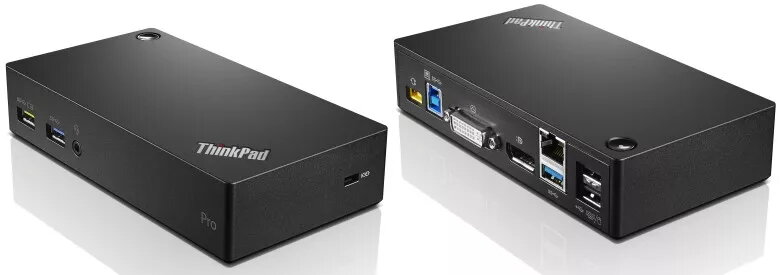
The Lenovo 40A70045IT docking station is a compact wired docking solution that expands connectivity for compatible USB-enabled laptops and desktops. It provides multiple USB ports, video outputs and Gigabit Ethernet via a single USB 3.2 Gen 1 (Type-B) connection, allowing fast attachment of peripherals and external displays while powered by an external DC adapter.
This dock supports USB 3.2 Gen 1 data transfer speeds and delivers a simple single-cable connection to up to two external monitors (HDMI and DVI-D), Gigabit Ethernet, and several USB devices. Its compact black enclosure (150 x 80 x 32 mm) and light weight (0.24 kg) make it easy to position on any desk. The always-on USB port can charge a mobile device even when a computer is not actively transferring data. The unit is certified to international safety and quality standards, ensuring reliable daily operation.
Place the docking station on a stable surface and connect the supplied DC power adapter to the dock. Use a USB 3.2 Gen 1 (Type-B) cable to connect the dock to your laptop or desktop USB port. Attach external displays to the HDMI and DVI-D ports as needed, and plug Ethernet, keyboard, mouse, printers, speakers and other USB devices into the corresponding ports. The always-on USB port can be used to charge a mobile device while the dock is powered.
Ensure the dock is connected to its AC/DC adapter before use. For optimal video performance, use high-quality HDMI and DVI-D cables and connect displays to the dock before powering on the host computer. Keep firmware and host USB drivers up to date for best compatibility.
{{highlightedFeature.featureTitle}}:
{{getProductFeatureValueById(product, highlightedFeature.featureId)}}
