
Dreame vacuums for fast and efficient cleaning!
In cart {{totalProductsCount}} item(s)
Your cart is empty
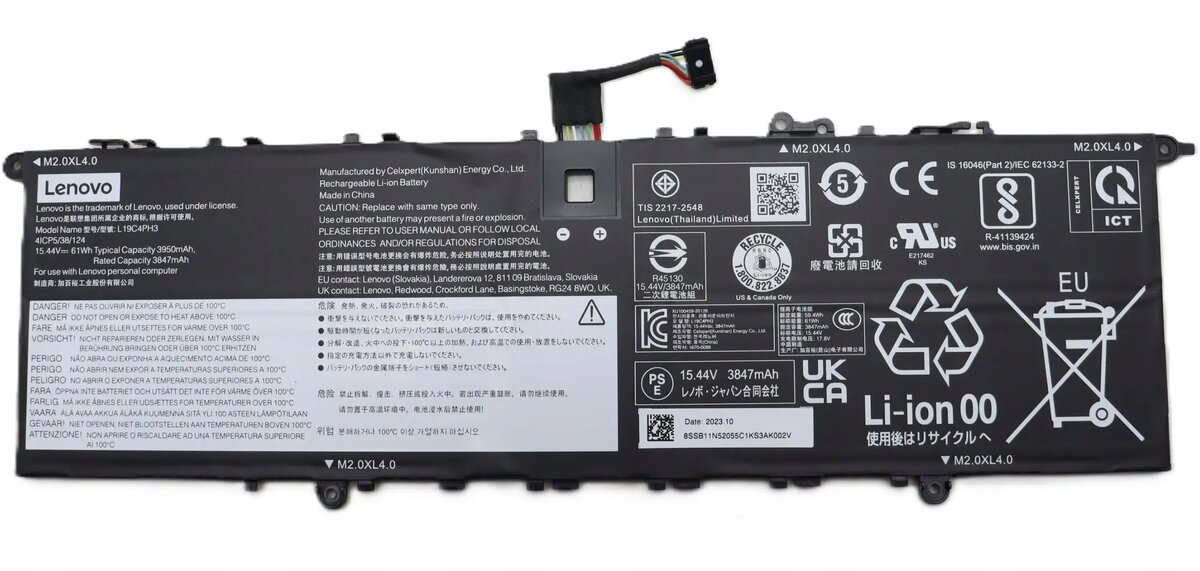
Replacement laptop battery Lenovo 61Wh 4-cell lithium-ion
Replacement 61Wh 4-cell lithium‑ion laptop battery compatible with a range of Lenovo notebooks. This module delivers 61 watt‑hours of energy from four lithium‑ion cells to restore battery life for everyday mobile work, travel, and general-purpose computing. Designed as a direct replacement for worn or failing batteries, it reinstates unplugged runtime and helps maintain the original portability of the laptop when the internal battery no longer holds sufficient charge. Verify compatibility with your specific Lenovo model before purchase and follow safe handling and installation guidance.
The lithium‑ion chemistry provides a balance of energy density and weight, offering practical runtime without significant added bulk. With 61Wh capacity and a four‑cell configuration, the battery supports standard mobile workloads such as web browsing, document editing, and video playback. It is intended to be a like‑for‑like replacement to recover runtime and reduce the need to keep the device constantly plugged in. The design is compatible with typical Lenovo battery compartments and mounting points, facilitating a straightforward swap when compatibility is confirmed.
Before installation, shut down the laptop, disconnect the power adapter, and follow the manufacturer’s instructions for accessing the internal battery or battery compartment. Remove the old battery according to the laptop model’s service guide, taking care to avoid contact with metal tools on exposed contacts. Insert the replacement battery and secure any latches or screws required by the device. After installation, reconnect the power adapter and fully charge the new battery before initial use to calibrate the charge indicator if recommended by the device maker.
Store and operate the battery within the temperature and humidity ranges specified by your laptop manufacturer. Avoid extreme temperatures, physical damage, and prolonged storage at full charge. Use the laptop’s power management settings to extend battery lifespan and follow proper recycling procedures for the removed battery.
{{highlightedFeature.featureTitle}}:
{{getProductFeatureValueById(product, highlightedFeature.featureId)}}
{{ productComparisonGenerationError }}
