
{{ totalProductsCount }}

In cart {{totalProductsCount}} item(s)

Total:
{{sum | formatAmount}}

Your cart is empty

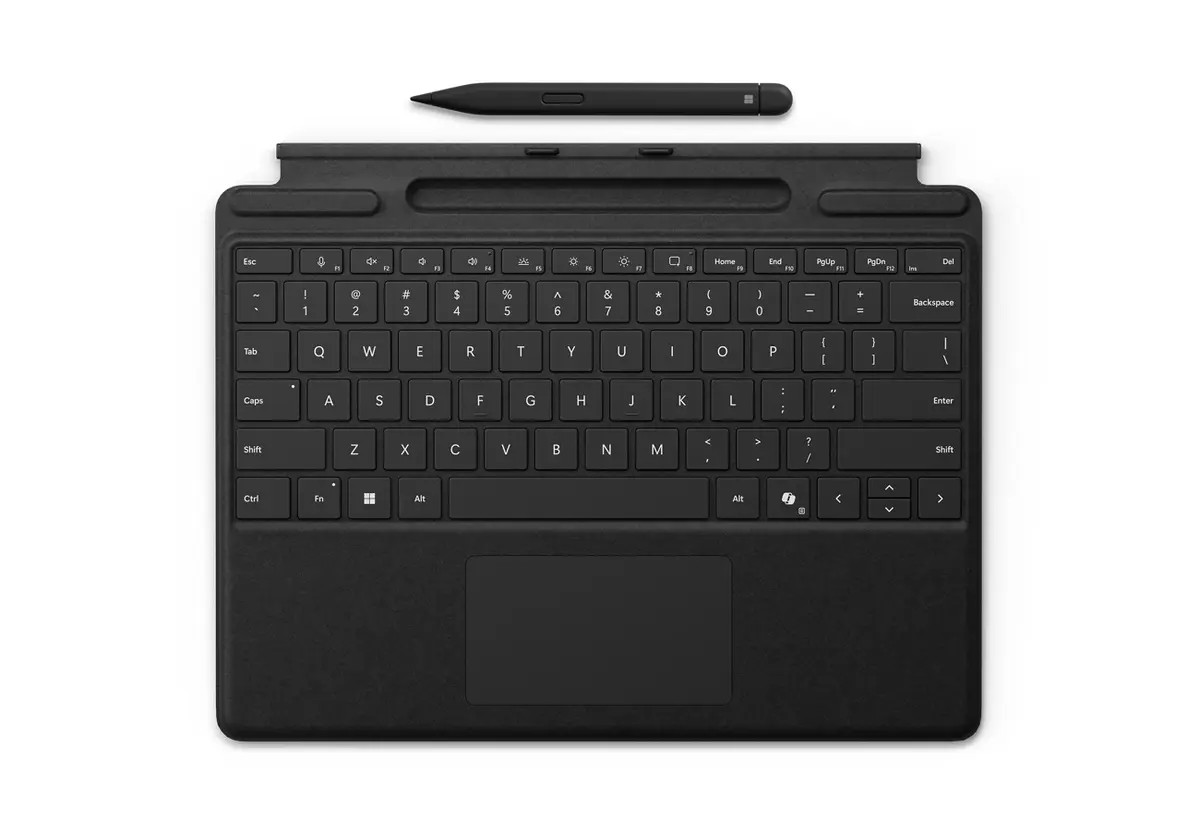
header-product Microsoft Surface Pro Keyboard with Slim Pen QWERTY English Black
247.49 €

Microsoft Surface Pro Keyboard with Slim Pen QWERTY English Black

Fast shipping
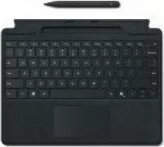
Microsoft Surface Pro Keyboard with Slim Pen Photo 1
Microsoft Surface Pro Keyboard with Slim Pen Photo 2
Microsoft Surface Pro Keyboard with Slim Pen Photo 1
Microsoft Surface Pro Keyboard with Slim Pen Photo 2
payment

Discount 7%

You save: 20.00 €

The discount is valid from 20.10.2026 to 17.11.2026

Keep track of price changes You keep track of price changes
Watch the price drop

Leave your address - as soon as the price of the product goes down, you'll know about it right away

You keep track of price changes

Microsoft Surface Pro Keyboard with Slim Pen QWERTY English Black

{{email}}
You keep track of price changes

Microsoft Surface Pro Keyboard with Slim Pen QWERTY English Black

{{email}}
Price without discount: 267.49 €
Your Price:
{{selectedOffer.price | formatAmount}}

Short description

The Microsoft Surface Pro Keyboard with Slim Pen features a QWERTY layout and is designed for Surface Pro devices. It includes a touchpad and connects via Microsoft Cover port. The sleek black design complements your Surface Pro while providing a comfortable typing experience. Compatible with Surface Pro 10, 9, 8, and X, it enhances productivity and ease of use.

Available at price 247.49 €: 2 pcs.
Total available for order: 7 pcs.
Warranty: 2 Years
SKU: 11264093
free shipment

Cheapest delivery:

Unisend LV

Pick-up points

Unisend LV

Cost

1.99 €

Deliver

{{selectedOffer.parcelStationDeliveryString}}

Customer service center
2b. Kengaraga str., Riga, Latvia, LV-1063
Wednesday {{selectedOffer.officeDeliveryString}}
free
Courier Delivery Please note that in case of a large parcel additional delivery costs may apply!
02.11.2026 {{selectedOffer.courierDeliveryString}}
From 4.99 € (Weight: 0.29 kg)
Parcel couriers
Unisend LV / Venipak Pickup LV / Venipak Locker LV / DPD Paku skapis / Omniva LV / Latvijas Pasts pakomāts / Latvijas Pasts nodaļa
02.11.2026 {{selectedOffer.parcelStationDeliveryString}}
From 1.99 €
0 credit

pay in 3 equal parts

today

0 €

afterward

3 mth. × 82.5 €

overpayment

0 €

All payment Methods:
Cash payment, Bank transfer, Bank cards on-line, Apple Pay, Google Pay, Installment
36 months installment: from 6.87 euros per month
Together cheaper
{{product.price | formatAmount}}
{{product.title}}
{{productBundle.reference.specialPrice | formatAmount}}
{{productBundle.title}}
{{productBundlePreviousPrice | formatAmount}}
{{productBundleSpecialPrice | formatAmount}}

You saving {{productBundleYouSave | formatAmount}}

Product information

Description

The Microsoft Surface Pro Keyboard with Slim Pen is a premium keyboard accessory designed for Surface Pro devices. It features a large glass touchpad, three dedicated hot keys including a Copilot key for quick access to AI features, and an integrated storage tray that securely holds and recharges the Surface Slim Pen for Business. The QWERTY English layout in black provides a familiar typing experience and connects via the Microsoft Cover port for a seamless attachment to Surface Pro models.

Advantages

This keyboard combines a responsive full-size keyset with a spacious glass touchpad for precise navigation. The three innovative hot keys, including the Copilot key, allow faster access to productivity and AI tools. The built-in Slim Pen storage tray keeps the Surface Slim Pen for Business securely in place and charges it, reducing the need for separate charging accessories. Compatible with Surface Pro 10, 9, 8, and X, the keyboard offers plug-and-play connectivity through the Microsoft Cover port.

Suitable for

  • Users of Surface Pro 10, 9, 8 and Surface Pro X
  • Professionals who need portable keyboard and pen storage
  • People who use AI-assisted workflows via the Copilot key
  • Anyone seeking a compact cover with an integrated touchpad

Key specifications

  • Model: Microsoft Surface Pro Keyboard with Slim Pen (QWERTY English)
  • Color: Black
  • Connection: Microsoft Cover port (magnetic attachment)
  • Compatibility: Surface Pro 10, 9, 8, X
  • Included: Built-in Surface Slim Pen for Business storage and charging tray
  • Touchpad: Large glass touchpad
  • Hot keys: Three dedicated hot keys including Copilot key
  • MPN: 8X8-00162
  • EAN: 196388356430

How to use

Attach the keyboard to the Surface Pro via the Microsoft Cover port until it magnetically connects. Place the Surface Slim Pen for Business into the integrated storage tray to store and recharge it automatically. Use the large glass touchpad for cursor control and the dedicated hot keys to open Copilot and other shortcuts. The QWERTY layout operates like a standard keyboard for typing and navigation.

Usage recommendations

For reliable charging of the Slim Pen, ensure the tray is free of debris and the keyboard is properly attached to a compatible Surface Pro model. Keep firmware up to date on your Surface device to ensure full functionality of the Copilot key and hot keys.

All features
Weight: Weight of the product without packaging (net weight). If possible, the net weight is given including standard accessories and supplies. Please note that sometimes the manufacturer leaves out the weight of accessories and/or supplies.
0.294 kg
Pointing device:
Touchpad
Compatibility: The other products, software and hardware this product can be used with.
Surface Pro 10 Surface Pro 9 Surface Pro 8 Surface Pro X
Windows keys:
Yes
Numeric keypad: Small, palm-sized, seventeen key section of a computer keyboard, usually on the very far right. The numeric keypad features digits 0 to 9, addition (+), subtraction (-), multiplication (*) and division (/) symbols, a decimal point (.) and Num Lock and Enter keys. Laptop keyboards often do not have a numpad, but may provide numpad input by holding a modifier key (typically labelled "Fn") and operating keys on the standard keyboard.
No
Power source: What is providing power for the product e.g. mains electricity.
Dock
Keyboard layout: The type of keys on a keyboard, and their position on the keyboard. This can differ from country to country.
QWERTY
Height: The measurement of the product from head to foot or from base to top.
4.89 mm
Width: The measurement or extent of something from side to side.
289.1 mm
Depth: The distance from the front to the back of something.
226.1 mm
Connectivity technology: The technology that enables connectivity of the device, e.g. wired or wireless.
Docking
Product colour: The colour e.g. red, blue, green, black, white.
Black
Housing material: What the casing of the product is made of.
Alcantara
Windows operating systems supported: Windows vesions wich can be used with the device.
Windows 11, Windows 10
Brand compatibility: What other brands this brand can be used with.
Microsoft
Device interface: The ports (sockets) where the device connects with other devices.
Microsoft Cover port
Keyboard language: The letters which are marked on the keys for convenience of the keyboard usage with specific language.
English
Accelerometer:
Yes

Description

Machine translation.

Similar products

{{product.title}}
Show details Hide details

{{highlightedFeature.featureTitle}}:

{{getProductFeatureValueById(product, highlightedFeature.featureId)}}

{{product.price | formatAmount}}

Product comparison

This comparison examines the Microsoft Surface Pro Keyboard with Slim Pen QWERTY English Black alongside alternative options from the same manufacturer: Microsoft Surface Pro Keyboard Slim Pen 2 Touchpad Platinum, Keyboard and Slim Pen bundle Microsoft Surface Pro, Microsoft Surface Pro Keyboard with Slim Pen for Business QWERTZ German Black, Microsoft Surface Pro Keyboard with pen storage QWERTY Microsoft Cover port Black, and Microsoft Surface Pro Flex Wireless Keyboard with Touchpad Mechanical QWERTY Bluetooth Black. All products are designed for Surface Pro tablets to provide typing, navigation, and stylus input. The primary differences lie in keyboard layouts, material choices, wired versus wireless connectivity, pen integration, and compatibility across specific tablet generations.

⚙️ Below is a comparison of key characteristics, including keyboard layout, language configuration, attachment method, device compatibility, and standout features such as wireless mode or materials.

ParameterMicrosoft Surface Pro Keyboard with Slim Pen QWERTY English BlackMicrosoft Surface Pro Keyboard Slim Pen 2 Touchpad PlatinumKeyboard and Slim Pen bundle Microsoft Surface ProMicrosoft Surface Pro Keyboard with Slim Pen for Business QWERTZ German BlackMicrosoft Surface Pro Keyboard with pen storage QWERTY Microsoft Cover port BlackMicrosoft Surface Pro Flex Wireless Keyboard with Touchpad Mechanical QWERTY Bluetooth BlackPractical significance
Layout and LanguageQWERTY (English)Not specified (Platinum)QWERTYQWERTZ (German)QWERTYQWERTYChoosing the correct layout ensures a comfortable and familiar typing experience for your primary language.
Connection TypeMicrosoft Cover portMicrosoft Cover portMicrosoft Cover portMicrosoft Cover portMicrosoft Cover portBluetooth (wireless)Wireless connectivity allows the keyboard to be placed independently from the tablet for ergonomic flexibility.
CompatibilitySurface Pro 10, 9, 8, XWindows 10 and 11Surface Pro 11, 10, 9, 8Surface Pro 10, 9, 8, XSurface Pro 8, 9, 10, 11Surface Pro 11, 10, 9, 8Verifying compatibility ensures the accessory physically attaches and functions correctly with your specific tablet generation.
Special FeaturesIncludes Slim PenAlcantara material, Slim Pen 2Bundle with pen supportBusiness version, German layoutBuilt-in pen storage slotMechanical keys, backlighting, up to 41h battery lifeAdded features like internal batteries or integrated pen holders enhance on-the-go usability.

◎ The table below evaluates which product is most suitable for specific user needs, workflows, and typing requirements.

Use caseRecommended productWhy
Standard productivity in EnglishMicrosoft Surface Pro Keyboard with Slim Pen QWERTY English BlackOffers the familiar English QWERTY layout and stable direct connection via the Microsoft Cover port.
General office and creative work on recent modelsKeyboard and Slim Pen bundle Microsoft Surface ProProvides broad compatibility up to the 11th edition for seamless typing, note-taking, and sketching.
Typing in GermanMicrosoft Surface Pro Keyboard with Slim Pen for Business QWERTZ German BlackFeatures the QWERTZ layout tailored specifically for German language users.
Flexible placement away from the tabletMicrosoft Surface Pro Flex Wireless Keyboard with Touchpad Mechanical QWERTY Bluetooth BlackBluetooth connectivity and a built-in battery allow detached operation up to 10 meters away.

Choose the Microsoft Surface Pro Keyboard with Slim Pen QWERTY English Black if you need a standard English QWERTY typing experience with a reliable direct port connection for Surface Pro 8, 9, 10, and X devices. If you prefer wireless setup flexibility or require support for the latest Surface Pro 11 generation with mechanical keys, one of the alternative models may serve your specific workflow better.

Might be useful
{{product.manufacturerName}}
{{product.categoryName}}
{{product.title}}
{{product.specialPrice}}
{{product.price}}
Stock data
Warehouse Stock Delivery to the store Store Price
BT10 2 Wednesday Best delivery
Fast shipping
Discount 7%
247.49 € Best price
EU85 5 09.11.2026
287.49 €
Fast shipping
Discount 7%
247.49 €
Stock: 2
Delivery Date: Wednesday Best delivery
Warehouse: BT10
287.49 €
Stock: 5
Delivery Date: 09.11.2026
Warehouse: EU85

Customer reviews

Customer questions

FAQ

How much does the Microsoft Surface Pro Keyboard with Slim Pen cost, and is it available for purchase?

The price is 247.49 € (valid at the time of publication and already includes all taxes). The item is available for order — 7 pcs. are in stock, and you can place your purchase right now with delivery across Latvia and Europe or choose pickup at the Riga collection point. We offer favorable purchase terms, including the option to split the payment into convenient monthly installments. Availability and price are updated in real time, so we recommend placing your order in advance.

If I order this product today, when will I receive my order?

If you place your order today, delivery will be as fast and convenient as possible. You will be able to pick up your order on Wednesday at the Riga pickup point or choose delivery across Latvia and Europe. We carefully inspect every purchase and pack it securely for safe transportation.

What payment options are available?

AiO.lv offers several payment methods: Cash payment, Bank transfer, Bank cards on-line, Apple Pay, Google Pay, Installment. All transactions are 100% secure and encrypted.

Can Microsoft Surface Pro Keyboard with Slim Pen be purchased with a lease?

Yes, the purchase is available both on credit and with an interest-free installment plan. We work with leading banks and leasing companies in Latvia, allowing you to make your purchase on convenient terms — with a minimal down payment and a repayment period from 3 to 36 months. You can apply for credit or installments for the Microsoft Surface Pro Keyboard with Slim Pen online, and the application process is as simple as possible:
  • Select the product on the website and add it to your cart;
  • When placing your order, choose the payment method “Installments”;
  • Fill in the required details for the lending partner;
  • Receive a decision within a few minutes.
For more information about available payment options, interest-free installment terms, and credit conditions in Latvia, please visit the Payment page.

Can this product be purchased for a company (with VAT)?

Yes. AiO.lv works with legal entities in Latvia and across Europe. The product price already includes VAT. For certain product categories, as well as for companies from other EU countries with a valid VAT number, a 0% VAT rate may apply. We issue the invoice immediately after the order is placed, support electronic BIS invoices, and automatically generate all necessary accounting documents. You can complete the purchase for a company online — simply select the company profile and choose bank transfer as the payment method during checkout.

What is the warranty period?

All Microsoft products come with an official 2 Years warranty. It covers all manufacturing defects and malfunctions that may occur during use. The warranty is valid at all authorized Microsoft service centers and through AiO.lv

Can the product be returned after purchase?

Yes, you can return the product within 14 days of purchase if you bought it as a consumer (not a legal entity). Returns are possible without giving any reason — the main condition is that the product retains its original appearance and full set of accessories. We will make the process as simple and convenient as possible: just contact our customer support team, and we will help you arrange the return.

Where should I contact for warranty service?

For warranty-related questions you can contact the AiO.lv (SIA VSPRO) customer support team. We will assist with consultation, warranty claim processing, and coordination with certified service centers.
warranty
14-Day Return Policy We are confident in our quality, but if the purchase doesn’t fit — you have 14 days to return the product with peace of mind.
shipping
Fast Delivery Get your orders as quickly as possible — right to your door, parcel lockers, or pickup points across Latvia and the EU.
payment
Secure Payment Pay the way you prefer: cash, VISA, MasterCard, Apple Pay, Google Pay, bank transfer, or 0% installment plan.
warranty
Quality Since 2008 AiO.lv has been on the market for over 18 years and has earned trust — with more than 6000 genuine positive reviews on Google.