Powerful EcoFlow stations for energy anywhere!
In cart {{totalProductsCount}} item(s)
Your cart is empty
Microsoft Surface Pro Keyboard with Slim Pen QWERTY English Platinum
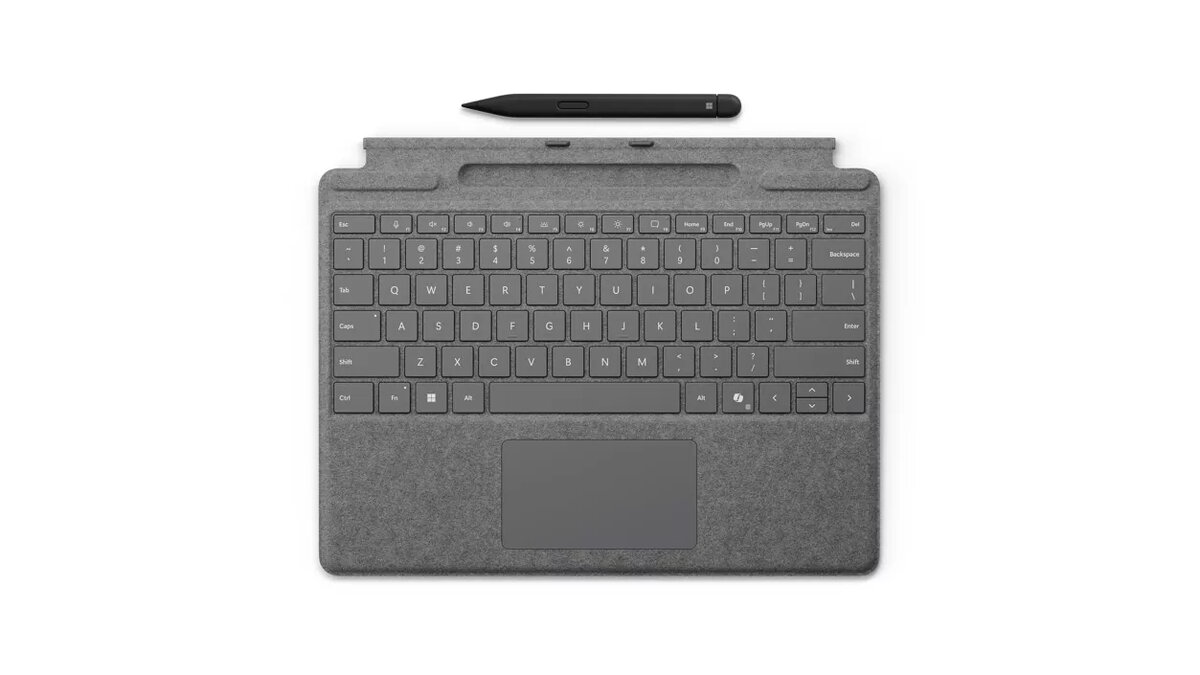
The Microsoft Surface Pro Keyboard with Slim Pen QWERTY English Platinum is a detachable keyboard designed for Surface Pro devices. It connects via the Microsoft Cover port and draws power through docking to provide a full typing surface and integrated input options. This keyboard includes a built-in storage tray for the Surface Slim Pen for Business, a large glass touchpad for precise control, three dedicated hot keys including a Copilot key, and a QWERTY English layout in a platinum finish. It is compatible with Windows 10 and Windows 11 and is intended for mobile productivity and business use.
The integrated storage tray charges and secures the Surface Slim Pen for Business so the pen is available when needed and remains charged between uses. The large glass touchpad supports accurate pointer control and multi-touch gestures for efficient navigation. The keyboard offers a comfortable typing experience with a compact profile and includes three hot keys for quick access to functions, one of which is the Copilot key for AI features. The platinum Alcantara-covered surface combines a refined appearance with a soft, durable feel suitable for frequent handling.
Attach the keyboard to a compatible Surface Pro device via the Microsoft Cover port so it docks and receives power automatically. Place the Surface Slim Pen for Business into the built-in storage tray to charge and secure it when not in use. Use the large glass touchpad to navigate and multi-touch gestures to manage windows and scrolling. Use the dedicated hot keys, including the Copilot key, to access assigned functions quickly while working in Windows 10 or Windows 11.
Keep the Alcantara-covered surface clean and dry; follow manufacturer guidance for light spot cleaning. Store the Surface Slim Pen for Business in the keyboard tray when transporting to ensure it remains charged and protected. Use the Copilot key and hot keys within supported applications for improved productivity, and connect to supported Surface Pro models to ensure proper docking power and functionality.
{{highlightedFeature.featureTitle}}:
{{getProductFeatureValueById(product, highlightedFeature.featureId)}}