
Powerful EcoFlow stations for energy anywhere!
In cart {{totalProductsCount}} item(s)
Your cart is empty
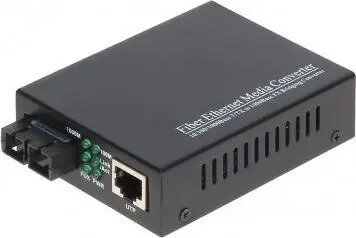
Media converter singlemode No name OMG2-SM — single-mode fiber to Ethernet converter
The Media converter singlemode No name OMG2-SM — single-mode fiber to Ethernet converter converts a single-mode optical signal to standard Ethernet, enabling integration of single-mode fiber links into copper Ethernet networks. The device is compact and intended for extending network reach, establishing point-to-point fiber links or connecting a fiber backbone to Ethernet switches and devices. It supports straightforward deployment where a single-mode fiber interface must communicate with 10/100 Mbps Ethernet equipment.
The converter provides a simple physical-media translation between single-mode fiber and Ethernet copper ports without requiring configuration, making it suitable for rapid installations. Its compact form factor allows placement in closets, racks or close to endpoints with limited space. By converting signals at the physical layer it preserves existing Ethernet addressing and protocols while extending link distance using single-mode fiber.
Install the converter near the fiber termination point or Ethernet device. Connect the single-mode optical fiber to the converter's fiber port using the appropriate connector type and ensure a clean, properly seated connection. Plug an Ethernet cable from the converter's copper port to the switch, router or endpoint device. Attach the external DC power adapter and power on the unit; indicator LEDs (if present) will show link and activity status. No additional configuration is required for standard 10/100 Mbps operation; verify link speed and duplex settings on connected Ethernet equipment as needed.
Use single-mode patch cords with proper connectors and clean end faces to maintain signal quality. Place the converter in a ventilated, dry environment away from extreme temperatures and moisture. For reliable operation, use a regulated external power adapter that meets the device's voltage and current requirements and verify link compatibility with the connected Ethernet equipment.
{{highlightedFeature.featureTitle}}:
{{getProductFeatureValueById(product, highlightedFeature.featureId)}}
{{ productComparisonGenerationError }}