
Leave your address - as soon as the price of the product goes down, you'll know about it right away
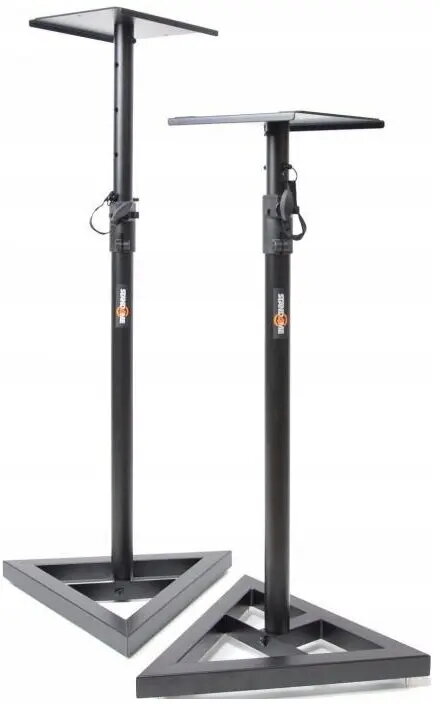
Monitor stands STAND4ME MON 1 MKII set of 2 — height adjustable, durable
In cart {{totalProductsCount}} item(s)
Your cart is empty
Monitor stands STAND4ME MON 1 MKII set of 2 — height adjustable, durable
Leave your address - as soon as the price of the product goes down, you'll know about it right away
Monitor stands STAND4ME MON 1 MKII set of 2 — height adjustable, durable
The STAND4ME MON 1 MKII set of 2 are height-adjustable monitor stands designed to raise desktop screens to a more ergonomic viewing level while providing stable, durable support. Each riser elevates monitors to reduce neck and shoulder strain, improves viewing angle, and creates usable space beneath the display for keyboard storage or desk organization. The pair is intended for typical home offices, workplace desks, and study areas that require reliable monitor elevation and simple height adjustment.
The set offers a combination of height adjustability and sturdy construction to ensure consistent support for most desktop monitors. By lifting the screen, these stands promote better posture and help to clear desk surface area. Their simple design allows easy repositioning and quick setup without special tools, making them practical for changing workstations or multi-user environments.
These monitor stands are intended for desktop use with typical computer monitors. They may not be suitable for very large, unusually heavy professional displays, TV screens, or monitors that require special mounting brackets. If a monitor arm with full articulation (tilt, swivel, rotation) or integrated cable management is required, a dedicated adjustable arm could be more appropriate than fixed risers.
Place each STAND4ME MON 1 MKII riser on a clean, level section of your desk. Position your monitor centrally on the riser and adjust the height to achieve a comfortable eye level; the top of the screen should be roughly at or just below eye height when seated. Ensure the monitor feet or base make full contact with the riser surface for stability. Use the space beneath the elevated monitor for a keyboard, documents, or other desk accessories to keep the workspace organized.
For ergonomic benefit, set the monitor height so the top of the screen is at eye level and sit at a comfortable distance where text remains clear without leaning forward. Use both stands for matching height in dual-monitor setups and periodically verify stability if monitors are moved or cables are adjusted.
{{highlightedFeature.featureTitle}}:
{{getProductFeatureValueById(product, highlightedFeature.featureId)}}