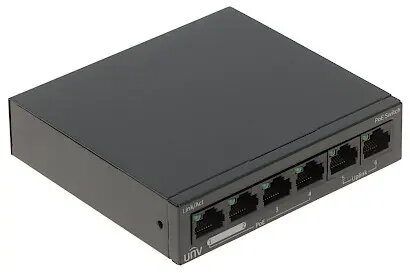
The Uniview NSW2020-6T-POE-IN 4-Port PoE Network Switch is a professional-grade networking device engineered to provide both data connectivity and electrical power to compatible hardware through a single Ethernet cable. Designed for reliability and ease of use, this switch simplifies the deployment of IP-based systems by eliminating the need for separate power supplies for each connected device. Its compact form factor and robust build quality make it an essential component for maintaining stable network performance in various professional and residential environments.
Advantages
This network switch offers significant benefits by streamlining installation processes and reducing cable clutter. By supporting Power over Ethernet technology, it allows for the seamless integration of IP cameras, wireless access points, and VoIP phones without requiring additional electrical outlets near the device location. The switch is built to ensure consistent data throughput and reliable power delivery, which is critical for maintaining the uptime of surveillance systems and office communication networks. Its plug-and-play functionality ensures that users can expand their network infrastructure quickly and efficiently without complex configuration requirements.
Suitable for
- Small-scale IP surveillance systems
- Office network expansion
- Connecting VoIP phones
- Powering wireless access points
- Home network setups requiring PoE support
When it may not be suitable
This device may not be suitable for large-scale enterprise networks that require high-density port counts or advanced managed features like VLAN tagging and complex traffic prioritization. It is also not intended for outdoor environments unless housed in a protective, weather-resistant enclosure.
Key specifications
- 4 PoE-enabled ports
- Compact desktop design
- Plug-and-play installation
- Stable data transmission
- Efficient power management for connected devices
How to use
To use the switch, connect it to a power source using the provided adapter. Once powered on, connect your network router or main switch to the uplink port using an Ethernet cable. Then, connect your PoE-compatible devices, such as IP cameras or access points, to the designated PoE ports. The switch will automatically detect the power requirements of the connected devices and begin transmitting data and power immediately.
What to consider before purchase
- Ensure your devices are compatible with the PoE standard supported by the switch
- Verify that the total power consumption of your devices does not exceed the switch's power budget
- Check the required number of ports for your current and future network expansion
- Confirm the physical space available for the switch installation
Usage recommendations
For optimal performance and longevity, ensure the switch is placed in a well-ventilated area to prevent overheating. Use high-quality Ethernet cables to maintain signal integrity and prevent power loss over longer distances.