
Save time and money with our discounts!
In cart {{totalProductsCount}} item(s)
Your cart is empty
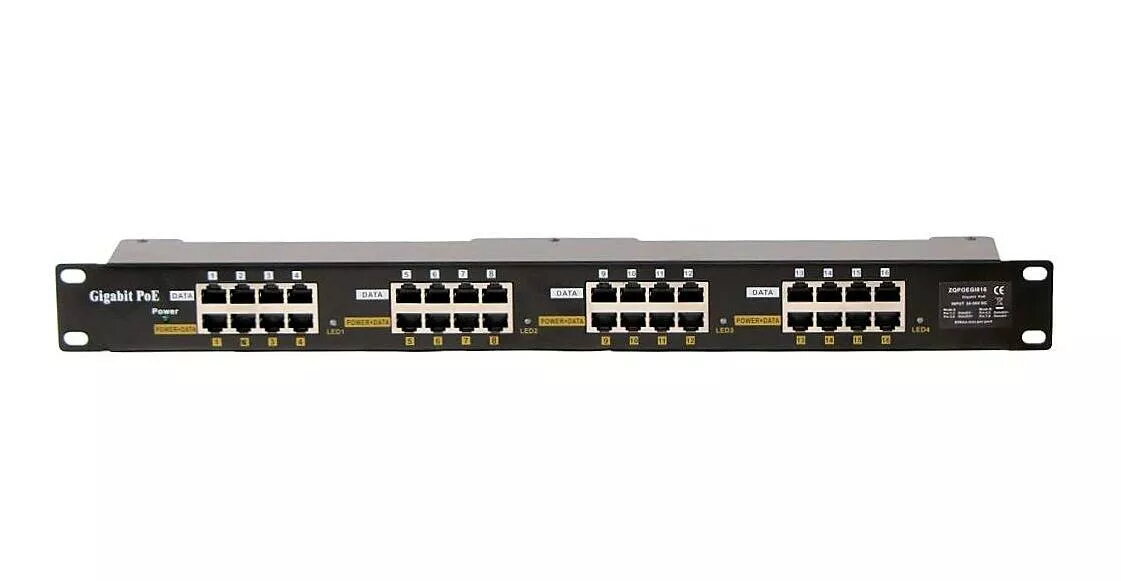
Passive PoE Switch POE-PAN16-GB 16-port shielded, Gigabit Ethernet, passive PoE
Passive PoE Switch POE-PAN16-GB is a 19" panel integrating 16 shielded gigabit passive PoE injector ports with an input voltage range of 24–57 V. It provides a centralized power distribution point that connects between an existing switch and patch panel to deliver data and power over UTP cabling to devices such as IP cameras, IP phones and wireless units. Each port includes over-current protection up to 650 mA (±15%) and the chassis provides grounding. The panel supports three-level current indication via LEDs grouped across four port groups: no load (0–20 mA), normal (0–400 mA, green) and overcurrent (>400 mA, red). Power is supplied through one of two 2.1 mm 60 V jacks; both jacks feed all 16 ports simultaneously according to the selected A/B mode.
The panel offers a compact 19" rack-mount form factor with 16 shielded Gigabit RJ-45 ports and passive PoE compatibility, making it suitable for centralized powering of multiple devices. Built-in per-port over-current protection (OCP) and three-level LED current status simplify monitoring and protect connected equipment. Dual power inputs provide redundancy or flexible power source placement, while the shielded connectors and gigabit data rates support stable network performance.
Install the POE-PAN16-GB into a standard 19" rack. Connect the network switch to the panel patch side so data passes through to the PoE ports. Choose the appropriate A or B power mode depending on the powered device pinout (Mode A for devices using pins 1/2- and 3/6+; Mode B for devices using pins 4/5+ and 7/8-). Provide DC power via one of the 2.1 mm power jacks; both jacks feed all ports. Verify LED current indicators for each port group to confirm proper load and detect overcurrent conditions. Do not mix devices that require different supply voltages on the same panel if the device vendors recommend incompatible PoE behavior (for example mixing Ubiquiti 24 V devices with 48 V devices may cause issues).
Use a power supply sized to the total power draw of all connected devices and the selected input voltage. The power supply is not included. Confirm device compatibility with passive PoE and select the correct A/B mode. Avoid combining devices that require different input voltages (24 V vs 48 V) on the same panel when those devices exhibit different PoE port behavior.
{{highlightedFeature.featureTitle}}:
{{getProductFeatureValueById(product, highlightedFeature.featureId)}}
{{ productComparisonGenerationError }}