
Filters you can trust. Pure water every day.
In cart {{totalProductsCount}} item(s)
Your cart is empty
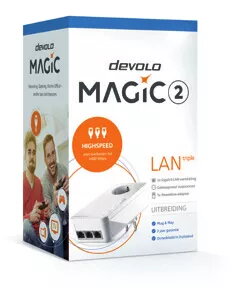
Ethernet LAN Adapter Devolo Magic 2 LAN triple
The Ethernet LAN Adapter Devolo Magic 2 LAN triple is a Powerline networking device that delivers up to 2400 Mbit/s maximum data transfer rate and supports Gigabit Ethernet connections. Designed for in-home or small-office network extension, the adapter uses existing electrical wiring to transmit data and includes a built-in power socket to preserve wall outlet availability. The compact white housing (72 mm x 41 mm x 143 mm) and low typical power consumption of 5 W (0.9 W in standby) make it suitable for continuous operation. The device supports common Ethernet and QoS networking standards and is compatible with Android and iOS devices for setup and monitoring.
The adapter provides high-speed Powerline connectivity up to 2400 Mbit/s while offering Gigabit Ethernet ports for stable wired connections. Its built-in power socket avoids loss of an outlet and the low power consumption supports energy-efficient use. Compliance with IEEE 802.1p and IEEE 802.3 family standards ensures interoperability with typical network equipment. The compact form factor and white finish allow discreet placement in living rooms, offices, or media areas.
Plug the adapter into a mains outlet near your router and connect it to the router with an Ethernet cable. Place the other adapter units in the rooms where you need network access and connect devices to their Ethernet ports. Use the manufacturer's app on an Android or iOS device to perform initial setup, pair adapters, and monitor connection status. Allow a short pairing and link adaptation period while the Powerline connection establishes and optimizes throughput across the building wiring.
For best performance, connect the adapter directly to a wall socket rather than to a power strip or surge protector. Avoid placing units on different electrical phases if possible and keep heavy appliances that create electrical noise away from adapters. Use Gigabit Ethernet cables for connected devices to fully utilize available throughput, and ensure firmware is up to date via the manufacturer's tools or app.
{{highlightedFeature.featureTitle}}:
{{getProductFeatureValueById(product, highlightedFeature.featureId)}}
{{ productComparisonGenerationError }}