A curated selection of maximum value offers!
In cart {{totalProductsCount}} item(s)
Your cart is empty
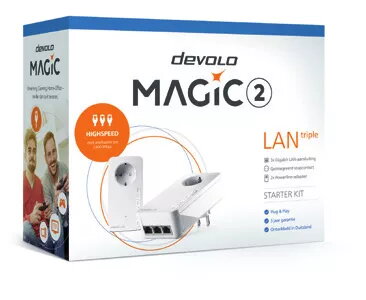
Ethernet LAN Adapter Devolo Magic 2 LAN triple
The Ethernet LAN Adapter Devolo Magic 2 LAN triple is a compact powerline network adapter designed to extend high-speed wired internet across a building using existing electrical wiring. The adapter supports a maximum data transfer rate of 2400 Mbit/s and implements multiple Ethernet standards for reliable communication. It includes three Gigabit Ethernet ports for connecting PCs, smart TVs, game consoles or network switches, and features a built-in power socket so no wall outlet is lost during installation. The unit is energy-efficient with typical power consumption of 5 W and a low standby consumption of 0.9 W, and is compatible with Android and iOS devices for simplified setup and monitoring.
The Devolo Magic 2 LAN triple provides multiport wired connectivity without running additional cables, allowing several devices to use stable Gigabit connections simultaneously. Its support for established networking standards (including IEEE 802.3 and related variants) ensures interoperability with existing network equipment and robust data transmission. The compact white housing (72 x 41 x 143 mm) and integrated power socket maintain a tidy installation while preserving the wall outlet for other devices. Low typical and standby power consumption contributes to energy-efficient operation.
Plug the Devolo Magic 2 LAN triple into a mains outlet close to your router and connect one of its Gigabit Ethernet ports to the router using an Ethernet cable. Place additional Magic 2 adapters in other rooms where network access is needed and pair them according to the manufacturer's pairing procedure to create a powerline network. Connect devices to the three onboard Gigabit Ethernet ports for wired connectivity. Use the companion app on Android or iOS if you want to monitor link status or manage basic settings.
For best performance, plug the adapter directly into a wall socket rather than into a multi-socket extension or surge protector. Place paired adapters on the same electrical circuit where possible. Maintain firmware updates via the manufacturer's tools to ensure compatibility and network stability.
{{highlightedFeature.featureTitle}}:
{{getProductFeatureValueById(product, highlightedFeature.featureId)}}
{{ productComparisonGenerationError }}