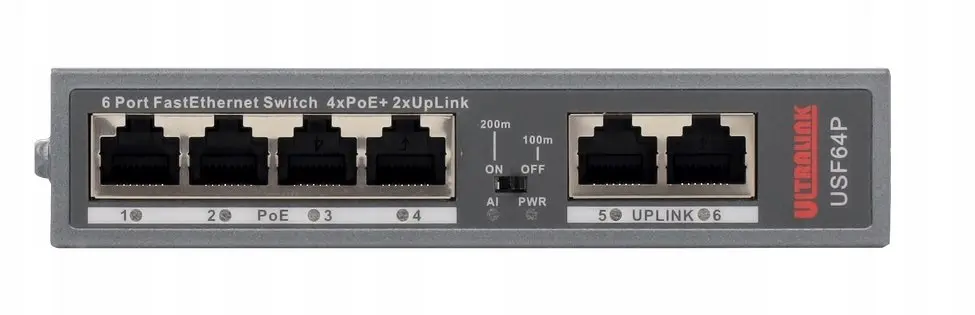
The Pulsar USF64P Ultralink is a professional-grade FastEthernet switch engineered to provide stable network connectivity and reliable power distribution for modern infrastructure. This compact device is specifically designed to support small-scale surveillance systems and office network expansions, offering a seamless integration of data and power through a single cable architecture.
Advantages
The primary benefit of this switch is its efficient Power over Ethernet Plus capability, which allows for the simultaneous transmission of data and electrical power to connected devices such as IP cameras, VoIP phones, or wireless access points. By utilizing the four dedicated PoE+ ports, users can significantly reduce installation complexity and costs by eliminating the need for separate power supplies near the endpoint devices. The inclusion of two additional RJ45 uplink ports ensures flexible network topology, allowing for easy connection to routers, NVRs, or higher-level network switches without sacrificing performance.
Suitable for
- Small-scale IP surveillance systems
- Office network expansions
- Powering VoIP telephony systems
- Connecting wireless access points
When it may not be suitable
This switch is limited to FastEthernet speeds of 10/100 Mbps, which may not be sufficient for high-bandwidth applications such as 4K video streaming, large file transfers, or high-traffic backbone connections that require Gigabit Ethernet performance.
Key specifications
- 4 x PoE+ ports
- 2 x RJ45 uplink ports
- FastEthernet 10/100 Mbps data transmission
- Compact desktop design
- Efficient power management for connected peripherals
How to use
To set up the Pulsar USF64P, connect the device to a standard power outlet using the provided power cable. Connect your network source, such as a router or main switch, to one of the RJ45 uplink ports. Then, connect your PoE-enabled devices, such as IP cameras or access points, to the four PoE+ ports using high-quality Ethernet cables. The switch will automatically detect the power requirements of the connected devices and begin data transmission immediately upon connection.
What to consider before purchase
- Ensure your network devices support the PoE standard
- Verify that 100 Mbps speed meets your bandwidth requirements
- Check the total power budget to ensure it covers all connected devices
Usage recommendations
For optimal performance and longevity, ensure the switch is placed in a well-ventilated area to prevent overheating. Use high-quality Cat5e or Cat6 Ethernet cables to maintain signal integrity and prevent power loss over longer distances.