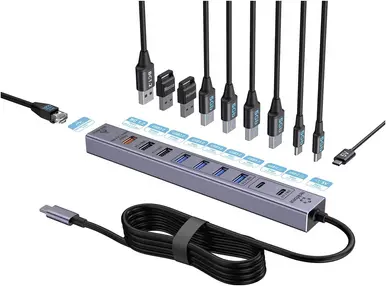
In this comparison, the main product Renkforce RF-7465830 Internal USB-C Hub 10+1 Port USB 3.0 5 GBit/s Grey is evaluated alongside several alternative USB hubs from the same brand. All products feature a grey finish and are designed to expand connectivity options, but they differ significantly by installation type (internal desktop solutions versus external portable hubs), port count, interface connection, and maximum data transfer speed.
⚙️ The specifications comparison table below highlights key characteristics, including mounting type, port quantity and type, data transfer speeds, and device form factor.
| Parameter | Renkforce RF-7465830 Internal USB-C Hub 10+1 Port USB 3.0 5 GBit/s Grey | Renkforce RF-7465828 Internal USB-C Hub 6+1 Port USB 3.2 Gen 2 10 GBit/s Grey | Renkforce RF-6855462 USB 3.0 4-Port Hub with Aluminum Case | Renkforce RF-6861934 USB hub 4-port USB-A USB 3.0 | Renkforce RF-USBH-250 USB 3.0 hub with integrated USB-C plug | Renkforce RF-TCH-100 3-port USB 3.0 hub | Practical conclusion |
|---|
| Installation type | Internal | Internal | External | External | External | External | Internal models mount inside a PC desktop case, while external hubs connect externally and suit laptops and tablets. |
| Port count | 10+1 ports | 6+1 ports | 4 ports | 4 ports | Multiple USB 3.0 ports | 3 ports | Renkforce RF-7465830 provides the highest port density for managing a large number of connected devices simultaneously. |
| Data transfer speed | Up to 5 GBit/s (USB 3.0) | Up to 10 GBit/s (USB 3.2 Gen 2) | Up to 5 GBit/s | Up to 5 GBit/s | SuperSpeed USB 3.0 standard | USB 3.0 standard | The RF-7465828 model offers twice the data transfer speed, while other devices rely on standard USB 3.0 rates. |
| Connection interface | USB-C | USB-C | USB-A | USB-A | Integrated USB-C cable | USB-C connector | Different plug types determine compatibility with specific motherboard headers or computer and mobile device ports. |
◎ The suitability table below evaluates usage scenarios and buyer needs to help determine the most appropriate hub for specific tasks.
| Use case | Recommended product | Why |
|---|
| Setting up a desktop PC requiring extensive peripheral connections inside the computer chassis | Renkforce RF-7465830 Internal USB-C Hub 10+1 Port USB 3.0 5 GBit/s Grey | The maximum port count (10+1) and internal positioning make it ideal for complex desktop configurations. |
| Handling heavy file transfers inside a desktop setup that demand faster data exchange rates | Renkforce RF-7465828 Internal USB-C Hub 6+1 Port USB 3.2 Gen 2 10 GBit/s Grey | USB 3.2 Gen 2 support delivers high speeds up to 10 GBit/s with a streamlined port layout. |
| Connecting external drives and peripherals to a traditional laptop featuring standard USB-A ports | Renkforce RF-6855462 USB 3.0 4-Port Hub with Aluminum Case / Renkforce RF-6861934 | An external aluminum housing and standard USB-A ports provide convenient expansion for classic laptops and PCs. |
| Mobile use with modern ultrabooks or tablets equipped with USB-C ports | Renkforce RF-USBH-250 / Renkforce RF-TCH-100 | Compact external hubs with an integrated USB-C connector offer easy portability for quick accessory attachment. |
The main difference between the Renkforce RF-7465830 Internal USB-C Hub 10+1 Port USB 3.0 5 GBit/s Grey and alternative models is its internal desktop installation design and high port count (10+1) combined with standard USB 3.0 speeds. This model is most suitable for desktop PC users who need to connect numerous devices simultaneously within an integrated system setup. If maximum data transfer speed is the priority, the alternative internal model with USB 3.2 Gen 2 is more appropriate, whereas laptop owners will benefit more from portable external hubs featuring USB-A or USB-C interfaces.