{{ totalProductsCount }}

In cart {{totalProductsCount}} item(s)

Total:
{{sum | formatAmount}}

Your cart is empty

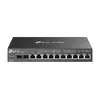
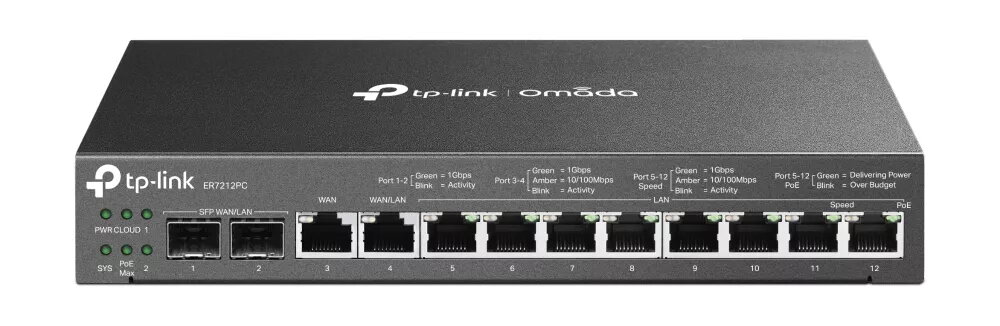
header-product Router TP-Link Omada 3-in-1 Gigabit VPN ER7212PC

Router TP-Link Omada 3-in-1 Gigabit VPN ER7212PC

Router TP-Link Omada 3-in-1 Gigabit VPN ER7212PC Photo 1
Out of stock.
View similar!

Short description

The TP-Link Omada 3-in-1 Gigabit VPN Router ER7212PC offers advanced networking capabilities with support for multiple protocols including TCP/IP and NAT functionalities. It features a powerful 1200 MHz processor, 4GB flash memory, and 1GB internal memory, ensuring high performance and reliability. With a robust metal housing and Gigabit Ethernet interface, it is designed for secure and efficient networking in various environments.
Warranty: 2 Years
SKU: 5089850

Charging device included Charging device included
delivery
Information regarding the items availability for purchase will be posted on this site
price
Item cost information will be published on this site
Together cheaper
{{product.price | formatAmount}}
{{product.title}}
{{productBundle.reference.specialPrice | formatAmount}}
{{productBundle.title}}
{{productBundlePreviousPrice | formatAmount}}
{{productBundleSpecialPrice | formatAmount}}

You saving {{productBundleYouSave | formatAmount}}

Product information

Description

The Omada ER7212PC is a compact 3-in-1 Gigabit VPN router that combines routing, PoE+ switching and a hardware controller in a single device. Designed for home and small business use, it supports multiple WAN ports for load balancing, high-security VPN protocols, and centralized management via the Omada app or web interface. The fanless, minimalist design allows quiet operation and flexible placement on a desk or ceiling.

Advantages

The ER7212PC replaces separate router, controller and PoE+ switch hardware, simplifying deployment and reducing equipment footprint. Multiple Gigabit WAN ports and multi-WAN load balancing improve bandwidth utilization across several internet lines. Built-in centralized management lets you configure and update connected devices in bulk and monitor the network remotely. The device supports a range of VPN protocols for secure remote connections and implements layered security features including firewall policies, VLAN support, DoS protection, filtering and IP–MAC binding.

Key specifications

  • Form factor: compact, fanless design suitable for desk or ceiling installation
  • Device type: 3-in-1 router combining router, PoE+ switch functionality and controller capability
  • WAN: up to four Gigabit WAN ports with multi-WAN load balancing
  • VPN: supports OpenVPN, IPSec, PPTP and L2TP (Client/Server); one-click auto IPSec VPN
  • Security: advanced firewall policies, DoS defense (TCP/UDP/ICMP floods, Ping of Death), IP/MAC/URL/keyword filtering, IP–MAC binding
  • Management: centralized management via Omada app and web browser, remote monitoring and bulk updates

How to use

Connect your internet lines to the WAN ports and attach PoE devices to the PoE+ ports as needed. Use the web interface or the Omada app to run initial setup, select WAN load balancing or failover as required, and enable VPN services. Configure firewall rules, VLANs and filtering options from the centralized management console. For remote access or site-to-site connections, create VPN profiles using the supported protocols and enable one-click IPSec where appropriate.

Recommendations

For optimal performance, place the ER7212PC in a well-ventilated, dust-free location and keep firmware updated through the Omada controller. Use multi-WAN load balancing when multiple internet lines are available, and enable IP–MAC binding and VLAN segmentation to enhance security in multi-client environments.

Specifications

DHCP server: A server is a system which that responds to requests across a computer network to provide, or help to provide, a network service. DCHP servers uses the DCHP (Dynamic Host Configuration Protocol), which is a standardized networking protocol used by servers on an IP network to allocate IP addresses to computers. The purpose of DHCP is to automate the IP address configuration of a computer without a network administrator. IP addresses are typically selected from a range of assigned IP addresses stored in a database on the server and issued to a computer which requests a new IP address. An IP address is assigned to a computer for a set interval, after which, the computer must renew the IP address or acquire a new one.
Yes
DHCP client: Whether the product features a DHCP (Dynamic Host Configuration Protocol) to obtain IP addresses within a network.
Yes
Ethernet LAN (RJ-45) ports: Number of Ethernet LAN (RJ-45) ports (connecting interfaces) in the device. Ethernet LAN (RJ-45) ports allow a computer to connect to the ethernet.
10
SFP WAN:
Yes
3G/4G USB modem compatibility:
No
SIM card slot: Whether the device features a SIM card slot.
No
DSL WAN: Whether or not the product features a DSL WAN (Wide Area Network) connection option.
No
Ethernet WAN:
Yes
Product colour: The colour e.g. red, blue, green, black, white.
Black
Ethernet interface type:
Gigabit Ethernet
Networking standards: The way in which the network is working, e.g. IEEE 802.11a, IEEE 802.11b, IEEE 802.11g.
IEEE 802.3u, IEEE 802.3z, IEEE 802.1Q, IEEE 802.3, IEEE 802.3ab, IEEE 802.3x
All features

Packaging data

Package weight: Weight of the packaged product.
1920 g
Package height: The distance from the top to the bottom of the packaging.
73 mm
Package depth: The distance from the front to the back of the packaging.
374 mm
Package width: The distance from one side of the packaging to the other.
227 mm

Weight & dimensions

Height: The measurement of the product from head to foot or from base to top.
35 mm
Depth: The distance from the front to the back of something.
131 mm
Width: The measurement or extent of something from side to side.
226 mm

Operational conditions

Storage relative humidity (H-H):
5 - 90
Operating relative humidity (H-H):
10 - 90
Storage temperature (T-T): The minimum and maximum temperatures at which the product can be safely stored.
-40 - 70
Operating temperature (T-T): The minimum and maximum temperatures at which the product can be safely operated.
0 - 45

Power

Power over Ethernet (PoE): The device supports Power over Ethernet (PoE), which is one of several standardized or ad-hoc systems which pass electrical power along with data on Ethernet cabling. This allows a single cable to provide both data connection and electrical power to devices such as wireless access points or IP cameras.
Yes
Output current:
2.43 A
Output voltage:
53.5

Design

LED indicators:
Y
Housing material: What the casing of the product is made of.
Metal
Product colour: The colour e.g. red, blue, green, black, white.
Black

Features

Certification:
CE, FCC, RoHS
Internal memory type: The type of internal memory such as RAM, GDDR5.
DDR3
Internal memory: The amount of memory, usually measured in bytes (e.g. MB, GB), which is installed in the system's hardware.
1024 MB
Flash memory:
4096 MB
Processor frequency: The clock rate is the fundamental rate in cycles per second (measured in hertz) at which a computer performs its most basic operations such as adding two numbers. There are more factors, like internal memory size, that influence a computer's actual response time.
1200 MHz
Built-in processor: Whether or not a processor is built into the device.
Yes

Packaging content

Manual:
Yes
AC adapter included:
Yes

Security

NAT functionality:
Multi-Net NAT; Virtual Server; NAT-DMZ; FTP/H.323/SIP/IPSec/PPTP ALG; UPnP;
Access Control List (ACL):
Yes
URL filtering:
Yes

Protocols

Supported protocols:
TCP/IP, DHCP, ICMP, NAT, PPPoE, NTP, HTTP, HTTPS, DNS, IPSec, PPTP, L2TP, SNMP
DHCP client: Whether the product features a DHCP (Dynamic Host Configuration Protocol) to obtain IP addresses within a network.
Yes
DHCP server: A server is a system which that responds to requests across a computer network to provide, or help to provide, a network service. DCHP servers uses the DCHP (Dynamic Host Configuration Protocol), which is a standardized networking protocol used by servers on an IP network to allocate IP addresses to computers. The purpose of DHCP is to automate the IP address configuration of a computer without a network administrator. IP addresses are typically selected from a range of assigned IP addresses stored in a database on the server and issued to a computer which requests a new IP address. An IP address is assigned to a computer for a set interval, after which, the computer must renew the IP address or acquire a new one.
Yes

Ports & interfaces

DC-in jack: The socket/plug where the DC electricity supply connects to the device.
Yes
Combo SFP ports quantity:
2
Power over Ethernet (PoE) ports quantity:
8
Ethernet LAN (RJ-45) ports: Number of Ethernet LAN (RJ-45) ports (connecting interfaces) in the device. Ethernet LAN (RJ-45) ports allow a computer to connect to the ethernet.
10

Management features

Reset button:
Yes
Universal Plug and Play (UPnP):
Yes

Network

Port forwarding:
Yes
VLAN support: A Virtual Local Area Network (VLAN) consists of a group of computers and switches that can be physically distributed over different networks and buildings, but form one LAN on a logical level.
Yes
Static route:
Yes
Ethernet LAN data rates: The different speed levels of the Ethernet LAN connection.
10, 100, 1000
Cabling technology: Type of cable technology performance.
10/100/1000Base-T(X)
Ethernet interface type:
Gigabit Ethernet
Networking standards: The way in which the network is working, e.g. IEEE 802.11a, IEEE 802.11b, IEEE 802.11g.
IEEE 802.3u, IEEE 802.3z, IEEE 802.1Q, IEEE 802.3, IEEE 802.3ab, IEEE 802.3x

WAN connection

SFP WAN:
Yes
3G/4G USB modem compatibility:
No
SIM card slot: Whether the device features a SIM card slot.
No
DSL WAN: Whether or not the product features a DSL WAN (Wide Area Network) connection option.
No
Ethernet WAN:
Yes

Description

Machine translation. Load original

Similar products

{{product.title}}
Show details Hide details

{{highlightedFeature.featureTitle}}:

{{getProductFeatureValueById(product, highlightedFeature.featureId)}}

{{product.price | formatAmount}}
Might be useful
{{product.manufacturerName}}
{{product.categoryName}}
{{product.title}}
{{product.specialPrice}}
{{product.price}}

Customer reviews

Customer questions

FAQ

What payment options are available?

AiO.lv offers several payment methods: Bank transfer. All transactions are 100% secure and encrypted.

Can this product be purchased for a company (with VAT)?

Yes. AiO.lv works with legal entities in Latvia and across Europe. The product price already includes VAT. For certain product categories, as well as for companies from other EU countries with a valid VAT number, a 0% VAT rate may apply. We issue the invoice immediately after the order is placed, support electronic BIS invoices, and automatically generate all necessary accounting documents. You can complete the purchase for a company online — simply select the company profile and choose bank transfer as the payment method during checkout.

What is the warranty period?

All TP-LINK products come with an official 2 Years warranty. It covers all manufacturing defects and malfunctions that may occur during use. The warranty is valid at all authorized TP-LINK service centers and through AiO.lv

Can the product be returned after purchase?

Yes, you can return the product within 14 days of purchase if you bought it as a consumer (not a legal entity). Returns are possible without giving any reason — the main condition is that the product retains its original appearance and full set of accessories. We will make the process as simple and convenient as possible: just contact our customer support team, and we will help you arrange the return.

Where should I contact for warranty service?

For warranty-related questions you can contact the AiO.lv (SIA VSPRO) customer support team. We will assist with consultation, warranty claim processing, and coordination with certified service centers.

How can I tell if this product suits my needs?

When making a choice, we recommend paying attention to the key features: dhcp server, dhcp client, ethernet lan (rj-45) ports, sfp wan, 3g/4g usb modem compatibility, sim card slot, dsl wan, ethernet wan, product colour, ethernet interface type, networking standards, compatibility with your devices or usage conditions, material quality, functionality, and warranty terms. These characteristics will help you determine how well the model meets your needs.

Where can I download the instructions for Router TP-Link Omada 3-in-1 Gigabit VPN ER7212PC?

You can download the instructions in PDF format from the “Instructions” section on the product description page. The file contains complete information about installation, setup, and usage.
warranty
14-Day Return Policy We are confident in our quality, but if the purchase doesn’t fit — you have 14 days to return the product with peace of mind.
shipping
Fast Delivery Get your orders as quickly as possible — right to your door, parcel lockers, or pickup points across Latvia and the EU.
payment
Secure Payment Pay the way you prefer: cash, VISA, MasterCard, Apple Pay, Google Pay, bank transfer, or 0% installment plan.
warranty
Quality Since 2008 AiO.lv has been on the market for over 18 years and has earned trust — with more than 6000 genuine positive reviews on Google.