Filters you can trust. Pure water every day.
In cart {{totalProductsCount}} item(s)
Your cart is empty
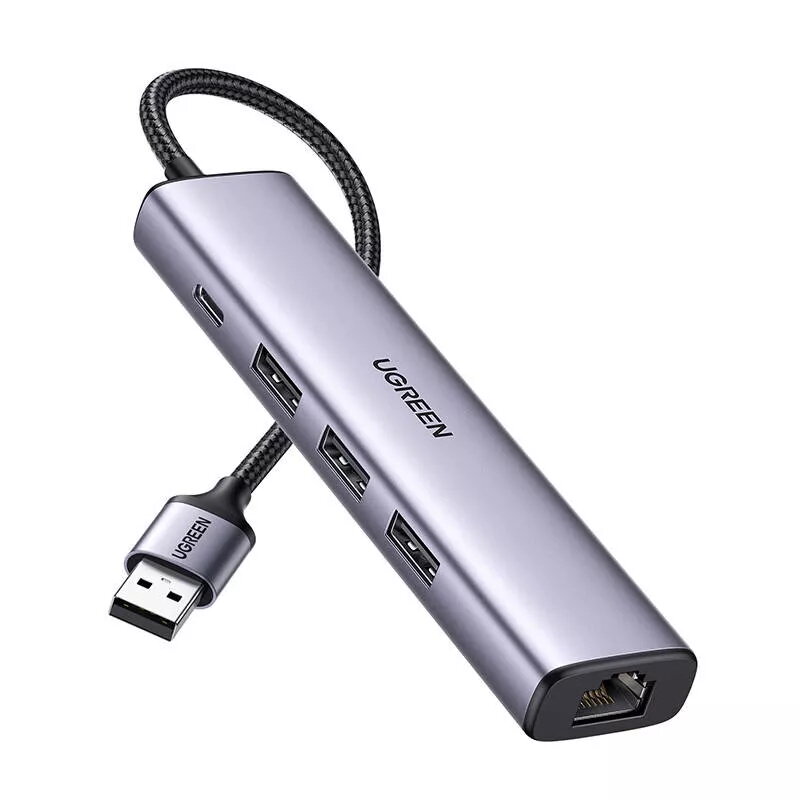
UGREEN 60554 5-in-1 USB-A Hub with 3x USB 3.0 Ports, RJ45 Ethernet, and USB-C Power Delivery
The UGREEN 60554 5-in-1 USB-A Hub is a multifunctional connectivity solution designed to enhance the capabilities of your laptop or desktop computer. By converting a single USB-A port into a versatile workstation hub, this device provides essential expansion options for users who require more peripheral connections and stable network performance. Its compact and durable design makes it a practical accessory for both office environments and mobile professionals.
This hub offers significant benefits by providing three high-speed USB 3.0 ports that allow for rapid data transfer rates of up to 5Gbps, ensuring that external hard drives, flash drives, and other peripherals operate efficiently. The inclusion of an RJ45 Gigabit Ethernet port provides a reliable and fast wired internet connection, which is often more stable than wireless alternatives. Furthermore, the integrated USB-C power delivery port ensures that your connected devices receive consistent power, helping to maintain productivity during intensive tasks.
This hub is designed specifically for devices with a USB-A interface and may not be compatible with systems that exclusively feature USB-C ports without an appropriate adapter. It is also not intended for high-power applications that exceed the power delivery specifications of the hub.
To use the UGREEN 60554 hub, simply connect the integrated USB-A cable into an available port on your computer. Once connected, the device is automatically recognized by most modern operating systems, allowing for immediate use of the USB ports and the Ethernet connection. For the Ethernet port, connect a standard network cable from your router or wall jack to the hub. If you require power delivery, connect a compatible USB-C power adapter to the designated port on the hub.
For the best performance, it is recommended to connect the hub directly to the computer's primary USB port rather than through another passive USB splitter. Always disconnect the device safely if you are transferring sensitive data to prevent potential file corruption.
{{highlightedFeature.featureTitle}}:
{{getProductFeatureValueById(product, highlightedFeature.featureId)}}
{{ productComparisonGenerationError }}