{{ totalProductsCount }}

In cart {{totalProductsCount}} item(s)

Total:
{{sum | formatAmount}}

Your cart is empty

header-product Unitek Cloning Station SATA USB3.0 to SATA6G 2.5" - Unitek 54238, SATA to USB cloning dock for 2.5" drives

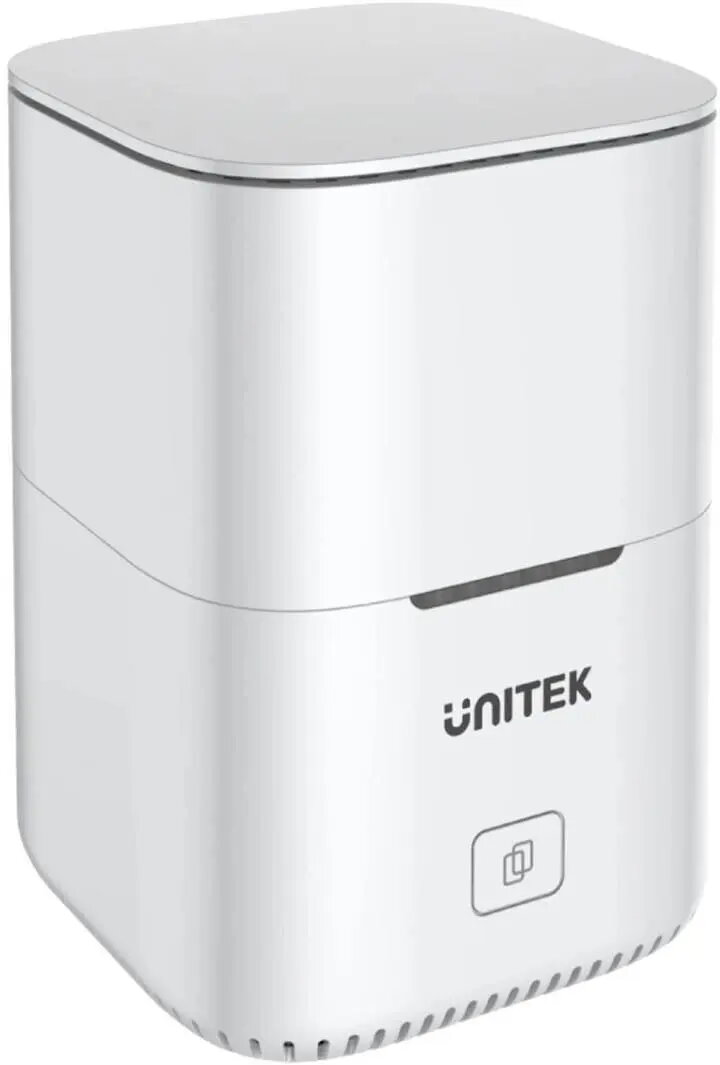
Unitek Cloning Station SATA USB3.0 to SATA6G 2.5" - Unitek 54238, SATA to USB cloning dock for 2.5" drives

Unitek Cloning Station SATA USB3.0 to SATA6G 2.5" Photo 1
Out of stock.
View similar!

Short description

Unitek Cloning Station (model 54238) is a SATA to USB3.0 docking and standalone cloning solution for 2.5" SATA drives supporting SATA6G transfer rate. It functions as a USB3.0 to SATA dock for data access via host connection and as a standalone duplicator for direct drive-to-drive cloning without a PC. Suitable for drive backup, system migration and disk duplication tasks.
Warranty: 2 Years
SKU: 12388989
Manufacturer: Unitek
delivery
Information regarding the items availability for purchase will be posted on this site
price
Item cost information will be published on this site
Together cheaper
{{product.price | formatAmount}}
{{product.title}}
{{productBundle.reference.specialPrice | formatAmount}}
{{productBundle.title}}
{{productBundlePreviousPrice | formatAmount}}
{{productBundleSpecialPrice | formatAmount}}

You saving {{productBundleYouSave | formatAmount}}

Product information

Description

The Unitek Cloning Station SATA USB3.0 to SATA6G 2.5" (model 54238) is a compact docking solution designed for 2.5" SATA drives. It supports USB 3.0 host connection for fast data transfer and also operates as a standalone cloner that copies data directly from one drive to another without a PC. The device supports SATA6G transfer rates for compatible drives and is intended for tasks such as drive backup, system migration and disk duplication.

Advantages

The unit combines a USB3.0-to-SATA dock and an independent cloning station in a single enclosure, enabling both live access to drives via a host and offline drive-to-drive duplication. Its support for SATA6G ensures higher throughput with compatible SSDs and HDDs, while the compact form factor and simple controls make it easy to use on a desktop or workstation. The device is suitable for quick backups and one-to-one cloning without additional software.

Suitable for

  • Backing up 2.5" SATA SSDs and HDDs
  • Migrating an operating system to a new 2.5" drive
  • Creating bit-for-bit copies of drives for duplication or recovery
  • Accessing drive data via USB 3.0 connection to a computer

When it may not be suitable

This cloning station is intended for 2.5" SATA drives only and is not suitable for 3.5" drives or drives that require specialized cloning features such as sector remapping, incremental cloning, or file-level selection. For large-scale or automated duplicating environments that require simultaneous cloning of multiple targets, a multi-bay duplicator would be more appropriate.

Key specifications

  • Supported drive size: 2.5-inch SATA drives
  • Interface to host: USB 3.0
  • Drive interface: SATA with support for SATA 6 Gbit/s transfer rate
  • Modes: USB dock mode (data access) and standalone cloning mode (drive-to-drive)
  • Power: external power supply required for standalone cloning (included with unit)

How to use

To use as a USB dock, connect the cloning station to your computer via the supplied USB 3.0 cable, insert a 2.5" SATA drive into the slot, and access files through the operating system’s file manager. To clone drives without a PC, install source and target 2.5" drives into the device, connect the external power supply, select the cloning function using the device controls, and start the cloning process. Monitor the indicator lights to confirm progress and completion. Follow the device’s user guide for recommended sequencing of source and target drives and for safe removal.

What to consider before purchase

  • Only compatible with 2.5" SATA drives — not suitable for 3.5" drives
  • Check that your drives support SATA 6 Gbit/s to benefit from the maximum transfer rate
  • Standalone cloning performs full drive-to-drive duplication; it does not provide file-level selection or incremental backups
  • Requires an external power supply for cloning operations; verify included accessories

Usage recommendations

Use the USB 3.0 connection for routine file transfers and diagnostics. For cloning, ensure the source drive is healthy and that the target drive has equal or greater capacity. Keep the device on a stable, ventilated surface during long cloning jobs and verify cloned data after completion.

Description

Machine translation. Load original

Similar products

{{product.title}} Show details Hide details

{{highlightedFeature.featureTitle}}:

{{getProductFeatureValueById(product, highlightedFeature.featureId)}}

{{product.price | formatAmount}}
Might be useful
{{product.manufacturerName}}
{{product.categoryName}}
{{product.title}}
{{product.specialPrice}}
{{product.price}}

Customer reviews

Customer questions

FAQ

What payment options are available?

AiO.lv offers several payment methods: Bank transfer. All transactions are 100% secure and encrypted.

Can this product be purchased for a company (with VAT)?

Yes. AiO.lv works with legal entities in Latvia and across Europe. The product price already includes VAT. For certain product categories, as well as for companies from other EU countries with a valid VAT number, a 0% VAT rate may apply. We issue the invoice immediately after the order is placed, support electronic BIS invoices, and automatically generate all necessary accounting documents. You can complete the purchase for a company online — simply select the company profile and choose bank transfer as the payment method during checkout.

What is the warranty period?

All Unitek products come with an official 2 Years warranty. It covers all manufacturing defects and malfunctions that may occur during use. The warranty is valid at all authorized Unitek service centers and through AiO.lv

Can the product be returned after purchase?

Yes, you can return the product within 14 days of purchase if you bought it as a consumer (not a legal entity). Returns are possible without giving any reason — the main condition is that the product retains its original appearance and full set of accessories. We will make the process as simple and convenient as possible: just contact our customer support team, and we will help you arrange the return.

Where should I contact for warranty service?

For warranty-related questions you can contact the AiO.lv (SIA VSPRO) customer support team. We will assist with consultation, warranty claim processing, and coordination with certified service centers.

warranty
14-Day Return Policy We are confident in our quality, but if the purchase doesn’t fit — you have 14 days to return the product with peace of mind.
shipping
Fast Delivery Get your orders as quickly as possible — right to your door, parcel lockers, or pickup points across Latvia and the EU.
payment
Secure Payment Pay the way you prefer: cash, VISA, MasterCard, Apple Pay, Google Pay, bank transfer, or 0% installment plan.
warranty
Quality Since 2008 AiO.lv has been on the market for over 18 years and has earned trust — with more than 6000 genuine positive reviews on Google.