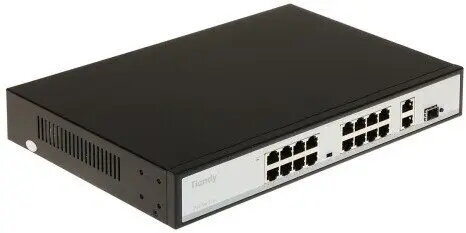
The Uniview TC-P3S019 is a professional 16-port PoE network switch engineered to provide reliable data transmission and power delivery for connected network devices. This robust switch is designed to support demanding environments, offering high-speed connectivity and efficient power management for surveillance cameras, access points, and VoIP phones. With its integrated SFP uplink ports, it allows for long-distance fiber optic connections, making it a versatile solution for scaling network infrastructures in offices, retail spaces, or security installations.
Advantages
This network switch offers significant benefits for system integrators and IT administrators by combining high-density port capacity with advanced power-over-ethernet capabilities. The inclusion of SFP ports ensures that the device can be easily integrated into fiber-based backbones, reducing latency and increasing bandwidth for data-intensive applications. Its stable performance and efficient power distribution help minimize downtime, while the plug-and-play design allows for quick deployment without the need for complex configuration, ensuring a seamless expansion of your existing network.
Suitable for
- IP surveillance systems requiring PoE power for cameras
- Small to medium-sized office network expansions
- Connecting VoIP telephony systems
- Wireless access point deployments
- Fiber optic network backbones via SFP uplinks
When it may not be suitable
This switch may not be the optimal choice for large-scale enterprise environments that require advanced Layer 3 routing features or complex VLAN management capabilities. Additionally, if your specific installation requires a higher power budget than the standard PoE output provided by this model, you may need to consider a more specialized industrial-grade switch.
Key specifications
- 16 PoE-enabled network ports
- Integrated SFP uplink ports for fiber connectivity
- Support for standard PoE power delivery
- High-speed data transmission performance
- Durable metal housing for heat dissipation
How to use
To set up the Uniview TC-P3S019, connect the device to a stable power source using the provided power cable. Connect your network devices, such as IP cameras or access points, to the PoE ports using standard Ethernet cables. If you are extending your network over a long distance, insert a compatible SFP module into the SFP uplink port and connect your fiber optic cable. The switch will automatically detect connected devices and begin power and data transmission without requiring manual configuration.
What to consider before purchase
- Verify the total power budget requirements of your connected devices
- Ensure compatibility with your existing SFP modules if using fiber uplinks
- Check the physical space requirements for rack or desktop mounting
- Confirm the cable length limitations for standard Ethernet connections
Usage recommendations
For optimal performance and longevity, ensure the switch is installed in a well-ventilated area to prevent overheating. Use high-quality shielded Ethernet cables for all PoE connections to maintain signal integrity and protect against electrical interference.