Dreame vacuums for fast and efficient cleaning!
In cart {{totalProductsCount}} item(s)
Your cart is empty
Ernitec ELECTRA-U06-1GB Unmanaged Gigabit Ethernet Network Switch with 4 RJ-45 Ports, 1 SFP Module, and Power over Ethernet
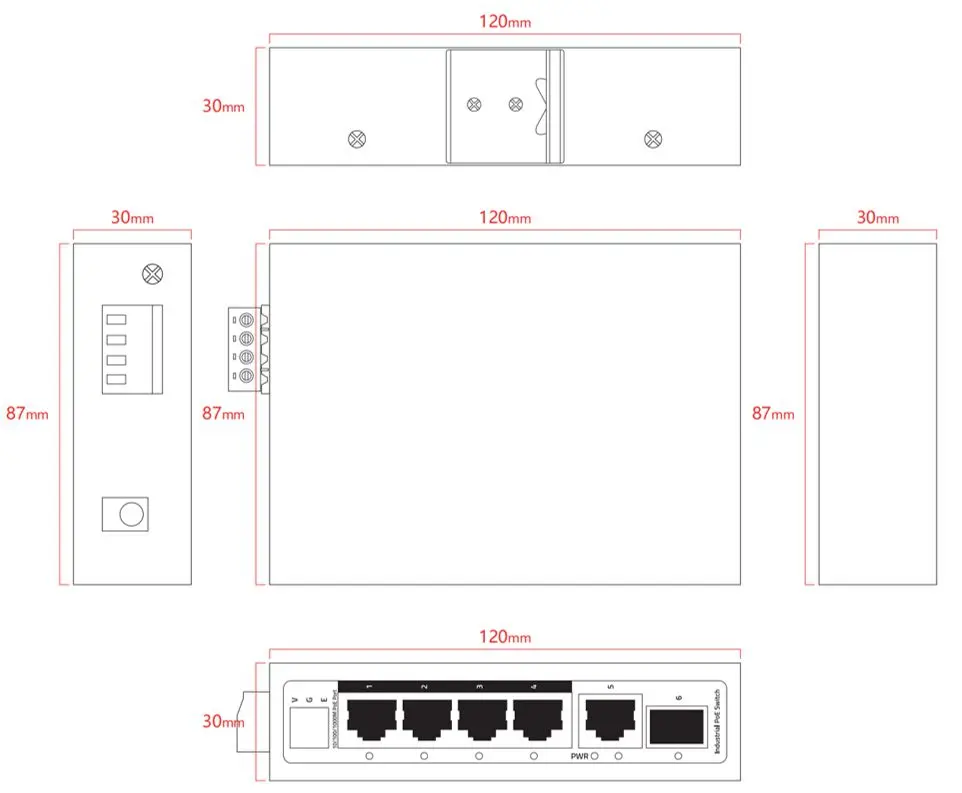
The Ernitec ELECTRA-U06-1GB Unmanaged Gigabit Ethernet Network Switch is designed to provide reliable and efficient wired connectivity for various small-scale networking and device powering applications. Equipped with four Gigabit Ethernet RJ-45 ports and one installed SFP module, this unmanaged switch ensures high-speed data transmission while maintaining a straightforward, plug-and-play setup process without the need for complex software configuration. It features a robust switching capacity of 12 Gbit/s and supports a 2000-entry MAC address table to handle local network traffic effectively.
This network switch offers integrated Power over Ethernet functionality, allowing connected compatible devices to receive both data and electrical power over a single Ethernet cable, which helps minimize cable clutter and simplifies physical installation. The inclusion of Gigabit Ethernet ports guarantees fast data transfer rates suitable for modern high-bandwidth requirements. Additionally, the pre-installed SFP module facilitates flexible network expansion and long-distance fiber connection capabilities, while the unmanaged operation ensures immediate usability right out of the box.
This switch may not be suitable for large-scale enterprise environments that require advanced network management, VLAN configuration, port security, or remote monitoring capabilities, as it operates entirely as an unmanaged device. Additionally, networks requiring high-density port configurations beyond its available interface count will need a larger switch or multiple interconnected units.
To set up the Ernitec ELECTRA-U06-1GB network switch, place it on a stable flat surface or mount it according to your spatial requirements. Connect the power supply to the unit and plug it into a standard electrical outlet. Use standard Ethernet cables to connect your router or primary network source to one of the available ports, and then connect your end devices, such as computers or PoE-enabled hardware, to the remaining RJ-45 ports. The switch will automatically initialize and begin transmitting data without requiring any manual software configuration.
Usage recommendations: Ensure adequate ventilation around the switch during operation to prevent heat buildup. Use certified Ethernet cables to maintain stable Power over Ethernet delivery and optimal Gigabit data transfer speeds.
{{highlightedFeature.featureTitle}}:
{{getProductFeatureValueById(product, highlightedFeature.featureId)}}
{{ productComparisonGenerationError }}